Today’s Most Helpful Link…

After prancing around Google for what has seemed like hours, trying to get a definitive list of all field types, so I can configure some additional fields within a Content Query Web Part, I finally found one. Kartic – you are my hero for the day.

http://kartickapur.wordpress.com/2007/11/01/content-query-web-part-customisation-and-adding-custom-fields/


Increase the ‘Save as Template’ size limit for Lists and Sites

The default size limit for the ‘Save as Template’ function in SharePoint is limited to 10MB. This however, can be changed easily using stsadm. To do so, go into the 12 Hive bin folder (Drive:\\Program Files\Common Files\Microsoft Shared\web server extensions\12\BIN\) and run the following command:

stsadm -o setproperty -propertyname max-template-document-size -propertyvalue 50000000

This command, exactly as entered above, will increase that limit to 50MB. If you would like to make this number higher, than just adjust the propertyvalue argument to the size that you need.


WSS v2 Email Configuration Gotcha – Spaces in SMTP server names

This morning I was working on an issue for a client, to track down why alerts were not being sent out to subscribers within their WSS v2 environment. I checked all of the well known issues, such as making sure the SharePoint Timer Service was running, and also restarted it just for kicks. And that the accounts were the same for the Timer Service as well as the content database for the WSS server as well, so that the Timer Service can actually connect to the database and process alerts… and everything was just fine, however, alerts were still not being sent out.

Since we have an external server here which we use to process mail, I added in a few rules to allow my client’s server to relay mail through, so I can control every aspect of the process, and that is when I found the issue.

image

When highlighting the server name in the Outbound SMTP server configuration box to remove and replace with our server, there was an extra space on the end of the server name. This was the case for both the virtual server and central configuration SMTP settings. I dropped the space from both, and alerts were finally making it out of SharePoint, and onto their subscribers.

The environment which this occurred in was WSS v2 running with SP2. I will look to see if I can find a hotfix for this issue or if this is fixed in WSS v2 SP3.


Resources for SharePoint Usage Analysis Processing

I have been looking into usage analysis processing options for a client, and thought I would share my findings with the rest of the world…so without further ado – below are some links that you may find useful for usage analysis processing in v2/v3 versions of SharePoint

http://www.bluedoglimited.com/SharePointThoughts/ViewPost.aspx?ID=129

http://www.bluedoglimited.com/SharePointThoughts/ViewPost.aspx?ID=8

http://blogs.msdn.com/joelo/archive/2007/09/28/sharepoint-reporting-solution.aspx

http://blogs.msdn.com/joelo/archive/2007/11/06/web-usage-reporting-tools.aspx


Technorati Tags: ,,

Programmatically Set a Text Field Default Value

Just a quick code snippet on setting the Default Text Value of a Single Line of Text field in SharePoint to a specific value.

   1: // update Shared Documents list "Customer Name" field
   2: SPList repDocs = childWeb.Lists["Shared Documents"];
   3: SPField clientName = repDocs.Fields["Customer Name"];
   4: clientName.DefaultValue = "foo";
   5: clientName.Update();
 

Access Denied error when activating the Publishing Infrastructure features on a site collection

When working with a client yesterday, rolling out a new site collection, we needed to activate the Office SharePoint Server Publishing Infrastructure feature on the site collection, as we needed the Summary Link Web Part, among others.

However, when activating this feature, we received an "Access Denied" error. Intriguing…

After a little research, I determined that the Publishing Resources were not activated at install time, thus giving us that error.

Never fear however, stsadm can ease your woes, just run the following command:

stsadm -o activatefeature -name PublishingResources -url http://site.collection.url

Then, go into the Site Collection Features, and activate the publishing resources, and you should be good to go!


Site Collection Usage Data (v2/v3)

To obtain site collection usage data in SharePoint, visit the following URLs:

v2/SPS 2003: https://sitecollectionurl/_layouts/1033/Usage.aspx

v3/MOSS 2007: https://sitecollectionurl/_layouts/Usage.aspx


Microsoft Releases New Enterprise Search Indexing Connectors

Microsoft released two additional Enterprise Search Indexing connectors today. One for EMC Documentum, and one for IBM FileNet. Both of these connectors work with the following applications:

  • Microsoft Office SharePoint Server 2007
  • Microsoft Search Server 2008
  • Microsoft Search Server 2008 Express

More Information…

IBM FileNet Connector 2008

Overview (from Microsoft)
The Enterprise Search Indexing Connector 2008 for IBM FileNet enables Microsoft enterprise search systems to index the contents of an IBM FileNet repository. Once indexed, this connector also allows IBM FileNet search results to be displayed for users from within the Microsoft enterprise search system. These capabilities are based on the connector’s ability to natively access the appropriate file formats, data structures and security implementation of the IBM FileNet document management system.

Known Issues
http://go.microsoft.com/fwlink/?LinkId=119737&clcid=0x409

Training Video
http://www.microsoft.com/winme/0804/32391/ConnectorTraining_IBMFilenet/index.html

EMC Documentum Connector 2008

Overview (from Microsoft)
The Enterprise Search Indexing Connector 2008 for EMC Documentum enables Microsoft enterprise search systems to index the contents of an EMC Documentum repository. Once indexed, this connector also allows EMC Documentum search results to be displayed for users from within the Microsoft enterprise search system. These capabilities are based on the connector’s ability to natively access the appropriate file formats, data structures and security implementation of the EMC Documentum document management system.

Known Issues
http://go.microsoft.com/fwlink/?LinkId=119736&clcid=0x409Training Video
http://www.microsoft.com/winme/0804/32391/ConnectorTraining_EMCDocumentum/index.html


Disabling Form Buttons and Still Get the PostBack Event to Fire

I was working on developing a web part today for a client to automatically provision SharePoint sites. One item I had left to take care of was disabling of the button after the form has been submitted, so that everything runs smoothly. Simple? Should be… but, but I was running into a wall.

Finally, I came across the answer – and I wish I still had it bookmarked, sorry for not passing along the credit on this one, but, it lies in creating a function that will allow the button to actually run the submit function, however, any clicks will return a false, allowing the button to basically be disabled from any further interaction. The code snippet is below (to be placed in the CreateChildControls section in the web part) with the aforementioned code to disable the button highlighted in bold.

   1: btnCreate = new Button();
   2: btnCreate.Text = "Create Site";
   3: btnCreate.Click += new EventHandler(btnCreate_Click);
   4: btnCreate.Attributes.Add("onclick","this.onclick=new Function('return false;');");
   5: this.Controls.Add(this.btnCreate); 


Technorati Tags: ,,

Dealing with Errors During Development

Of course good .NET programming practices have you nest your code within try/catch blocks, so you can still render pages even if there is some bad code within one of the web parts on the page, however, most articles I have seen reference pushing all errors to the Trace log.

This is all well and good in a production environment, but, in a development environment, I find it useful rather than to write errors to the Trace log, and having to dig through thousands of lines of messages (if you are not throttling events that is) in a text file (or using a third party tool – I’ve seen some on CodePlex), write event log entries to the system event log, and keep that open.

Writing events to the system event log is easy – just do the following in your code.

// we need to include the System.Diagnostics namespace
using System.Diagnostics;

// example try/catch block
try
{
// code here
}
catch (Exception ex)
{
    Trace.Write(ex);
    Trace.WriteLine(HttpContext.Current.Request.Url.ToString());
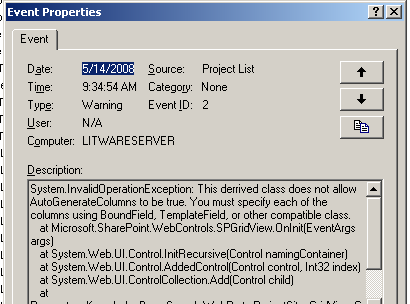
    EventLog.WriteEntry("Project List", ex.ToString(), EventLogEntryType.Warning, 2);
}

The 4 parameters passed above are

  • Source
    • String value containing the name of the source application
  • Message
    • String value containing the error message
  • Type (Error, FailureAudit, Information, SuccessAudit, Warning)
    • Must be specified by using EventLogEntryType
  • Event ID
    • Byte value representing an error code

Which will write an event, such as the example shown above to the Application event log.

image_2

More on the EventLog class can be found here: http://msdn.microsoft.com/en-us/library/system.diagnostics.eventlog(VS.80).aspx

Technorati Tags: ,,