SharePoint Saturday Baltimore Session Materials and Wrap-up

SharePoint Saturday Baltimore was a really great event. As Mark Miller from EndUserSharePoint.com put it “SharePoint Saturday Baltimore was one of the best organized events I’ve participated in for a while. Eric [Harlan] and his team did a tremendous job making the day flow seamlessly”. That hit the nail right on the head. Even in a building where sessions spanned multiple floors, and only about 10 minutes to move between each session, I did not see one person wandering aimlessly.

Eric Harlan provided us with some additional information at the speaker dinner, held the night before, and as well at the introduction to the event. This event “sold out” in 12 hours, and there were many on the waiting list. That’s quite impressive for a SharePoint event, held on a Saturday, during a beautiful summer day, and I was happy to be able to have a part in it.

Unfortunately due to the speed my virtual machine decided to run at during the presentation, as well as the great questions and interaction from the attendees to my session (which was the first of the day), we ran out of time, and I was unable to complete two additional demonstrations, and give out references, and answer more questions. I promised everyone that I would record the session after the event, and post it for everyone to see in its entirety. However, Mark Miller from EndUserSharePoint.com, graciously offered to help organize a virtual SharePoint user group for just this, at SharePoint Nation. Many thanks to Mark for this, and I am looking forward to it.

The details are currently being worked out, but, looking to do this sometime in the month of August, so I will keep the details flowing on my blog here as they become available, as well as there will be information posted on the EndUserSharePoint.com website, and the SharePoint Nation site as we firm out those details. If for some reason you will be unable to make that event, all events are recorded and made available on the site for viewing. I am looking forward to it, and thanks, once again to Mark.

Now, back to the event. I would like to thank all attendees, speakers, sponsors, and organizers for the great job they did. I met a bunch of great people, and was able to spend some time with some old and new friends alike. If you are into SharePoint at all, I highly suggest that when a SharePoint Saturday event comes to your area, you free up a Saturday and attend.

Without further ado – below is my presentation on Developing Custom Actions within SharePoint, hosted on SlideShare.

My sample code from the demos has not changed however since my presentation of this material in Boston – that can be found here:  SharePoint Saturday Boston – Introduction to Developing Custom Actions within SharePoint – Code Samples.zip

Please post any questions regarding this material in the comments section for this post, and I will be happy to answer them.

Also, I will be reviewing the audio recording I had made during the session, and will post the questions and answers from the session on this site within the coming weeks.

Some additional resources for Custom Actions I have on my blog:

In addition to what I have made available here, other presentations from the day can be found on the SharePoint Saturday Baltimore website.

The live blogging and tweet stream from the event can be viewed here if you missed it: http://www.endusersharepoint.com/?p=1836

And some photos as well: http://www.endusersharepoint.com/?p=1857

A big thank you again to all who attended, and made this event happen. I hope I have the privilege again to be a part of another SharePoint Saturday event soon! Please check out the SharePoint Saturday website for a listing of all previous and upcoming events, and if there is one in your area, or even a 6 hour drive, it is well worth your time. http://www.sharepointsaturday.org


SharePoint Administration Freeware Tool – Axceler PinPoint

Axceler just released a new tool which will fit nicely into the SharePoint administrator’s toolbox, that can help answer some commonly asked questions in a SharePoint environment:

  • What are my most active sites?
  • What documents/pages see the most activity?
  • What are the largest sites and items within my farm?

Axceler PinPoint provides you with answers to these common question – and best of all, it’s free. The only downside is that it needs to be run from one of the SharePoint servers within your farm, and cannot be run remotely, as it makes use of the object model to work it’s magic. A small price to pay IMHO for this information.

Freeware SharePoint Tool Download

Click here for more information and to download


SharePoint 2010 Sneak Peek

Sorry for the delay on this post. I was away on vacation last week when the updates were made to the Microsoft SharePoint website, and I am still playing catch-up on work.

In any event, Microsoft has released 3 videos talking about some of the new features and what to expect with the next version of SharePoint, each with a different focus (Overview, IT Professional, and Developer). To see these videos, just follow this link: http://sharepoint.microsoft.com/2010/Sneak_Peek/Pages/default.aspx

Under each of the videos, they also list several highlights about the new version for that specific focus. All of these of course are directing people to the SharePoint Conference in Las Vegas this October (http://www.mssharepointconference.com/). Not going? You should…

In addition to this, they have also released a technical preview of the SharePoint 2010 SDK available from here: http://www.microsoft.com/downloads/details.aspx?FamilyID=94afe886-3b20-4bc9-9a0d-acd8cd232c24&displaylang=en

Also, Bjørn Furuknap, who writes the Understanding SharePoint Journal, has started a series on what developers can expect based off of news in the blogosphere, twittersphere, and the SDK, which can be found here: http://www.sharepoint2010beta.com/


Quest DropThis for SharePoint 1.0 Freeware

The folks over at Quest Software have recently released a free utility to allow you to easily integrate your Outlook 2003 or 2007 client into SharePoint via their community site – SharePoint For All.

This tool works by allowing you to upload attachments into SharePoint, and provide a link in your email to that document, helping eliminate the sending of attachments through your own, as well as your recipients’ mail servers. All directly from within Outlook.

I find this utility extremely handy for sending files to clients, and pushing the files up to their project site, as well as working with internal teams, pushing files up to my MySite.

Go here to download the software, a mini-guide, and there is also a link to their support forum to share your questions and feedback: http://sharepointforall.com/media/p/401.aspx

Usage is simple, once the add-in is configured, send an email with an attachment, and you will be prompted with the box above so you can specify the location (other than the default you have configured), click OK, and you’re off to the races.

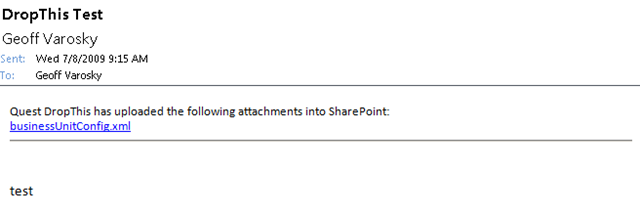
Your recipient will see an email like this, with a link to the attachment (if the first or second options are chosen)

image 

A word of note for Outlook 2007, which is not mentioned in the guide here: http://sharepointforall.com/blogs/team/archive/2009/06/23/the-official-quest-drop-this-for-sharepoint-mini-guide.aspx 

When I had installed (your mileage may vary), the utility was automatically set as disabled. You will know the utility is disabled if there is not a new Quest DropThis for SharePoint tab under Tools > Options. To change this, go into Tools > Trust Center, and click on Add-Ins. You should then see Quest DropThis for SharePoint underneath the Disabled Application Add-ins section. On the bottom of that screen, select Disabled Items from the Manage drop-down, and click Go. Find Quest DropThis for SharePoint in the list, and click Enable. Once enabled, it will then go under Inactive Application Add-ins, to now enable this add-in, select COM Add-ins from the Manage drop-down and click Go. Then, check the Quest DropThis for SharePoint option in the list, and click OK. You should now be ready to go!


AvePoint Releases FREE Tool for SharePoint Item Level Restoration from SQL and DPM Backups

AvePoint announced this at the SharePoint Technology Conference in Boston two weeks ago, and has issued a formal press release as of July 1st, 2009. They are now offering a FREE tool (DocAve SQL Restore Controller), that will allow you to perform full-fidelity item-level restore capabilities in SharePoint from SQL and DPM backups!

As with all of AvePoint’s products, this tool is available in their DocAve software suite (trial can be downloaded here: http://avepoint.com/resources/free-trial-downloads/). The trial gives you 30 days to try out the entire product suite, and after the 30 days period is up, you still have access to the DocAve SQL Restore Controller.


Executing SPQuery Queries and the U2U CAML Query Builder

If you are querying against any list using the SPQuery method, then most likely you are using the U2U CAML Query Builder. And if you are not, why? (This is old news! It’s been around since SharePoint 2003) This utility is always one of the first installations to any of my development environments.

This utility makes your life much easier by allowing you to build and test your queries directly against SharePoint, before debugging them, through code. And you can also do it remotely via web services, so you do not have to install and run this directly from the server itself.

A newer version was released last year as well that will install directly into your farm via a feature, to allow you to build, test, and save queries all from the SharePoint UI!

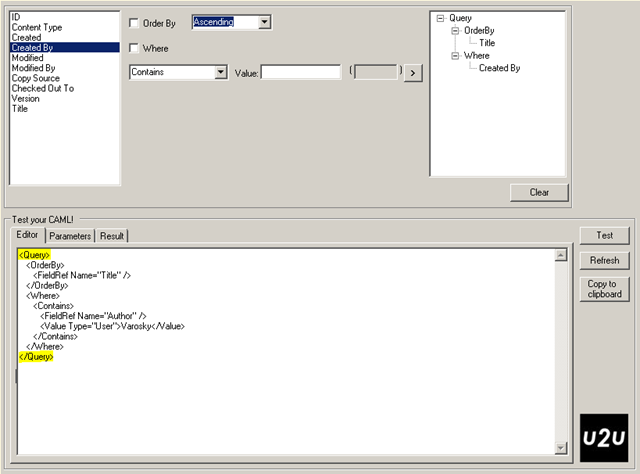
However, a common issue takes place when you copy the query directly from the U2U CAML Query Builder (which works just fine in the utility itself), in that no matter what conditions you have specified for your query, you always retrieve all list items. If this is the first time you have run into this – you have no doubt done a little of the timeless developer troubleshooting method

  1. Bang head against desk
  2. Repeat

You need not worry however, this is a quick fix. The U2U CAML Query Builder inserts <Query> </Query> tags around the query itself. In your code, just drop these start and end tags from your query, and you should now be returning your expected results.

image


SharePoint Saturday Baltimore – Registration Opens 7/13!

image 

SharePoint Saturday Baltimore is quickly approaching! And the good news is here – registration opens at 10am EST on July 13th, 2009. Be sure to register early, as the slots are sure to fill up quickly!

For more information, and the place to visit to register for this event on 7/13, please click here: http://www.sharepointsaturday.org/baltimore/