Registration Opens for SharePoint Saturday NYC on August 15th!

Yesterday it was announced on the SharePoint Saturday NYC site that registration for this free, one-day SharePoint conference will open on August 15th.

The speakers list was published to the site yesterday as well, and sessions will be posted to the site (35 of them!) before registration opens on the 15th. A schedule was also posted, which I will re-post here:

8:00 am – 8:45 am – Registration & Breakfast
8:45 am – 9:15 am – Welcome
9:30 am – 10:45 am – Sessions
11:00 am – 12:15 pm – Sessions
12:15 pm – 1:00 pm – Lunch
1:00 pm – 2:15 pm – Sessions
2:30 pm – 3:45 pm – Sessions
4:00 pm – 5:15 pm – Sessions
5:30 pm – 6:00 pm – Closing & Giveaways

This is going to be yet another great SharePoint Saturday event, so, register early to ensure your spot as an attendee for this conference on the 15th at http://www.sharepointsaturday.org/ny


Speaking at SharePoint Saturday NYC

I am excited to announce that I just heard from the coordinators of SharePoint Saturday NYC, Michael Lotter and Dux Raymond Sy, that I will be speaking at the upcoming SharePoint Saturday NYC event, taking place on September 12th, 2009.

An official speakers and session lists have not been released to the site as of yet, but already a great lineup is coming together from the looks of it on twitter (search for hashtag #spsnyc).

I will again be presenting my session “Introduction to Developing Custom Actions within SharePoint”, however a modified version based on prior feedback and time limitations from the Boston and Baltimore events.

For more information on the event, please visit the SharePoint Saturday NYC site. I will post registration details as soon as they are released. Hope to see everyone there!


SharePoint Saturday Baltimore Session Materials and Wrap-up

SharePoint Saturday Baltimore was a really great event. As Mark Miller from EndUserSharePoint.com put it “SharePoint Saturday Baltimore was one of the best organized events I’ve participated in for a while. Eric [Harlan] and his team did a tremendous job making the day flow seamlessly”. That hit the nail right on the head. Even in a building where sessions spanned multiple floors, and only about 10 minutes to move between each session, I did not see one person wandering aimlessly.

Eric Harlan provided us with some additional information at the speaker dinner, held the night before, and as well at the introduction to the event. This event “sold out” in 12 hours, and there were many on the waiting list. That’s quite impressive for a SharePoint event, held on a Saturday, during a beautiful summer day, and I was happy to be able to have a part in it.

Unfortunately due to the speed my virtual machine decided to run at during the presentation, as well as the great questions and interaction from the attendees to my session (which was the first of the day), we ran out of time, and I was unable to complete two additional demonstrations, and give out references, and answer more questions. I promised everyone that I would record the session after the event, and post it for everyone to see in its entirety. However, Mark Miller from EndUserSharePoint.com, graciously offered to help organize a virtual SharePoint user group for just this, at SharePoint Nation. Many thanks to Mark for this, and I am looking forward to it.

The details are currently being worked out, but, looking to do this sometime in the month of August, so I will keep the details flowing on my blog here as they become available, as well as there will be information posted on the EndUserSharePoint.com website, and the SharePoint Nation site as we firm out those details. If for some reason you will be unable to make that event, all events are recorded and made available on the site for viewing. I am looking forward to it, and thanks, once again to Mark.

Now, back to the event. I would like to thank all attendees, speakers, sponsors, and organizers for the great job they did. I met a bunch of great people, and was able to spend some time with some old and new friends alike. If you are into SharePoint at all, I highly suggest that when a SharePoint Saturday event comes to your area, you free up a Saturday and attend.

Without further ado – below is my presentation on Developing Custom Actions within SharePoint, hosted on SlideShare.

My sample code from the demos has not changed however since my presentation of this material in Boston – that can be found here:  SharePoint Saturday Boston – Introduction to Developing Custom Actions within SharePoint – Code Samples.zip

Please post any questions regarding this material in the comments section for this post, and I will be happy to answer them.

Also, I will be reviewing the audio recording I had made during the session, and will post the questions and answers from the session on this site within the coming weeks.

Some additional resources for Custom Actions I have on my blog:

In addition to what I have made available here, other presentations from the day can be found on the SharePoint Saturday Baltimore website.

The live blogging and tweet stream from the event can be viewed here if you missed it: http://www.endusersharepoint.com/?p=1836

And some photos as well: http://www.endusersharepoint.com/?p=1857

A big thank you again to all who attended, and made this event happen. I hope I have the privilege again to be a part of another SharePoint Saturday event soon! Please check out the SharePoint Saturday website for a listing of all previous and upcoming events, and if there is one in your area, or even a 6 hour drive, it is well worth your time. http://www.sharepointsaturday.org


SharePoint Saturday Baltimore – Registration Opens 7/13!

image 

SharePoint Saturday Baltimore is quickly approaching! And the good news is here – registration opens at 10am EST on July 13th, 2009. Be sure to register early, as the slots are sure to fill up quickly!

For more information, and the place to visit to register for this event on 7/13, please click here: http://www.sharepointsaturday.org/baltimore/


Speaking at SharePoint Saturday Baltimore

I have the privilege yet again to join a great group of speakers and attendees in Baltimore on July 25th, 2009, to once again speak at SharePoint Saturday.

If you are unfamiliar with SharePoint Saturday, it is a free event that covers a wide range of areas within SharePoint: end user, architect, developer, administrator, and there will even be a SharePoint 101 track to help those new to SharePoint learn the basics.

There is a great lineup of speakers set so far, including Adam Macaulay, Dan Lewis, Dan Usher, Dux Raymond Sy, Eric Harlan, Errin O’Connor, Joel Oleson, Michael Noel, Mike Watson, Shadeed Eleazer, and more! Visit this page for the complete listing of speakers: http://www.sharepointsaturday.org/baltimore/Pages/speakers.aspx

Registration is set to open within a few weeks, and I will post any updates here regarding the event as I receive them, once it is open, and you are in the area, I highly suggest you attend if you can!

If you are not in the Baltimore area, do not worry. There are other SharePoint Saturday events scheduled around North America, and now, the world! Below are links to the other currently scheduled SharePoint Saturday events:

I will be delivering an updated version of my presentation that I had delivered in Boston for SharePoint Saturday, “Introduction to Developing Custom Actions within SharePoint”. Custom Actions control features in SharePoint such as the Edit Control Block, the Site Actions menu, toolbars, and the links within the Site Settings page. Learn how to leverage Custom Actions to extend the SharePoint User Interface. This session will describe the basics of Custom Actions, a demonstration to build one or more and apply them to a site in SharePoint, as well as provide resources for additional information

There are currently 4 demonstrations planned throughout the session, and possibly an additional demonstration if I can fit it in.

As per my Boston presentation, I will post all slide-decks, code samples, and answers to questions on my blog here within a few days following the Baltimore event.

Looking forward to meeting up with some friends, and meeting some new ones at this event. Hope to see you there!


Combining Multiple CustomAction Elements Together

I’ve been slowly, but surely, getting the questions asked during my SharePoint Saturday Boston presentation, so, here goes the next one.

Can you combine multiple custom actions within a feature?

YES! You sure can! In my 4th demonstration (Custom Action Groups), I showed this within my ElementManifest file (manifest.xml), where I defined a CustomActionGroup, as well as 4 additional CustomAction elements within a single manifest file. See code example below:

   1: <?xml version="1.0" encoding="utf-8" ?>
   2: <Elements xmlns="http://schemas.microsoft.com/sharepoint/">
   3:   <CustomActionGroup Id="HelpResources"
   4:        Location="Microsoft.SharePoint.SiteSettings"
   5:        Title="CustomAction Resources on MSDN" />
   6:  
   7:   <CustomAction Id="CustomActionLocsAndIds" 
   8:                 Title="Custom Action Locations and Ids" 
   9:                 GroupId="HelpResources" 
  10:                 Location="Microsoft.SharePoint.SiteSettings" 
  11:                 Sequence="0">
  12:     <UrlAction Url="http://msdn.microsoft.com/en-us/library/bb802730.aspx"/>
  13:   </CustomAction>
  14:   
  15:   <CustomAction Id="CustomActionElement"
  16:                 Title="CustomAction Element"
  17:                 GroupId="HelpResources"
  18:                 Location="Microsoft.SharePoint.SiteSettings"
  19:                 Sequence="1">
  20:     <UrlAction Url="http://msdn.microsoft.com/en-us/library/ms460194.aspx"/>
  21:   </CustomAction>
  22:   
  23:   <CustomAction Id="CustomActionGroupElement"
  24:                 Title="CustomActionGroup Element"
  25:                 GroupId="HelpResources"
  26:                 Location="Microsoft.SharePoint.SiteSettings"
  27:                 Sequence="2">
  28:     <UrlAction Url="http://msdn.microsoft.com/en-us/library/ms438085.aspx"/>
  29:   </CustomAction>
  30:  
  31:   <CustomAction Id="HideCustomAction"
  32:                 Title="HideCustomAction Element"
  33:                 GroupId="HelpResources"
  34:                 Location="Microsoft.SharePoint.SiteSettings"
  35:                 Sequence="3">
  36:     <UrlAction Url="http://msdn.microsoft.com/en-us/library/ms414790.aspx"/>
  37:   </CustomAction>
  38: </Elements>

The person who asked this question had a business need to create a lot of custom actions, however, did not want to have a feature built for each one, even though features are handy ways of deploying functionality to SharePoint, if you have hundreds of features, that can become a management nightmare.

I also mentioned, that what you can do is separate these out into functional ElementManifest files – as you can have any number of them defined in your feature, and they do not all need to be named elements.xml, or manifest.xml. A good example of this can be seen in the 12 Hive FEATURES folder, looking at some of the built in CustomAction elements and CustomActionGroup elements.

For instance, if you wanted to break out your manifest definition files into one for each CustomActionGroup, you can do so easily, by specifying different files – code example below.

   1: <?xml version="1.0" encoding="utf-8" ?>
   2: <Feature xmlns="http://schemas.microsoft.com/sharepoint/"
   3:          Id="{FFC864FD-C78D-4fd0-8F18-963D1EA59E0C}"
   4:          Title="SPS.CustomActionGroup"
   5:          Description="Custom Action Grouping example"
   6:          Scope="Site"
   7:          Version="1.0.0.0"
   8:          Hidden="false"
   9:          >
  10:   <ElementManifests>
  11:     <ElementManifest Location="MSDNResources.xml"/>
  12:     <ElementManifest Location="BlogResources.xml"/>
  13:     <ElementManifest Location="TwitterResources.xml"/>
  14:   </ElementManifests>
  15: </Feature>


This will make not only the management of features easier within SharePoint as far as managing what gets activated, also the management of the solution as well, so you are not managing 400 CustomAction elements within a single file, you can break them out as needed.

And to answer the question before it gets asked in this entry’s comments – the CustomActionGroup does not need to be defined within the same file as its CustomAction elements. You could break it down into CustomActionGroups.xml and CustomActions.xml if you’d like to separate them out.

Again – the names of the ElementManifest XML definition files do not matter – as long as they are referenced within the feature.xml file (this filename MUST be feature.xml), then you are all set. They really do not even need to have an XML definition, as long as it is declared at the top of the XML file, they will be interpreted as XML files.


RecurrenceId Attribute of the CustomAction Element

During my session at SharePoint Saturday Boston – I mentioned that I would look into just what exactly RecurrenceId does, and make a post about it here. RecurrenceId is a token that is available for the URLAction element within the CustomAction element.

I did some additional research, and was able to find this via MSDN:

“A recurrence identifier that identifies a specific instance of a recurring appointment. It is used with the to uniquely identify the instance.”

The above quote is from an Exchange related article, however, it still fits the bill, and gives a little more useful information than the one found in the RecurrenceId Property link below, which is:

Returns the identifier (ID) of an instance of a recurrent item.

Paul Grenier (AutoSponge) who was attending my session, was spot on with his guess. The RecurrenceId property would be useful in the URLAction element to specifically identify a recurring event list item, and to only act on that specific item, as recurring events within events lists are just one single list item, and not copies of the original with their own specific GUIDs. They have the same GUID as the original event, however, just have an incremented RecurrenceId that can be used to directly identify that specific occurrence of the event.

More information on this SPListItem Property can be found here in the WSS 3.0 SDK: SPListItem.RecurrenceID Property (Microsoft.SharePoint), however, there is not much there.

As of my session on Saturday, I had never needed to use this attribute before in my travels, and virtually the only documentation on it I could find before SharePoint Saturday Boston, was that you cannot use it with the Edit Control Block. This doesn’t make much sense to me however, why it is even available, as I would think the only time this would be useful, is to directly interact with an event list item from the Edit Control Block.

image

Anyhow – there is now a blog posting out in the wild for others to consume regarding the RecurrenceId attribute. I hope this helps someone else out.


Delete this site

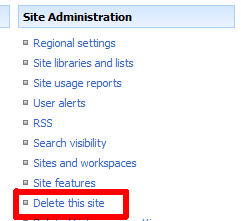
No, this is not a request for the Live Spaces administrators to follow through on, this is going to be a post about the ‘Delete This Site’ link, or more aptly, the DeleteWeb custom action within SharePoint, on the Site Settings page.

Yesterday, during my session on developing custom actions within SharePoint at SharePoint Saturday Boston, my third demonstration was on hiding custom actions, using the HideCustomAction element. My example was to hide the ‘Delete this site’ action found under Site Administration custom action group, on the Site Settings page, as shown below.
image

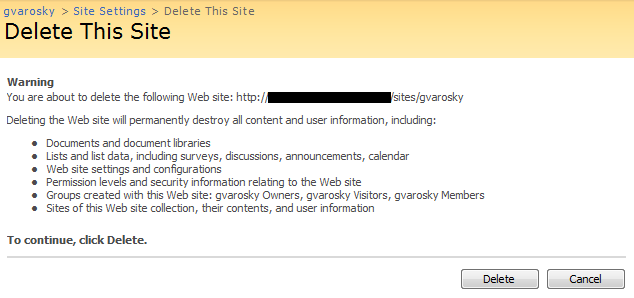
I’ve had to deploy this solution for several clients in the past, where they have given full control of sites (webs) over to one or more people, to help manage a large deployment. However, on more than one occasion, the sites themselves have been deleted, “accidentally”, even though when you go to delete a site in SharePoint, you are prompted to confirm this action, without any confusing ‘Yes or No’ buttons, only ‘Delete’ and ‘Cancel’, which, in my humble opinion, is just about as straight forward as you can be.
image

So, during my demonstration, someone had asked if this prevents users from accessing the DeleteWeb function entirely, so sites cannot be deleted at all. No, this only hides the link to the site. If the person knows the URL by remembering it, googling it, or, now, reading this blog post, by going to http://www.intranet.net/sites/subsite/_layouts/deleteweb.aspx, and they have permissions to delete the site, they can definitely still delete it. What we are doing here is just removing it from their field of view, or “security through obscurity”. What I also did in the code (available on this blog post) was keep the feature hidden, so it needs to be activated from the server via stsadm, so the site administrator, if they were to check the site features and see a feature called Hide Delete This Site Link From Bob or something similar activated on the site, they could then just deactivate the feature, and be on their way to deleting it. Again adding and extra level of protection on that function.

Another question came up – if sites are deleted, do they go to the recycle bin? No, they do not… out of the box that is. I also mentioned that Microsoft IT had posted a project to Codeplex, which creates a solution for this. Their utility, found here at http://codeplex.com/governance, is called Microsoft IT Site Delete Capture. This is a great solution that I have deployed for numerous clients, captures the contents of the site on the server itself, and stores it away in an administrator defined location, for later restoration… this beats trying to load a site from a backup tape, then the site can be restored afterwards. This makes use of the SPWebEventReceiver.SiteDeleting method. If you wanted to take this a step further, you could modify the event receiver (which Microsoft IT has posted on the above mentioned Codeplex site here), to look at what user is deleting that site, see if they are, say, a site collection administrator, and then let them delete it, or, if they are not, do not let them delete it, and fire off an email, or log entry in the system event log or ULS logs, stating that Bob tried to delete his site again, even after the intensive training we gave him last week on just that subject.

And another question that came up on this topic during my session – can you assign rights, as you can for the CustomAction method, to the HideCustomAction method, so it is only visible to those that should see it – no, you cannot, however, I would recommend you hide the existing DeleteWeb action, and then replace it with your own DeleteWeb (however, it should not be called DeleteWeb, as that is already being used OOTB) action, which you then give rights to, using the Rights attribute of CustomAction, with any of the possible values in Microsoft.SharePoint.SPBasePermissions, however, there is unfortunately, not a "SiteCollectionAdministrator” SPBasePermission you can assign, but maybe your site collection administrators are the only ones with ApproveItems,UseRemoteAPIs,DeleteVersions permissions, and then you can really pick out who is who to make that link visible to.

I hope this helps and gives a little more detail and clarity on what was covered yesterday at SharePoint Saturday. I welcome any more questions on the subject, just leave a comment!


SharePoint Saturday Boston Session Materials

SharePoint Saturday Boston has come to a close, and it was a very successful event. Well over 200 attendees were able to make the event, hosted at the Microsoft office in Waltham, MA, from all over New England and beyond.

First off – I would like to thank all of the attendees who came to my session – Introduction to Developing Custom Actions within SharePoint. I had a great turnout, and a great group of attendees, with some fantastic feedback and questions on my presentation.

Next, I would like to thank everyone who attended the event. A lot of hard work goes into putting an event like this together, and all the support and interest from the attendees make great events like this happen, and keep them continuing to happen. Thanks to all of you, this event was able to take place, and I was happy to be a part of it.

Last, but certainly not least, a big thanks to all of the speakers, and coordinators of this event. You all did a great job, and I was sad that I was unable to attend more sessions, as there was a lot of great content delivered. Because of this event, I was able to learn a few things myself, reconnect with past acquaintances, make new friends and connections, and also come away with some great ideas for future topics to speak on.

As promised during my presentation, I am making my slide deck available via SlideShare (embedded below), as well as the code samples presented during my session. Also, as promised, I will work to get most, if not all, of the questions asked during the presentation up here as well. I will plan to do so over the next week.

Code samples from the presentation are available here: SharePoint Saturday Boston – Introduction to Developing Custom Actions within SharePoint – Code Samples.zip

Please feel free to ask any questions about the content of this presentation via the comments below!


Speaking at Boston SharePoint Saturday

As I had previously posted, SharePoint Saturday is coming to Boston, and I am pleased to announce that I have been accepted as a speaker for the event! There are some great speakers and sessions lined up for this free one-day conference, and I am excited to be a part of it. If you are not already signed up to go, and will be in the area on March 14th, 2009, I highly suggest you do so here.

I will be delivering a session entitled ‘Introduction to Developing Custom Actions within SharePoint’. This will be a level 200 session, as all of the demonstrations will be built in the session utilizing Visual Studio. Knowledge of the product, SharePoint 12 hive, Features, etc., is a bonus to have going into this session, however, not a pre-requisite. And there will be ample amounts of XML, as well as a little bit of code.

Here is the session summary (as it appears on the SharePoint Saturday site) –

“Custom Actions control features in SharePoint such as the Edit Content Block, the Site Actions menu, toolbars, and the links within the Site Settings page. Learn how to leverage Custom Actions to extend the SharePoint User Interface. This session will describe the basics of Custom Actions, a demonstration to build one or more and apply them to a site in SharePoint, as well as provide resources for additional information.”

I am planning 4 demonstrations for this presentation currently, so show different aspects of how the different Custom Actions elements within SharePoint can be used to modify existing elements and create new elements.

Once this event is over, I will post slide decks, as well as recordings/screen captures of the demonstrations to by blog here, in case you were unable to make it, or unable to attend the session.

For more information on resources for developing Custom Actions for SharePoint, take a look at one of my previous posts which includes an aggregation of great resources available on the subject.

Links
Session Information – http://www.sharepointsaturday.org/boston/Pages/meeting.aspx?meetingid=15 
SharePoint Saturday – Boston – http://www.sharepointsaturday.org/boston/
Registration for the Event – https://www.clicktoattend.com/invitation.aspx?code=135382