Registration Open for Boston Area SharePoint User Group (BASPUG) on September 8th, 2010

Registration is now open for the 5th meeting of the Boston Area SharePoint User Group (BASPUG) taking place on September 8th, 2010, at the Microsoft NERD Center in Cambridge, MA, from 6-8PM. BASPUG_195square_initials

We will have Steven Fowler. He is an author, speaker, consultant, founder and principal of Fowler Consulting, Inc. He will be presenting "Becoming a SharePoint Solution Provider".

Session Abstract

What are the basics when designing and delivering SharePoint based business solutions? How do I approach a business problem? What are the available tools and techniques? In this session we’ve cover the basics and get you pointed in the right direction.

We’ll cover:

  • An Overview of Lists and Web Parts
  • Site Columns, Content Types, List Definitions
  • Using Out of the Box > SharePoint Designer > Visual Studio
  • Page Viewer, CQWP, DVWP
  • Next Steps

About Steven

Steven Fowler is an experienced author, speaker and consultant possessing a mix of advanced technology and strategic business acumen derived from over 15 years of progressive project management, architecture and engineering experience. Steven has worked with SharePoint since the 2003 versions, and recently completed one of the world’s largest SharePoint implementations for the Department of Defense. 

Steven maintains an active blog at www.SharePointSteven.com, and can be found on Twitter @stevenmfowler.

Sustenance
Food and beverages will be available at the event. After the meeting, depending on interest, we will adjourn to a local watering hole to keep the discussions going.

Meeting Sponsor
Our sponsor for this meeting is Axceler.

Specializing in software for Microsoft SharePoint, Axceler has delivered award winning administration products worldwide since 1994. For Microsoft SharePoint, Axceler offers ControlPoint and, with the recent acquisition of echoTechnology, Davinci Migrator for SharePoint 2010. ControlPoint is the best way to get control over a SharePoint environment and gives SharePoint professionals the ability to manage permissions, copy sites, analyze activity and much more. ControlPoint was recently named the Best SharePoint Product of 2009 by the editors of WindowsITPro. Davinci Migrator for SharePoint 2010 reduces the risk, lowers the overall cost, and shortens the time it takes to complete a SharePoint 2010 migration. Axceler is based in Woburn, MA with offices in Los Angeles, Seattle, and London, UK.

Raffle Prizes
We will be handing out raffle tickets at the BASPUG meeting for the following items.

For more information, and to register, please visit http://www.bostonsharepointug.org/

Please help spread the word on twitter, blogs, and by any other medium! Follow us on twitter at @BASPUG, and by twitter hashtag #BASPUG. Join our LinkedIn group here: http://www.linkedin.com/groups?gid=2878468

We hope to see you there!

Registration Open for SharePoint Saturday Boston – 9/25/10

SharePointSatBostonI am pleased to announce that registration is now open for SharePoint Saturday Boston! Register today to reserve your spot. Registration is on a first-come, first-serve basis.

What’s SharePoint Saturday Boston?

SharePoint Saturday Boston is a free community‐focused SharePoint event dedicated to educating and engaging members of the local technical community. SharePoint Saturday draws upon the expertise of local SharePoint IT professionals, developers and solutions architects who come together to share their real world experiences, lessons learned, best practices, and general knowledge with other like‐minded individuals.

When is SharePoint Saturday Boston?

Saturday, September 25th, 2010
8:00AM – 6:00PM

Where will SharePoint Saturday Boston be held?

SharePoint Saturday Boston will be held at the Microsoft Waltham office at 201 Jones Rd., Sixth Floor, Waltham, MA 02451

Who is organizing this event?

ThirdM and Grace-Hunt 

How do I register?

Registration is limited and based on first come first serve basis. http://spsboston.eventbrite.com


Speaking at the SharePoint Best Practices Conference 2010 – Washington, D.C.

Looking through my posts recently, I notice I had left out a major conference! The Best Practices Conference in Washington, D.C.!

image 
In any event – my co-presenter Mark Rackley did a good write up about it here: http://www.sharepointhillbilly.com/archive/2010/08/03/the-truth-behind-sharepoint-best-practices.aspx and more information on the conference can be found here: http://www.bestpracticesconference.com

This is one of the biggest SharePoint related conferences of the year. And as luck has it, they usually have one on the east coast (D.C.) and on the west coast (San Francisco). So, which ever one you are closest to, and you are involved in SharePoint, you should be attending. There are many great speakers and sessions available on all sorts of SharePoint topics, centering around best practices. Even if you only learn one thing (and you are bound to learn a LOT more than that), it is worth the conference price alone.

While you’re there, be sure to drop into the session I am co-presenting with Mark – “SharePoint Customization: Overcoming Hurdles and Avoiding Pain”.

Abstract: "Why am I getting a security error?" "Why does my code work sometimes, but not others?" "I wonder if McDonalds is hiring." Writing custom code in SharePoint opens up unlimited possibilities but also throws many hurdles in your way that will slow you down if you don’t take them into account. So, before giving up and searching for careers in the fast food industry, equip yourself with the knowledge you need to succeed in writing custom code for SharePoint.

In this session you will learn:

  • Best practices for avoiding performance issues
  • Best practices for avoiding memory leaks
  • Best practices for elevating privileges
  • Avoid not disposing of SP Objects

Should be a hoot!

So – go ahead and register while there is still time, and we’ll see you in D.C.!


Registration Open for Boston Area SharePoint User Group (BASPUG) on August 11th, 2010

Registration is now open for the 4th meeting of the Boston Area SharePoint User Group (BASPUG) taking place on August 11th, 2010, at the Microsoft NERD Center in Cambridge, MA, from 6-8PM.

We will have Asif Rehmani, a SharePoint Trainer, MVP, and Consultant, will be presenting "Creating Workflows with SharePoint Designer 2010, InfoPath and Visio".

Session Abstract
Forms and Workflows are important for automating business processes. Companies usually rely on programmers to create the forms and workflows using code. Not anymore! With InfoPath 2010 and SharePoint Designer 2010, you can create powerful data driven form composite solutions on your SharePoint sites. InfoPath gives you the ability to pull data from databases and lists, and create forms with data validation and conditional formatting. SharePoint Designer’s workflows let you then design powerful multi-step workflows centered around the form collected data, building upon the out-of-the-box reusable workflows and even import workflow designs from Visio!  In this presentation, you will see how these tools come together to design workflows and route forms across your organization for task assignment and approval.

About Asif
Asif has been training and consulting on primarily SharePoint technologies since 2004. He is a SharePoint Server MVP and MCT. Asif runs a SharePoint Videos website (http://www.sharepoint-videos.com) which provides SharePoint, SharePoint Designer and InfoPath Video Tutorials. Some of his videos have also been published at Microsoft’s TechNet site. Asif also provides in-person and online SharePoint training publicly and in private workshops through Critical Path Training (http://www.criticalpathtraining.com).

Over the years, Asif has been a speaker on SharePoint topics at several conferences including Microsoft’s TechEd, SharePoint Conference, SharePoint Connections, and Advisor Live. He is the co-author of the book "Professional SharePoint Designer 2007" by Wrox publications (http://tinyurl.com/8tdsoq) and is currently working on two more book projects. Asif was the co-founder and is currently one of the active leaders of the Chicago SharePoint User Group (http://www.cspug.org)

For a more detailed bio, please visit http://www.sharepoint-videos.com/about/.
You can reach Asif at: asif@sharepointelearning.com.

Food will be provided for free as well from Source Consulting.

For raffles this meeting, Black Blade Associates will be raffling off a license for their SharePoint Zip product. Lightning Tools will be raffling off a license for BCS Meta Man. We will also be raffling off one free 2009 SharePoint Conference content pass, as well as X-Box Games, Books, Shirts, and more!

For more information, and to register, please visit http://www.bostonsharepointug.org/

Please help spread the word on twitter, blogs, and by any other medium! Follow us on twitter at @BASPUG, and by twitter hashtag #BASPUG. Join our LinkedIn group here: http://www.linkedin.com/groups?gid=2878468

We hope to see you there!

SharePoint Saturday Boston – Call for Speakers – 9/25/10

That’s right! The venue is confirmed, and we’re starting to open up the flood gates for speakers and sponsors. The call for speakers is officially open, with the sponsor call coming soon (later this week most likely – so stay tuned for that).

If you are interested in speaking at SharePoint Saturday Boston on September 25th, 2010, please download the speaker’s submission form here.

After completing the form, please return it to SPSBoston@live.com as soon as possible as the speaker slots fill up fast. The call for speakers WILL CLOSE by August 21st, 2010. You must have the form in by then if you wish to speak at the event!

Once your outline is received we will review and send email confirmation that it was accepted.

What: Join SharePoint architects, developers, and other professionals that work with Microsoft SharePoint Technologies for the 3rd ‘SharePoint Saturday’ Boston event, to be held on Saturday, September 25th, 2010 at the Microsoft Office on Jones Road in Waltham, MA.  SharePoint Saturday will be an educational, informative & lively day filled with sessions from respected SharePoint professionals & MVPs, covering a wide variety of SharePoint-orientated topics.  SharePoint Saturday is FREE, open to the public and is your local chance to immerse yourself in SharePoint! 

When: September 25th, 2010

Where: Microsoft Office, 201 Jones Road, Waltham, MA

Follow us on twitter at @SPSBoston, and use the hashtag #spsbos when tweeting about the event. Visit the SharePoint Saturday Boston website for the most up-to-date information as well: http://www.sharepointsaturday.org/boston


Speaking at the SharePoint Nation Virtual User Group – July 21st, 2010

image

Ever since I participated in the developer panel last October for SharePoint Nation, I’ve been hoping to get back in there to deliver a session, and thankfully now I have the chance to do so! On Wednesday, July 21st, at 8PM EDT, I will be delivering my “Creating Custom Actions in SharePoint Session”.

No need to travel after a long day to attend – you can visit the user group at a nice respectable time of 8PM, from the comfort of your couch. Probably a little before the event, you’ll want to log in here: https://www.livemeeting.com/cc/mvp/join?id=N2MK63&role=attend&pw=SPN072110

Creating Custom Actions within SharePoint
Custom Actions control features in SharePoint such as the Edit Control Block, the Site Actions menu, toolbars, and the links within the Site Settings page. Learn how to leverage Custom Actions to extend the SharePoint User Interface. This session will describe the basics of Custom Actions, a demonstration to build one or more and apply them to a site in SharePoint, as well as provide resources for additional information.
Level: Beginner – Intermediate

Hope to see some of my readers there!


Hartford Code Camp 3 Session Materials

I had the pleasure (as well as a scenic country drive) to participate as a speaker at the 3rd Hartford Code Camp this past Saturday, just outside HFD in Bloomfield, CT. Unfortunately I could not stay past my session (9a – 10:15a), but, it was fun for the short time I was able to be there! From what I saw, both Bob and SB put together a great Code Camp, at a great location. Kudos to you both!

Thanks to those that dropped into my session, I had a feeling I would be attending another session as 9am struck on the clock, but then I had a healthy dose of attendees drop in, and we soon got underway.

I presented a session on “What’s New for Developers in SharePoint 2010”, slightly modified from the last time I had presented the material a few months ago, at the Western MA Microsoft Technology Users Group.

Below is the slide deck for all those interested, as well as the code samples that would have been used in the PowerShell segment, if we had the time…

Thanks again for attending!

Below are the PowerShell commands that I would have used, in the PowerShell section of the presentation, if we had the time to do it 🙂

Code Samples

PowerShell commands to enable the Developer Dashboard

   1: [Microsoft.SharePoint.Administration.SPWebService]::ContentService.DeveloperDashboardSettings.DisplayLevel='OnDemand';
   2: [Microsoft.SharePoint.Administration.SPWebService]::ContentService.DeveloperDashboardSettings.Update();


PowerShell command to get a listing of the URL, Author, and Title of a Web

   1: Get-SPweb -site http://whatsnewin2010.dev.grace-hunt.com | ft Url, Title, Author

PowerShell command to get the Title of all of the lists within a Web

   1: Get-SPweb -site http://whatsnewin2010.dev.grace-hunt.com | foreach { $_.Lists | ft $_.Url, Title }

PowerShell command to get the listing of all of the Resource settings for the User Code service (Sandbox Solutions)

   1: [Microsoft.SharePoint.Administration.SPUserCodeService]::Local.ResourceMeasures

PowerShell commands to enable the User Code service to run on a Domain Controller (local image development for Sandbox Solutions)

   1: $acl = Get-Acl HKLM:\System\CurrentControlSet\Control\ComputerName
   2: $person = [System.Security.Principal.NTAccount]"Users"
   3: $access = [System.Security.AccessControl.RegistryRights]::FullControl
   4: $inheritance = [System.Security.AccessControl.InheritanceFlags]"ContainerInherit, ObjectInherit"
   5: $propagation = [System.Security.AccessControl.PropagationFlags]::None
   6: $type = [System.Security.AccessControl.AccessControlType]::Allow
   7: $rule = New-Object System.Security.AccessControl.RegistryAccessRule($person, $access, $inheritance, $propagation, $type)
   8: $acl.AddAccessRule($rule)
   9: Set-Acl HKLM:\System\CurrentControlSet\Control\ComputerName $acl

PowerShell commands to view the Property Bag of a Web

   1: $web = get-spweb -site http://whatsnewin2010.dev.grace-hunt.com
   2: $web.AllProperties | ft


Registration Open for Boston Area SharePoint User Group (BASPUG) on June 14th, 2010

Registration is now open for the 3rd meeting of the Boston Area SharePoint User Group (BASPUG) taking place on July 14th, 2010, at the Microsoft NERD Center in Cambridge, MA, from 6-8PM.

We will have Bob German, a Technology Architect with Microsoft, presenting "Developing Great Solutions with SharePoint 2010 and Silverlight”.

Session Abstract
SharePoint and Silverlight make an unbeatable combination for building great web applications. In this session, you will learn how to develop these solutions more easily than ever with Visual Studio 2010 and SharePoint’s new client object model and REST services. We’ll begin with an empty Visual Studio project and show how to get started, and then move on to topics such as how to deal with large datasets, out-of-browser support, building mash-ups and more.

About Bob
Bob German is a Technology Architect at the Microsoft Technology Center in Boston, MA. Bob specializes in web sites, portals and collaboration technologies, including Microsoft SharePoint and related technologies. With over 30 years of industry experience, Bob helps customers create and prove out solutions which fit their business and technology needs.

Food will be provided for free as well!

For raffles this meeting, Black Blade Associates will be raffling off a license for their SharePoint Zip product. Lightning Tools will be raffling off a license for BCS Meta Man. We will also be raffling off one free 2009 SharePoint Conference content pass, as well as X-Box Games, Books, Shirts, and more!

For more information, and to register, please visit http://www.bostonsharepointug.org/

Please help spread the word on twitter, blogs, and by any other medium! Follow us on twitter at @BASPUG, and by twitter hashtag #BASPUG. Join our LinkedIn group here: http://www.linkedin.com/groups?gid=2878468

We hope to see you there!


Speaking and Sponsoring SharePoint Saturday NYC on July 31st, 2010

It has been a very busy week for me, so even though I received confirmation last weekend, I am just getting around to posting about it now. I was very pleased to find an email in my inbox to find that my session has been accepted for SharePoint Saturday NYC!

SharePoint Saturday NYC will be held at the Microsoft Manhattan Office – more details are on the site here http://www.sharepointsaturday.org/ny/Pages/about.aspx

Also, we will be teaming up with one of our favorite partners, AvePoint, to help sponsor the event (we’ll be raffling off a netbook!)

My session will be on Creating Custom Actions in SharePoint 2010.

Custom Actions control features in SharePoint such as the List Item Menu, the Site Actions menu, toolbars, and the links within the Site Settings page, as well as the Ribbon UI in SharePoint 2010. Learn how to leverage Custom Actions to extend the SharePoint User Interface. This session will describe the basics of Custom Actions, demonstrations to build and apply them in SharePoint, as well as provide resources for additional information.

This session is the 2010 version of the session I have been giving off and on for the past year and a half, upgraded and completely revamped for 2010. If you’ve attended my 2007 version of this session, then you will be in luck, as there is a lot more happening with custom actions in SharePoint 2010, we might need to gloss over some of the base material to build these out.

I will also be covering creating these in SharePoint Designer 2010, and importing them into Visual Studio 2010. Lots of fun and excitement! I hope to see all of my 8 readers there!


Converting the SharePoint and Office 2010 Information Worker Virtual Machines to VMWare from Hyper-V

I had a problem. My laptop (my main computer), runs Windows 7. The 2010 Information Worker (RTM) virtual images are Hyper-V. I run all of my development images off of (2) 1TB external ESATA 7200RPM drives using VMWare Player, since Virtual PC is no longer useful for the most part.

So, a few months ago, I started poking around, to see what the options were out there for converting Hyper-V images to VMWare… the pickings were thin. I had some conversations at SharePoint Saturday DC with Ken Price about the issue, as he had the same issue as I did. I pinged him yesterday on twitter to see if he had come up with any leads – and it appears he did.

image

image

image

So, I took that as my challenge, to set out and see if this works. See… I am working with a group of people on a new book (waiting on contract stuff now, so, I’ll spare the details until everything is confirmed), and our plan is to use this IW image as our base for examples and screenshots, etc., to have a consistent feel throughout the book, as we’re all taking on different chapters.

So, first things first, I downloaded the Information Worker Virtual Images, both the front-end server with SharePoint and Office (2010-7a) and the backend server (2010-7b) with Exchange 2010 from here: http://go.gvaro.net/a6P7ec [Editor’s note: Can I just plug Verizon FiOS for giving me a sweet connection with 25Mb/s download speeds?]

Once I downloaded those images, I ran the executable files for each image to join the +/- 700MB rar file slices, 2010-7a.part01.exe and 2010-7b.part01.exe.

Once that was done, I downloaded and fired up WinImage, which is very simple to operate, see the screenshot walk-through below…

Go to Disk >Convert Virtual Hard Disk Image

image

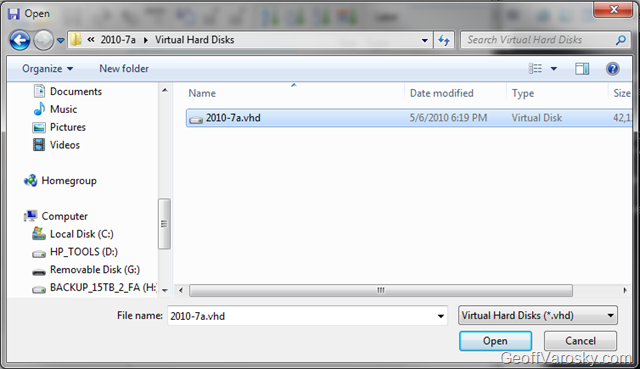
Select the 2010-7a VHD first located in the Virtual Hard Disks folder

image

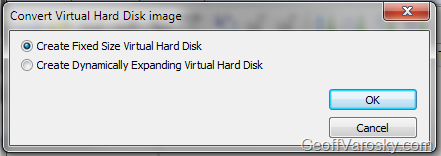
Set the disk to either be a fixed disk, or a dynamically expanding disk

image

Then select the converted VMDK name to use (the one seen there is from my initial conversion, you will not see that) but, to keep things simple, just name the output file 2010-7a.vmdk.

image

And then let it do it’s thing. Repeat the same steps for the 2010-7b.vhd as well, if you also want to run exchange as well.

Ok, we then need to create the VMX files (the VMWare virtual machine configuration files)… to do so, I first copied one over by hand, but, that just lead me to BSOD after BSOD when booting up, so, I did a quick search, and found VMX Builder, a free utility from PowerWF. This however complained that I did not have a license to perform this action, which makes no sense, as it is a FREE program. So, off I went looking for something else… and found a web-based approach called EasyVMX! With such enthusiasm in the name, I had to check it out.

I went with EasyVMX v 2.0 (on the right), as it offered the most flexibility.

image

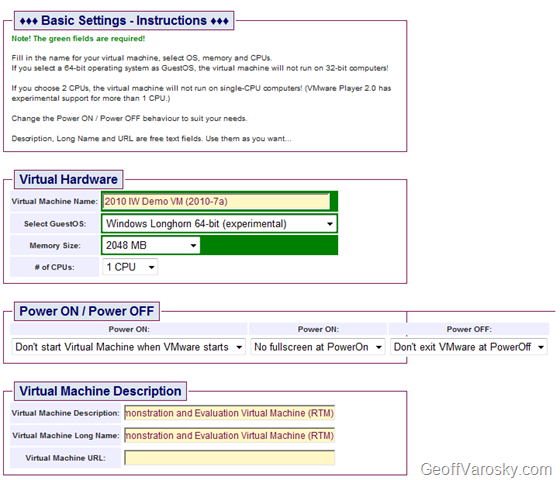
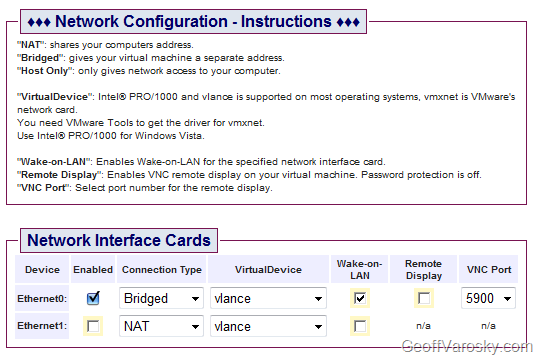
I then configured my VM as shown below in the following screenshots

image

image

image

image

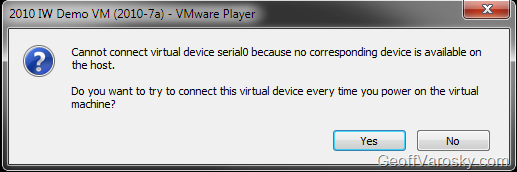
In the image above – disconnect the parallel port and serial port if you’d like, it’ll save you some yes/no error prompts when starting up the VM later…

image

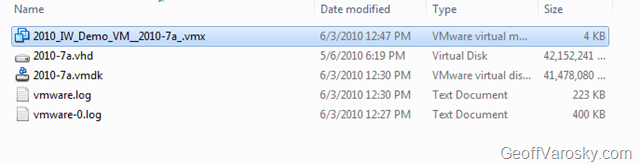
I then downloaded the VM from the ZIP contained above, and opened it, and copied out the VMX files that was created, and pasted that into the folder with our converted 2010-7a VMDK

image

image

I then changed the configuration around slightly, to point to the VMDK that we converted, as well as the image name, as shown below [click to enlarge] in Beyond Compare.

image 

Then, we can now add the machine into VMWare Player.

image

image

I then edit the VMWare Machine Settings to change the RAM to 4096

image

And reconnecting the Network to connect at power-on, and to replicate the physical machine state

image

Now, time to flush out a few configuration differences from the EasyVMX generated configuration, I answered No to all of the following pop-up questions (see note above when using EasyVMX configuration on avoiding these)

image

image

AND HOLY MOLY! IT WORKS!

image

So, that is how you can convert a Hyper-V image to VMWare, especially in the case of the 2010 Information Worker Demonstration Virtual Machine(s). I hope this helps! This allowed me to then send the following tweet back to Ken Price

image

This here would be that blog post 🙂