Boston Area SharePoint Users Group Registration Now Open!

BASPUG_195square_initials

I am pleased to announce that we have opened up registration for the Boston Area SharePoint Users Group inaugural meeting, being held on May 12th, 2010 at the Microsoft NERD Center in Cambridge, MA.

Chris Bortlik, a SharePoint Technology Specialist with Microsoft, will be presenting a session to kick off the user group, as well as coinciding with the official launch of Office and SharePoint 2010, also taking place on May 12th, “Introducing SharePoint 2010”. Come and learn more about the new product, network with others, enjoy some free food, and participate in the free raffle!

Please sign up today by visiting http://www.bostonsharepointug.org and clicking on the Register Now link on the site, or, right here: http://baspug51210.eventbrite.com/?ref=ecount

Fore more information on this event, and the group itself, please head on over to http://www.bostonsharepointug.org.

Also, please help us spread the word! Follow us on twitter @BASPUG and by using the hash-tag #BASPUG. We also have a group on LinkedIn.

We look forward to seeing you there!


Even more on Correlation IDs within SharePoint 2010

I briefly talked about log correlation IDs in two previous posts (More on Correlation IDs in SharePoint 2010 and The SharePoint 2010 Developer Dashboard), and am also including a bit from yet another post (Diagnostic Logging Enhancements in SharePoint 2010). When you get to an error page in SharePoint 2010, you are now presented with a Correlation ID. Basically, this is just expanding upon Wictor Wilén’s post here: Working with SharePoint 2010 Correlation ID in PowerShell and code. I basically just want to flesh these out a bit, and ways to get at the errors you are looking for.

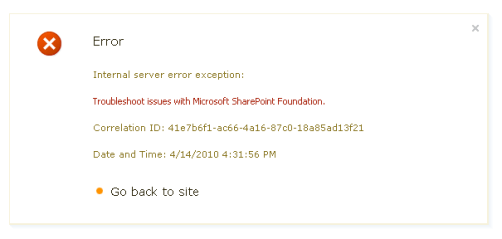
Using our Boston Area SharePoint Users Group website as an example – we don’t have search configured yet on the new site, however, we have the search box available currently (we’ll fix it, I swear!). Running a search produces the following error message:
 

image

Straight, and to the point. While about as useless as your regular everyday SharePoint error, you get a pretty icon, but, more importantly, you get a correlation ID. Now, let’s see what we get using the Get-SPLogEvent PowerShell command mentioned in Wictor’s article…

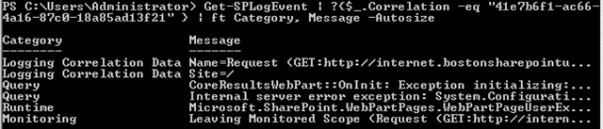
So, I am running the following command –

   1: Get-SPLogEvent | ?{$_.Correlation -eq "41e7b6f1-ac66-4a16-87c0-18a85ad13f21"} | ft Category, Message -Autosize
   2:  

And it’ll take a few moments, as it has a LOT of log entries to run through…
image

So, let’s take a step back. Now, this is NOT SUPPORTED BY MICROSOFT, at least as far as I know. So, don’t do it. ever. really. They’ll find you. This may change however once the RTM copy hits the shelves, and it is available at Target stores world-wide. Once it is released, then we’ll be able to find out all of what is and what is not supported.

But let’s say, for the sake of argument, I want to find those log entries fast, and, as luck would have it, I am also the resident SQL DBA, so, I have access to the SharePoint databases on the farm’s SQL server.

Take a look at the WSS_Logging database. Specifically, at the ULSTraceLog view. Notice in there, that there is a column named CorrelationId? Well kids, that means we can do a direct SQL search for it, in addition to the handy PowerShell Get-SPLogEvent command, as well as the code-based approach Wictor outlined in his post!

   1: SELECT * 
   2: FROM WSS_Logging.dbo.ULSTraceLog
   3: WHERE CorrelationId = '41e7b6f1-ac66-4a16-87c0-18a85ad13f21'
   4:  
   5:  

This, as you may notice if you also try, this will take a few moments, depending on the size of your logs, but, what I have noticed, is that it runs far quicker than the Get-SPLogEvent PowerShell command.

image 

So, in short, if you need a completely unsupported way to quickly get to your logs by using your CorrelationId, there is a faster way than viewing and searching through the ULS text logs on the file system, or using the Get-SPLogEvent PowerShell cmdlet.

I have not run actual timing tests on these, these are just from personal experience. Maybe one day I will get around to that…


Locate a List Template Identifier in SharePoint 2007

I received a comment on the GraceHunt.SharePoint.Features.CompleteTask project on CodePlex yesterday, and while responding, I thought I would also put together a post on locating the List Template ID for a list within the SharePoint UI.

Quick note – you will need to have the permissions to create new lists on the site to be able to do this.

First, go to Site Actions > Create

image

Next, hover over the the list template that you would like to know the internal List Template ID for, as shown below. For example, the Project Tracking – Project Tasks List, which is part of the IT Team Workspace template, available within Microsoft’s “Fab 40” Application Templates.

image

Next, look down in the status bar of your browser, or, click on the link, you will see the last variable in the query string for that link is named ListTemplate, and that will display the List Template ID for that list type.

image


New England Code Camp 13 Slide Decks and Code Samples

Code Camp 13 Logo - Courtesy Grey Wolf Design

The 13th New England Code Camp was a great event, and I am glad I had the chance to participate. This was my first code camp that I had the opportunity to present. It was definitely a different experience than the SharePoint Saturday events that I am usually presenting at and organizing, but a worthwhile experience. I cannot wait for the next one to come along!

Chris Bowen and Chris Piels did an excellent job organizing the event. Thanks to you both! And thank you to all who expressed interest in the Boston Area SharePoint Users Group, as well as attending my two sessions.

I presented two sessions back-to-back, first being What’s New For Developers in SharePoint 2010, and the second being Creating Custom Actions within SharePoint. Below, you will find my slide decks and code samples from each session.

What’s New For Developers in SharePoint 2010
Abstract: SharePoint 2010 offers developers a unique and well deserved set of tools to aid in the development of SharePoint 2010 solutions. In this session we’ll cover improvements in the UI and the toolsets themselves, from PowerShell as a powerful scripting interface to the API, the Developer Dashboard, the SharePoint Toolkit in Visual Studio 2010, and more.

Code Samples

PowerShell commands to enable the Developer Dashboard

   1: [Microsoft.SharePoint.Administration.SPWebService]::ContentService.DeveloperDashboardSettings.DisplayLevel='OnDemand';
   2: [Microsoft.SharePoint.Administration.SPWebService]::ContentService.DeveloperDashboardSettings.Update();
   3:  
   4:  

PowerShell command to get a listing of the URL, Author, and Title of a Web

   1: Get-SPweb -site http://whatsnewin2010.dev.grace-hunt.com | ft Url, Title, Author
   2:  
   3:  


PowerShell command to get the Title of all of the lists within a Web

   1: Get-SPweb -site http://whatsnewin2010.dev.grace-hunt.com | foreach { $_.Lists | ft $_.Url, Title }
   2:  
   3:  


PowerShell command to get the listing of all of the Resource settings for the User Code service (Sandbox Solutions)

   1: [Microsoft.SharePoint.Administration.SPUserCodeService]::Local.ResourceMeasures
   2:  
   3:  

PowerShell commands to enable the User Code service to run on a Domain Controller (local image development for Sandbox Solutions)

   1: $acl = Get-Acl HKLM:\System\CurrentControlSet\Control\ComputerName
   2: $person = [System.Security.Principal.NTAccount]"Users"
   3: $access = [System.Security.AccessControl.RegistryRights]::FullControl
   4: $inheritance = [System.Security.AccessControl.InheritanceFlags]"ContainerInherit, ObjectInherit"
   5: $propagation = [System.Security.AccessControl.PropagationFlags]::None
   6: $type = [System.Security.AccessControl.AccessControlType]::Allow
   7: $rule = New-Object System.Security.AccessControl.RegistryAccessRule($person, $access, $inheritance, $propagation, $type)
   8: $acl.AddAccessRule($rule)
   9: Set-Acl HKLM:\System\CurrentControlSet\Control\ComputerName $acl
  10:  
  11:  


PowerShell commands to view the Property Bag of a Web

   1: $web = get-spweb -site http://whatsnewin2010.dev.grace-hunt.com
   2: $web.AllProperties | ft
   3:  
   4:  

Also, more information on SharePoint Server 2010 can be seen on my blog under the categories of SharePoint 2010 Beta 2, SharePoint Designer 2010, and SharePoint 2010.


Creating Custom Actions within SharePoint
Abstract: Custom Actions control features in SharePoint such as the Edit Control Block, the Site Actions menu, toolbars, and the links within the Site Settings page. Learn how to leverage Custom Actions to extend the SharePoint User Interface. This session will describe the basics of Custom Actions, a demonstration to build one or more and apply them to a site in SharePoint, as well as provide resources for additional information.

Code Samples

  • Demo #1 – Creating a Simple Custom Action

  • SPS.SiteRecycleBin

    • This was the second deployment I quickly ran through, which added a Site Recycle Bin link to the Site Actions page under the Site Administration Custom Action Group

    • Download: SPS.SiteRecycleBin.zip

  • SPSDC.SiteActionsRecycleBin

    • This is the solution that I walked through during the first demonstration. This will add links to both the current site recycle bin, as well as the site collection recycle bin to the Site Actions menu.

    • Download: SPSDC.SiteActionsRecycleBin.zip

  • Demo #2 – Creating a Slightly More Complex Custom Action

    • Screencast: http://www.vimeo.com/9728320

    • SPS.CompleteTask

      • This is the solution from the second demonstration. This solution will add Complete Task links to the Tasks and Gantt Tasks (Project Tasks) lists shown in the Edit Control Block. This will allow you to set the task Status field to Completed, and the Percent Complete field to 100% for the given task.

      • Download: SPS.CompleteTask.zip

    • Demo #3 – Hiding Custom Actions

        • Demo #4 – Custom Action Groups

        •  

          Speaking at SharePoint Saturday DC on May 15th, 2010

          It appears that this SharePoint Saturday will be like no other, and I am excited to be a part of it. SharePoint Saturdays seem to usually number from anywhere from 75-275 attendees, and from about 20-30 speakers, just based on the ones I have attended, or know something about. SharePoint Saturday DC is fixing to have roughly 800 attendees, and 79 speakers. This will be the largest SharePoint Saturday event ever, with an all-star studded list of speakers and some very interesting sessions, if you are anywhere near Washington DC on May 15th, definitely take the day and come to SharePoint Saturday DC.

          I will be presenting a new session entitled “From SharePoint Designer to Visual Studio – Prototyping and Deploying Solutions in SharePoint 2010”. With SharePoint 2010, analysts and developers now have the ability to work together more efficiently to prototype solutions in SharePoint Designer 2010, and then deploy those re-usable solutions utilizing Visual Studio 2010. In this session we’ll introduce this new functionality available with SharePoint 2010 and its toolset, and complete a few demonstrations to showcase these new features.

          I hope you can join me for this, and many other sessions in DC next month!

          The What and the Why…
          You’re invited to ‘SharePoint Saturday DC’, on Saturday, May 15, 2010 at the NVCC Community Cultural Center in Annandale, VA.  SharePoint Saturday DC is FREE and will be an educational, informative & lively day filled with sessions from respected SharePoint professionals & MVPs, covering a wide variety of SharePoint-oriented topics.  SharePoint Saturday is FREE, open to the public and is your local chance to immerse yourself in SharePoint!

          The Where…
          SharePoint Saturday DC will be held at the NVCC Community Cultural Center in Annandale, VA. For more information, directions, etc., go here: http://bit.ly/spsdcvenue

          The When…
          SharePoint Saturday DC will take place on Saturday, May 15th, 2010, from 8AM to 6PM EST.

          The How…
          SharePoint Saturday DC is being organized by Dan Usher, Dux Raymond Sy, Gino Degregori, and Jennifer Davis, as well as being sponsored by a great cast of sponsors, including Grace-Hunt.

          The How do I register for this great event?
          That’s easy. Go here to register: http://spsdc.eventbrite.com/, and remember, it’s free!


          SharePoint 2010 Certifications

          And another short post for today – this time relating to SharePoint 2010 Certifications.

          There has been a lot of speculation and wonder in the SharePoint community about what the 2010 certification path would look like for the next release. Well, the good news is, as of about a month ago, some information started to come out from Microsoft, from several outlets, but, my information came from the Born to Learn blog at Microsoft Learning. Specifically, this post: http://borntolearn.mslearn.net/btl/b/weblog/archive/2010/03/03/what-s-comming-for-sharepoint-2010-exams.aspx, as well as the SharePoint Training site at Microsoft: http://www.microsoft.com/learning/en/us/training/sharepoint.aspx#2010sec2

          The 4 exams that are coming along for the June/July timeframe are:

          · 70-667: TS: Microsoft SharePoint 2010, Configuring
          · 70-668: PRO: Microsoft SharePoint 2010, Administrator
          · 70-573: TS: Microsoft SharePoint 2010, Application Development
          · 70-576: PRO: Designing and Developing Microsoft SharePoint 2010 Applications

          Two TS and two PRO exams, one set for IT Professionals, and one set for Developers. One great thing about the new generation of exams to be noted however, is that not only do these get you your MCTS (Microsoft Certified Technology Specialist) credit, but, they will also earn you your MCPD (Microsoft Certified Professional Developer) credit as well.

          Can’t wait to plop down in front of a computer at Prometric and take these once they are available!


          More on Correlation IDs in SharePoint 2010

          A while back, I did a post on the new developer dashboard in SharePoint 2010, I’ve also discussed this topic in several presentations on What’s New for Developers in SharePoint 2010, and I’ve talked about the wonderful new feature of correlation IDs that now appear in the developer dashboard, and other error messages, that help with tracking down errors within your logs.
           
          Wictor Wilén made a great post on Working with SharePoint 2010 Correlation ID in PowerShell and code. This article focuses on using the Get-SPLogEvent PowerShell cmdlet to track down logs using that correlation ID, and using it in code. A good read!


          2009 SharePoint Conference Developer Session Slide Decks Available from Microsoft

          I just came across these a few minutes ago, and needed to share this resource. I have had access to these since the conference, however, those that were unable to attend may find these useful. On February 22nd, Microsoft released the following slide decks to the public for developers…

          • Building Solutions with Business Connectivity Services by Using Visual Studio 2010 *
          • Deep Dive into Open XML 2.0 and the Open XML SDK 2.0
          • Developing Advanced Access 2010 Web Databases & Publishing to SharePoint 2010
          • Developing with REST and LINQ in SharePoint 2010 *
          • Developing with the New User Interface Features in SharePoint 2010 *
          • Excel 2010 and Excel Services, and the Top 10 New Features
          • Office 2010 UI Extensibility and Customization: Customizing with the Backstage View and Ribbon
          • Overview of the SharePoint 2010 Developer Platform *
          • Visual Studio 2010 SharePoint 2010 Development Tools Overview *
          • What’s New in Office 2010 for Developers

          Lots of great material! Download them from here: http://www.microsoft.com/downloads/details.aspx?FamilyID=f8cb362c-75ad-4cb9-9fbc-3abcdf6afeaf&displaylang=en

          * There are 5 videos available from the conference as well here: http://msdn.microsoft.com/en-us/sharepoint/ff405669.aspx


          Andrew Connell’s SharePoint Site Collection Keep Alive Job Utility

          Had to share this quickly with my few readers – if you are a presenter, or if you are a developer, or both for that matter, Andrew Connell wrote a great little utility for SharePoint 2010, which will keep a site, or sites, alive. Usually when you are presenting or developing, you warm up your site collections that you are working with first, so they are compiled in memory, but, if your application pool recycles, etc., you need to go through that process again.
           
          This utility takes care of that for you, and also gives you some handy configuration options. I highly recommend this little utility – a great addition to the SharePoint 2010 developers toolbox.
           

          New England Code Camp 13 Schedule Posted!

          Code Camp 13 Logo - Courtesy Grey Wolf Design

          Just a quick update regarding this upcoming weekend’s New England Code Camp 13…. the schedule has been posted, and registration is STILL open as well! Join myself, and 27 other speakers for 40 sessions in 6 rooms at the Microsoft Office in Waltham – for free. For more information, to view the schedule, and to register, follow this link: http://blogs.msdn.com/cbowen/archive/2010/03/20/new-england-code-camp-13-the-schedule.aspx

          I will be delivering my sessions on What’s New for Developers in SharePoint 2010 at 1:30PM in the MPR C room, followed up directly at 2:50PM, with Creating Custom Actions within SharePoint in the EBC room.

          I hope to see some of you there!