Introducing the Boston Area SharePoint Users Group

BASPUG_whitebg

I mentioned yesterday about the Boston Area SharePoint Users Group that we are putting together, however, I wanted to fully dedicate a blog post to it, and use this as a placeholder until we have the actual website up and running, so, if you came to http://www.bostonsharepointug.org, then you probably got directed to this post. Welcome!

The Boston Area SharePoint Users Group was founded by Geoff Varosky of Grace-Hunt, Ryan Tacy of AvePoint, Eugene Rosenfeld of Black Blade Associates, and Talbott Crowell of ThirdM. We wanted to bring together like minds to network and share their experiences, triumphs, and tribulations around Microsoft SharePoint. To provide a community platform for Boston area SharePoint users, administrators, developers, architects, to share their knowledge with the community. We meet on the 2nd Wednesday of every month at the Microsoft New England Research and Development Center in Cambridge, MA.

We are currently in the process of developing the real website, so, stay tuned here for more information, as well as @BASPUG on twitter, for more up to date information regarding the Users Group.

INAUGURAL MEETING
We will be holding our first meeting on May 12th, 2010, from 6pm – 8pm EST at the Microsoft New England Research & Development (NERD) Center. Our speaker will be Chris Bortlik of Microsoft, presenting “Introducing SharePoint 2010”. Our first meeting will also coincide with the official launch of Office 2010 and SharePoint 2010. Watch the live launch event during the day, and come and see SharePoint 2010 in action at night!

A little bit about Chris…
Chris Bortlik works at Microsoft as a SharePoint technology specialist. He works with Enterprise customers and partners in the Northeast in a pre-sales technical role. Chris speaks frequently at Microsoft events (including the SharePoint Conference) and is a contributing author of the upcoming "Essential SharePoint 2010" book. He also publishes a blog on TechNet at: http://blogs.technet.com/cbortlik/  Prior to joining Microsoft in 2008, Chris was a customer for 14 years working in technical IT architect, development and management roles – primarily leading .NET and SharePoint related projects.


SUSTENANCE
Food for our inaugural meeting, as well as the first few meetings, will be sponsored by AvePoint. The meetings will also not stop to a dead halt at 8pm, that is just when we need to be out of the facility. After the user group meetings, we will most likely announce and adjourn to a local watering hole, to continue on our discussions and networking, which may or may not be sponsored.

RAFFLE PRIZES
We will be handing out raffle tickets at the BASPUG meetings (when we have items to raffle that is!). Black Blade Associates will be raffling off a license, valued at $2000 for their SharePoint Zip product, at each and every meeting of the BASPUG!

We will also be working with some publishers as well to extend discounts, be able to raffle off free books, and more, to the members of the BASPUG.

FREQUENCY
The BASPUG will meet on the 2nd Wednesday of every month, from 6pm to 8pm EST, starting May 12th, 2010.

LOCATION
We will be meeting at the Microsoft New England Research & Development (NERD) Center, located in Cambridge, MA. For more information on the facility, as well as directions, please visit here: http://microsoftcambridge.com/About/Directions/tabid/89/Default.aspx

LINKED IN
Join our group on LinkedIn today to connect with the rest of the BASPUG members, and spread the word! http://www.linkedin.com/groups?gid=2878468

TWITTER
Follow news about the Boston Area SharePoint Users Group on twitter by following us @BASPUG, and by using the hashtag #BASPUG

INTERESTED IN SPEAKING OR SPONSORING?
Contact us at info@bostonsharepointug.org today!


Better Late Than Never… Wrap-Up of SharePoint Saturday Boston 2/27/10

image

It has been an absolute whirlwind since a few weeks before the SharePoint Saturday Boston, and still is going on as such, not a bad thing mind you, what is it they say about idle hands? In any event, I am finally getting around to pushing out a blog post about this event… so here goes.

First off, I would like to extend thanks to Talbott Crowell and his wife, Pradeepa Siva, of ThirdM, and Chris Bowen of Microsoft for helping organize this event. I took on most of the duties for organizing this event up front, but, it was a team effort all of the way, securing the facility (Microsoft office in Waltham), securing speakers and sponsors, handling registration, and day of planning. They were a HUGE help, and also helped me maintain some semblance of sanity during the event.

Next – Mother Nature. Yes. You. After months of planning and tireless effort, you had to go and dump an entire [insert any large home improvement store here] of wrenches into our gears. Thanks. A week or so before the event, with well over 300 attendees, speakers, and sponsors registered, you had to drop in one heck of a week of weather across the entire eastern seaboard. Rain, snow, sleet, hail, flooding – you name it, Ms. Mother Nature played it. None-the-less, excluding speakers and sponsors who we had register the event to get an accurate count, we had well over 225 people attend. WELL OVER. Minus the 29 speakers and associated entourages, the 21 sponsors and their people as well, we still had over 225 people attend. That is impressive! Even with Ms. Mother Nature bearing down on us like helpless cattle, we still had a tremendous turnout.

Speaking of the weather – our speakers. With only a few minor conflicts, and last minute schedule shifts, 28 of our 29 speakers made it. Both which had coverage. More than half of the speakers we had here at SharePoint Saturday Boston, came from out of town. Either they drove in the horrid weather on Friday night, or they came in early on flights over Friday and Saturday to make it here. Thank you all so much.

Let’s have a round of applause for our speakers again, who were not paid a dime to attend, they came out of their own pocket, or, out of their respective companies’ pockets – to share the joys and triumphs of SharePoint with fellow Bostonians and New Englanders – (sorry in advance if some of the speakers below did not have their company listed in their speaker forms, or, had their current employer listed on LinkedIn – shoot me an email, tweet, or message via carrier pigeon and I’ll update accordingly!)

Adam Macaulay – CorasWorks
Nate Buell – Metalogix
Bob German – Microsoft
Chris Bortlik – Microsoft
Chris Geier – K2
Chris McNulty – KMA
Christian Buckley – echoTechnology
Christina Wheeler – Summit 7 Systems
David J. Pileggi Jr. – Insight
Florin Muntean – Phillips
G. Scott Singleton – i3solutions
Geoff Varosky – Grace-Hunt
Jacob Lauzier – Atalasoft
Jeff Willinger – RightPoint
Jerry Hughes – Grace-Hunt
Jose M. Colon – MicroLink
Linc Williams – i3solutions
Mark Rackley – UNFI
Rebecca Isserman – B&R Solutions
Richard Harbridge – Cosma International Group of Magna International
Russ Edelman – Corridor Consulting
Ryan Tacy – AvePoint
Sadalit Van Buren – Burntsand
Srini Sistla – ComSys
Steven Fowler – Corridor Consulting
Supriyo “SB” Chatterjee – KeyTech LLC
Tom Miller – BlueThread Technologies
Tracey Klein – MindSHIFT
Virgil Carroll – High Monkey Consulting

And our sponsors, not only does the content drive these events from our speakers, but, our sponsors take care of everything else. Without both speakers and sponsors, these events would not be possible. Sponsors took care of everything from raffle items, speaker dinner, speaker shirts, attendee shirts, venue, lunch, breakfast, afternoon snacks, pens, pads, bags (they’ll be here for the next event, I swear! They arrived the night AFTER the event!), and everything in between.

Event Sponsors
Microsoft – Facility
Grace-Hunt – Host, Event Organizer, Attendee Pads and Pens
ThirdM – Host, Event Organizer
AvePoint – Lunch Sponsor
Quest Software – Breakfast Sponsor
RepliWeb – Drinks and Snacks
K2 – Speaker Dinner Social
echoTechnology – Attendee Bags
RackSpace – Schedule and Evaluation Printing
Bluethread – Speaker Shirts
CorasWorks – Attendee Shirts

Raffle Sponsors
CorasWorks – CorasWorks AppEngine
KMA – SharePoint Health Check 2-Day Services
PluralSight – PluralSight On-Demand 1-Year Standard Subscription
MetaLogix – Garmin Nuvi 855 Portable GPS
echoTechnology – Zune HD
Source Consulting – $225 American Express Gift Card
Burntsand – 2 Red Sox Tickets
Edgewater Technology – $200 Legal Seafoods Gift Certificate
Slalom Consulting – XBox 360
Innovative-e – 1 seat to Delivering SharePoint Success Mentoring Workshop
O’Reilly – Books
Cengage Technology – Books
Pearson Education – Books

And last, but, certainly not least, the attendees. Who made it out, on a Saturday, in the winter, during some horrific weather, on a Saturday, in horrific weather, on a Saturday, in horrific weather (ok, so the sun came out for a very brief period!) This is an entirely community focused event. Without you, our attendees, there really would be no event to speak of. We as speakers and organizers LOVE to speak at, and organize these events (our sponsors love them too!). I’ve said it before, and I will say it again, and others have done the same, the SharePoint community is one like no other. I’ve had the privilege to work in most aspects of the IT world – from a network engineer, to dial-up support technician, to systems administrator, to web designer, and just about everything in between. There truly is no community that I am aware of like the SharePoint community, and I am truly grateful to be a part of it.

Thank you ALL for attending, sponsoring, and speaking, to make SharePoint Saturday Boston a SMASHING SUCCESS!

On that note, two things.

1.) I’m planning another one already for later this year. I’d like to do them on a 6-ish month cycle. Stay tuned.

2.) Most of the attendees noted in their SPS Boston evaluations, that they do not attend a local SharePoint Users Group. Well – that is about to change. I’ve had it in mind for a while, and am collaborating with several other like minded people, that Boston (and the surrounding area) needs a new Users Group.

BASPUG_whitebg

Ryan Tacy of AvePoint, Eugene Rosenfeld of Black Blade, Talbott Crowell of ThirdM, and myself of Grace-Hunt, are starting up the Boston Area SharePoint Users Group. We’re still working on an online home for ourselves, which should hopefully grow legs within the next week, but, we have a venue, a speaker, and a date and time laid down in stone already.

Please, if you are in the Boston Area, join is, on the same date of the official launch of Office 2010 and SharePoint 2010, for the first meeting of the Boston Area SharePoint Users Group, at the Microsoft New England Research and Development (N.E.R.D.!) Center on May 12, 2010, from 6PM to 8PM. Chris Bortlik will be presenting “Introducing SharePoint 2010”.

Follow the BASPUG on twitter at @BASPUG and via the hashtag #BASPUG

Now, back to our regularly scheduled programming…

Please visit http://www.sharepointsaturday.org/boston for copies of session decks (including my own, under sessions – you’ll see a familiar list view web part with sessions we have available), sponsor, and speaker information from the event.

Thank you ALL again. This was a great event to see old friends, and make many new ones, and I look forward to our next SPS Boston event!

Follow SharePoint Saturday Boston on twitter at @SPSBoston and via the hashtag #SPSBos


Registration Now Open for SharePoint Saturday DC!


Ladies and Gentlemen, registration has now opened up for SharePoint Saturday DC! Information taken right from the site –

Registration has now opened for SharePoint Saturday DC on May 15. In addition, you can optionally donate $20.10 to the American Red Cross which will greatly help victims of recent global calamities.

Don’t forget to tell your colleagues and friends to register before slots run out!

Register now: http://spsdc.eventbrite.com

And as usual, Dux Raymond Sy is up to some good as always, so he’s giving you the option to also donate $20.10 to a great charity. Sign up today, and add a few points into the karma basket for yourself as well.

Grace-Hunt is also going to be sponsoring the event, and speakers have not been chosen as of yet. Either way, I will see you in DC on May 15th!


Save the Date – Office 2010 and SharePoint 2010 Launch

image
As stated at the link here (http://sharepoint.microsoft.com/businessproductivity/proof/pages/2010-launch-events.aspx#fbid=GLuBX_gI8tj), Office 2010 and SharePoint 2010 will officially be launched on May 12, 2010 @ 11 AM EST.

Some additional information is posted here (translated from German to English): http://translate.google.com/translate?js=y&prev=_t&hl=en&ie=UTF-8&layout=1&eotf=1&u=http%3A%2F%2Fblogs.technet.com%2Fzweitausendzehn%2Farchive%2F2010%2F03%2F05%2Frtm-und-launch-termin-technologiegarantie.aspx&sl=de&tl=en

The The Microsoft Office 2010 for Germany Blog on TechNet states that SharePoint and Office 2010 will both go into their Release To Manufacturing (RTM) stage in April. “Corporate office and related products” on May 12th, at the above launch event, and then will be generally available (GA) to the public in June!

Looks like some dates are finally being released to the general public – this is great news! The official launch will also be broadcasted live on the internet, so, go here (http://sharepoint.microsoft.com/businessproductivity/proof/pages/2010-launch-events.aspx#fbid=GLuBX_gI8tj) and save the date!

Thanks to Dux Raymond Sy (@meetdux) and Bjorn Furuknap (@furuknap) for spreading the good word via twitter!


AvePoint Releases FREE BLOB Management Tool for SharePoint 2007 and 2010

AvePoint - SharePoint Backup and Administration Software

A few weeks back, I had written a quick post about BLOB (Binary Large OBject) storage in SharePoint. Well, one of our partners, AvePoint, released yet another of their tools for FREE, the DocAve Extender, for SharePoint 2007 and 2010, to aid in this matter.

Straight from their website – here is some more information on the groundbreaking release of this tool, for free.

“Databases like SQL Server are designed to handle relational data of relatively small size (typically less than 1MB). However, when it comes to larger, non-relational data streams, known as Binary Large Objects (or BLOBs), databases like SQL are not optimal. This is because managing BLOB I/O calls takes up substantial SQL CPU and memory resources.

Since more than 95% of the data a typical organization uploads into SharePoint are BLOBS, SharePoint’s SQL resources become quite overburdened, and have less capacity to perform transactional data operations and queries.

To avoid this, organizations have a few options. The first option is to spend money on additional SQL Server resources. But SQL Server licensing is relatively expensive when compared to file-based storage, so this is not the most cost-effective route.

The second, more cost-efficient option is to extend this BLOB content directly to file-based storage, while providing unfettered user access to the BLOB content via SharePoint.  To do this, administrators can either:

  • Write custom code that leverages Microsoft’s APIs to create their own BLOB management functionality
  • Buy some expensive third party tool
  • Use AvePoint’s FREE DocAve Extender.

With DocAve Extender, BLOBs are never stored on the SQL Server database, meaning SharePoint can perform optimally, your SQL Server resources can be utilized efficiently, and your database costs can be kept to an absolute minimum.”

The utility allows you to literally have terabytes of data within a single content database. It can be encrypted and compressed as well for secure and trimmed storage, and stored on file servers, NAS, SAN, or even Cloud storage mediums.

So if you are looking to offload large file storage in SharePoint from your SQL server – look no further. http://www.avepoint.com/sharepoint-storage-extender-docave/.


Speaking at New England Code Camp 13 : Spring Back Into Code

Code Camp 13

I am pleased to announce that I will be speaking at the New England Code Camp 13 – Spring Back Into Code event, taking place on March 27th, 2010, at the Microsoft Office in Waltham, 201 Jones Road, 6th Floor, Waltham, MA.

The event takes place from 8:30am to 6:30pm. I will be presenting on Creating Custom Actions within SharePoint, and, What’s New for Developers in SharePoint 2010.

About the event – “Submit an abstract to share your knowledge with your peers or join us to learn and network with fellow developers. Anyone can submit an abstract (no review process) using this site (register as a speaker first) and you are in! There are both large and small rooms so if you are new or want a more intimate discussion let us know to schedule a conference room for your presentation/discussion. Any technology related topic is fair game, e.g, Visual Studio, SQL Server, JavaScript, Ruby-on-Rails, HTML/CSS, jQuery, etc.”

A lot of great names are attached to this event – if you are a developer in New England, you should be here, and I hope to see some of you there!

Click to Register for this event.

More information on this event can be found in Chris Bowen’s blog post on the subject here: http://blogs.msdn.com/cbowen/archive/2010/02/04/announcing-new-england-code-camp-13.aspx


Just a Few More Days Until SharePoint Saturday Boston

We’re closing in on a great event for SharePoint Saturday here in Boston, and, we still have seats available. Click here to register to attend today!image

In addition to almost 30 speakers and sessions for the event, ranging in topics from End User, Administration and Developer topics, we also have a boatload of FREE giveaway raffle prizes from our awesome sponsors, just for coming to learn about SharePoint on a Saturday.

What will be raffled off? Well, have a look:

CorasWorks – CorasWorks AppEngine
KMA – SharePoint Health Check 2-Day Services
PluralSight – PluralSight On-Demand 1-Year Standard Subscription
MetaLogix – Garmin Nuvi 855 Portable GPS
echoTechnology – Zune HD
Source Consulting – $225 American Express Gift Card
Burntsand – 2 Red Sox Tickets
Edgewater Technology – $200 Legal Seafoods Gift Certificate
Slalom Consulting – XBox 360
O’Reilly – Books
Cengage Technology – Books
Pearson Education – Books

That’s a lot of good stuff, almost makes me wish I was an attendee rather than a speaker, sponsor and organizer of the event!

In addition to those goods, breakfast, snacks, and lunch will all be provided free of charge by AvePoint, Quest Software, and RepliWeb, so you do not have to worry about going hungry, mentally or physically.

Each attendee will also receive a free SharePoint Saturday Boston shirt, provided by CorasWorks, a free “swag bag”, sponsored by echoTechnology, scratch pads and pens from yours truly at Grace-Hunt, and the chance to learn a heck of a lot from some of the best in the business.

What are you waiting for? Register today! http://www.clicktoattend.com/?id=145192 Or, visit the SharePoint Saturday Boston website for more information. See you on Saturday!


Free SharePoint 2010 Developer Oriented Webcasts on MSDN

Paul Andrew, the Technical Product Manager for the SharePoint Developer Platform, mentioned on his blog the other day, that he, and others are presenting a series of 8 webcasts, which will be developer focused events on MSDN.

To sign up for the future events, and, to find recordings of previous events, check here: http://www.microsoft.com/events/series/sharepointserver.aspx?tab=webcasts&id=42437

I’ve had the good sense to attend a couple of these so far, and they are great, and packed with good information, if you are  a developer interested in learning more about 2010, <plug>in addition to any of my presentations</plug>, there are great resources.


Microsoft SharePoint Team Blog : Enabling a Button on the Ribbon Based on Selection

Just needed to throw up a quick post for this, if, for some reason, you are not following the Microsoft SharePoint Team Blog, they made a post this past week about Enabling a Button on the Ribbon Based on Selection. Very good and useful code here for ways to manipulate the ribbon functionality in the 2010 UI with Custom Actions.
 
The Ribbon UI is definitely a hot topic in 2010, and will continue to be… now is a great time to learn more about Custom Actions!


Can a Single Custom Action Work Across All List Types?

A good friend of mine, Mark Rackley, posed a question to me yesterday…

Can I create one Custom Action that will work on all list types or do I have to create a separate custom action for each list type?

Which was a great question, and one that throughout all of the times I have spoken at various events and user groups on Custom Actions, I had never heard asked. So, I thought I would post a blog on this, and answer the question for others as well. Thanks for the ? (“question, Mark”)

Well, why don’t we see what we can do – I’ll take you through the trial and error process, to see if we can make this work.

So, let’s fire up Visual Studio, and get started, and let’s create a new blank WSP Builder Project (as I know Mark is a big fan of STSDEV)

image

Lets build out our folder structure, and add in our feature.xml file, as well as our element manifest

image

In our Feature file, let’s scope this out to the Site Collection, and fill in some of the other details…

   1: <?xml version="1.0" encoding="utf-8" ?>
   2: <Feature xmlns="http://schemas.microsoft.com/sharepoint/" 
   3:          Id="{842E1000-139E-4e3e-A747-F6E01B2A5AAE}" 
   4:          Title="MarksCustomAction" 
   5:          Description="Mark's Custom Action" 
   6:          Scope="Site" 
   7:          Version="1.0.0.0" 
   8:          Hidden="false" 
   9:          ImageUrl="GraceHunt\Grace-Hunt.gif">
  10:  <ElementManifests>
  11:    <ElementManifest Location="manifest.xml" />
  12:  </ElementManifests>
  13: </Feature>
  14:  

Now, to populate our ElementManifest, which will contain our CustomAction Element, let’s refer to the CustomAction Element section of the Windows SharePoint Services 3.0 SDK.

   1: <?xml version="1.0" encoding="utf-8" ?>
   2: <Elements xmlns="http://schemas.microsoft.com/sharepoint/">
   3:   <CustomAction
   4:       Id="MarksCustomAction"
   5:       Location="EditControlBlock"
   6:       Title="Grace-Hunt Website"
   7:       RegistrationType="List"
   8:       Sequence="12345">
   9:     <UrlAction Url="http://www.grace-hunt.com" />
  10:   </CustomAction>
  11: </Elements>
  12:  

Now, we know, especially if you’ve been to any of my sessions on Custom Actions, that the only thing you REALLY need in here is the Title attribute, but, we’ll add an Id, Location  – the Edit Control Block, a Title, set the RegistrationType to List, and, let’s give it a sequence number of 12345, and set the UrlAction to be http://www.grace-hunt.com.

Now, let’s deploy, and see what happens…

Using STSADM, let’s add the solution to our Farm. This will also give us a sanity check, to make sure that we have no errors in our feature. Otherwise, it would kinda yell at us…

image

Ok, that went well. Now, let’s deploy the solution…

image 

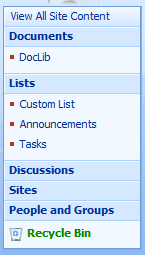
I’ll create a Custom List, Document Library, Announcements List, and a Task List.

image

And, then activate the feature…

image 

And now, let’s go check the EditControlBlock of our lists…

Checking Tasks… nope.

image

How about our Custom list…. nope. Not looking good at this point…

 image

And also checking the others…nothing. Well, this didn’t pan out too well. Let’s try something different. Since all content types inherit from the System content type, whose ID is 0x, let’s see if we map to that content type, if we have some success… so, let’s update our ElementManifest to the following…

   1: <?xml version="1.0" encoding="utf-8" ?>
   2: <Elements xmlns="http://schemas.microsoft.com/sharepoint/">
   3:   <CustomAction
   4:       Id="MarksCustomAction"
   5:       Location="EditControlBlock"
   6:       Title="Grace-Hunt Website"
   7:       RegistrationType="ContentType"
   8:       RegistrationId="0x"
   9:       Sequence="12345">
  10:     <UrlAction Url="http://www.grace-hunt.com" />
  11:   </CustomAction>
  12: </Elements>
  13:  

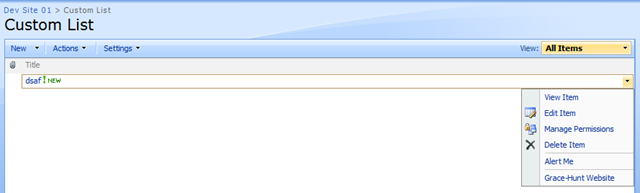
and re-deploy, and see what happens. Let’s check our Custom List…

image

There it is! Let’s try our Document Library…

image

There as well! And our Tasks List? Bingo!

image

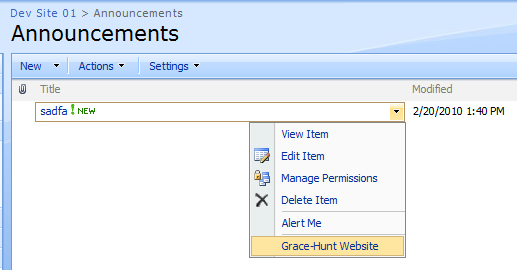
And also our Announcements List

image

So, as you can see, you can get a Custom Action to appear across all list types, by binding your Custom Action to the registration type of List, and  the base content type of 0x, and you can get a Custom Action to work across all list types, as all content types inherit from the System content type, 0x.

For more Custom Action resources, try this search against my blog.