BLOB Content in SharePoint – How Much Fat Can Be Trimmed?

I’ve been hearing a lot of chatter recently regarding BLOB (Binary Large OBject) storage in SQL. In fact, people have been talking about it many years. Thankfully, there are quotas which can be enforced, however, you still need to store BLOBs (photos, images, videos, documents – basically any attachments or files uploaded into SharePoint are BLOBs) in SharePoint, and SQL disk space can be, and is expensive.

Now, there are a lot of companies, some who are partners with Grace-Hunt, which make use of functionality within the SharePoint API to store files out of band from SQL, maintaining these BLOBs just as if they were in SQL. One of those companies, StoragePoint. They have a free tool, called BLOBulator, which is definitely geared towards their product, however, it is a great tool to peer into your SharePoint environment, and see how much space you actually can save by using an out of band BLOB storage solution such as theirs.

This is not a marketing effort – however, more of a reference point for myself to remember this tool, and share it with others who may have some use for it.


Property Bag Access in SharePoint Designer 2010

Almost daily, I am discovering new things with SharePoint 2010. Today, I was working away on my presentation for SharePoint Saturday NYC coming up in a few days, putting on the finishing touches, and, I came across this gem in SharePoint Designer 2010.

When you have a site open in SharePoint Designer 2010, in the ribbon, all the way over to the right, you’ll see a button for Site Options

image

Click it, go ahead, it’s not going to bite.

Now, the first tab you are opened to in this new window is labeled Parameters. What it should be labeled as however, is Property Bag. as that is exactly what it is.

image

Once just a bucket for developers to play with, the property bag is now exposed in SharePoint Designer 2010. Which is awesome. Now, properties which you were storing there for your own use, can be extended out to Site Administrators, and Power Users to make use of! Awesome, yes. Also, dangerous. If you have applications which rely on the Property Bag, you have now been warned. Others can access, change, view, and delete the data within the property bag.

And now back to your regularly scheduled programming…


WSS v3 and MOSS 2007 SP1 Support Ending April 28th, 2010

Stefan Goßner, a senior escalation engineer for SharePoint and MCMS, recently posted about this, and I needed to share this with my readers as well. His article is below, and it is a good read. If you are on SP1 for WSS and MOSS, you will need to have SP2 installed by April 28th, 2010, to maintain support from Microsoft. More information can be found in Stefan’s blog post here: http://blogs.technet.com/stefan_gossner/archive/2010/01/07/is-your-sharepoint-2007-farm-already-on-service-pack-2-if-not-read-this.aspx


Limiting SharePoint Designer Access in SharePoint 2010

With all of the new and improved features in SharePoint 2010, one which we cannot overlook, is how access for SharePoint Designer is handled. After SharePoint Designer 2007 went from a paid program to a freely available download, there was a lot of buzz around the community and the blogosphere about governance related to SharePoint Designer 2010. Woody Windischman, who "wrote the book” on SharePoint Designer, has some great information on this over at this blog, The Sanity Point. His article around governance can be found here: http://www.thesanitypoint.com/archive/2009/04/03/on-babies-bathwater-and-sharepoint-designer.aspx

Robert Bogue [SharePoint MVP], also had a good post on the topic, which can be found here: http://www.thorprojects.com/blog/archive/2008/02/12/sharepoint-designer-and-governance.aspx

With SharePoint 2010, there are no obscure methods or actions required to limit SharePoint Designer access, they’ve moved it into the Site Collection Administration!

To view/modify these settings, go up to your site collection level, and look under the Site Collection Administration custom action group on the Site Settings page, and click on the SharePoint Designer Settings link towards the bottom.

image 

From here, you can enable or disable SharePoint designer access to the entire site collection. And you can even go as far as enabled detaching pages from the site definition (unghosting pages), enable or disabling access to modify master and layout pages, and the ability to manage the site hierarchy.

image

A short but sweet post, but just another one of the new great features available in SharePoint 2010 (as of Beta 2).


January 5th, 2010 Global SharePoint Users Group Session Materials and Wrap-Up

Thanks to everyone who attended the Global SharePoint Users Group last night. It was a privilege to be the second presenter ever for this users group, and I had a great audience, who asked some great questions.

Thanks also go out to the organizers of the event, Dux Raymond Sy and Eric Harlan. Both have done a fantastic job at putting together this virtual users group.

And last, but certainly not least, a big thanks go out to AvePoint for donating and raffling off a netbook!

As promised during my session, here are the code samples and the slide deck from last nights meeting. You can find my code samples below the slide deck, along with additional references. Please leave any feedback you have, or questions, in the comments of this post. Since we do not receive any evaluation forms, any feedback is greatly appreciated!

  • Demo #1 – Creating a Simple Custom Action

  • GSPUG.SiteSettingsRecycleBin 

    • This was the second deployment I quickly ran through, which added a Site Recycle Bin link to the Site Actions page under the Site Administration Custom Action Group

    • Download: GSPUG.SiteSettingsRecycleBin.zip

  • GSPUG.SiteActionsRecycleBin

    • This is the solution that I walked through during the first demonstration. This will add links to both the current site recycle bin, as well as the site collection recycle bin to the Site Actions menu.

    • Download: GSPUG.SiteActionsRecycleBins.zip

  • Demo #2 – Creating a Slightly More Complex Custom Action

    • Screencast: http://www.screencast.com/t/ZDRhOTFkZmIt

    • GSPUG.CompleteTask

      • This is the solution from the second demonstration. This solution will add Complete Task links to the Tasks and Gantt Tasks (Project Tasks) lists shown in the Edit Control Block. This will allow you to set the task Status field to Completed, and the Percent Complete field to 100% for the given task.

      • Download: GSPUG.CompleteTask.zip

    • Demo #3 – Hiding Custom Actions

        • Demo #4 – Custom Action Groups

              Some additional resources for Custom Actions I have on my blog that I had made mention of during my presentation:

              Thank you all again for attending, and please let me know your thoughts and questions!

            •  

              SharePoint 2010 Visual Studio 2010 Extensions

              Wes Hackett, Matt Smith, Martin Hatch, and Glyn Clough have written some great SharePoint 2010 extensions for Visual Studio 2010. Currently in it’s alpha stage, it is already looking impressive. From the project page on Codeplex, it boasts the following features, including templates for custom actions, as well as custom action browsers (coming in the beta version).

              Alpha Release includes:
              Visual Studio 2010 includes new SharePoint tools to aid development against the SharePoint platform. SPVSX aims to provide further enhancements to these tools including:

              • New item templates
                • Custom Action (basic)
                • Hide Custom Action (basic)
                • Custom Action Group (basic)
                • Delegate Control (basic)
              • Deployment
                • Restart IIS
                • Recycle app pools
                • Copy to SharePoint root
                • Auto GAC
                • Auto copy to root
                • Attach to worker process
              • Server Explorer extensions
                • Web part gallery listing
                • Import Content Type into current project (stub – full feature to come in beta)
                • Display Custom Action Groups (stub – full feature to come in beta)
                • Display Custom Actions (stub – full feature to come in beta)
                • Display Hide Custom Actions (stub – full feature to come in beta)

              Visit the project page below to download and install. They can also be found in the Visual Studio Gallery.

              http://spvsx.codeplex.com/

              And, they have even given a sneak peak as to what is coming in the Beta version of the project: http://weshackett.spaces.live.com/blog/cns!41B731D6A8FE484A!380.entry

              I am excited to see all of these great projects popping up for SharePoint 2010 and Visual Studio 2010 already, long before the RTM version hits later this year.

              Great work guys, keep it up.


              CorasWorks Releases Unique ID Generator Tool for Free!

              William Rogers (Co-Founder & Chief Workplace Architect of CorasWorks) posted yesterday on the CorasWorks Community Site, that they are releasing their Workplace ID tool to the community for free, without requiring the need for any additional software. Released as the Workplace ID Generator Building Block (free download with registration), can be downloaded from the CorasWorks App Store here: http://community.corasworks.net/AppsHome.aspx?CWFrameSource=FrameAppDetail.aspx?C=5%26RID=123

              More information on this free download can be found in William’s blog post: http://community.corasworks.net/blogs.aspx?CWFrameSource=http://community.corasworks.net/blogs/williamsblog/archive/2010/01/05/unique-id-generator-tool-now-free-to-sharepoint-community.aspx

              Renaming a Master Template in PowerPoint 2007

              So, this is not directly SharePoint related, however, I speak on SharePoint, presenting my slide decks using PowerPoint, store slides within a Slide Library in SharePoint, and this happened to be something I figured out while building a deck on SharePoint. So, in essence, this is SharePoint related!

              So, I had an old template which I needed to change the Slide Master template name on, shown below. This is not quite apparent by bumbling around the various properties windows… but I did find a solution.

              image

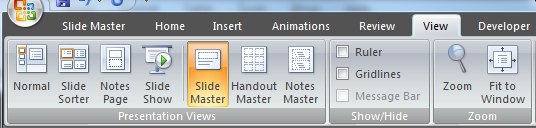
              Go to View > Slide Master

              image

              Then click on the top-most slide in the template deck

              image

              And then click on Rename

              image

              image

              Once you do so, you can now officially re-name the template name.

              image


              SharePoint Saturday Boston – Call for Speakers Closing on 1.11.10

              SharePointSaturdaySmall

              We have received lots of speaker submissions so far for the second SharePoint Saturday Event. Thanks to all who have submitted their sessions for review! We will be closing speaker submissions for this event on Monday, January 11th, 2010. So if you are still interested, there are only a few days left!

              If you are interested in speaking at SharePoint Saturday Boston on February 27th, 2010, please download the speaker’s submission form here (right-click, and choose Save Target As... to avoid password prompts).

              After completing the form, please return it to SPSBoston@live.com as soon as possible as the speaker slots fill up fast.

              Once your outline is received we will review and send email confirmation that it was accepted.

              See You at SharePoint Saturday Boston!

              FOR MORE INFORMATION: http://www.sharepointsaturday.org/boston/


              Speaking at SharePoint Saturday New York on January 30th

              It seems that just a few months ago, I was in New York City, speaking at a SharePoint Saturday event… oh wait, I was! Yes everyone, SharePoint Saturday is coming back to the Big Apple, and this time, all content will be focused on SharePoint 2010! So, if you were unable to attend the SharePoint Conference in Las Vegas back in October, or other events since then, here is your chance to soak up some information on SharePoint 2010, for free!

              I am excited to be heading back to New York City to be speaking at another SharePoint Saturday event there. I will be delivering a session on “What’s New for Developers in SharePoint 2010”. SharePoint 2010 offers developers a unique and well deserved set of tools to aid in the development of SharePoint 2010 solutions. In this session we’ll cover improvements in the UI and the toolsets themselves, from PowerShell as a powerful scripting interface to the API, the Developer Dashboard, the SharePoint Toolkit in Visual Studio 2010, and more.

              Sound interesting? Then come on and register for the event, and I’ll see you there!

              Registration is now open, click here to register for the event! https://www.clicktoattend.com/invitation.aspx?code=144473

              So, what is this SharePoint Saturday thing anyways?

              ”Join SharePoint architects, developers, and other professionals that work with Microsoft Office SharePoint Server 2007 for ‘SharePoint Saturday’, on Saturday, January 30th, 2010.  SharePoint Saturday will be an educational, informative & lively day filled with sessions from respected SharePoint professionals & MVPs, covering a wide variety of SharePoint-orientated topics.  SharePoint Saturday is FREE, open to the public and is your local chance to immerse yourself in SharePoint!”

              It also takes place on a Saturday.

              And go here for more information: http://www.sharepointsaturday.org/ny/