Geoff Varosky's Blog

SharePoint, Office 365, Azure, and Other Musings…

  • Home
  • About
  • Blog Links
  • Calendar
Posts Comments
  • SharePoint
  • SharePoint 2010
  • Events
    • SharePoint Saturday
    • User Groups
      • BASPUG
  • Office 365
  • PowerShell
  • SharePoint Online
  • SharePoint 2013

My Site Quick Launch Navigation in SharePoint 2010 Defaults

March 31, 2011 2 Comments

image

In SharePoint 2010, it is very easy to modify the tabs that appear on the profile pages

image

These are managed by the Quick Launch. To edit these, just go to Site Actions > Site Settings > Look and Feel > Quick launch

So you can add and remove to your heart’s desire. However – this will affect ALL profile pages, not just your own, so, you do need the proper permissions.
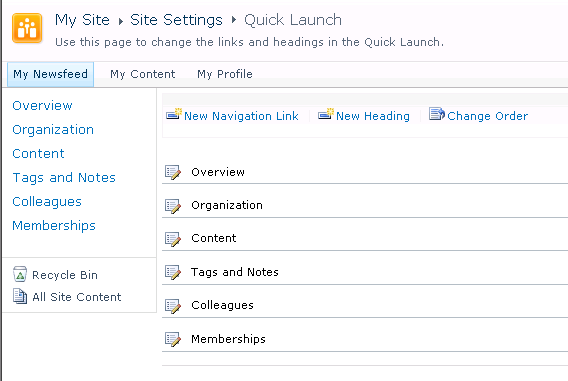
image

So, I routinely have clients that are looking to remove some of these tabs, since there is no option to hide them. So, at some point, say when they go back and enable social features, or allow people to create My Sites, they need to get those links back. Below is a listing of each of the default links, their order, as well as the link itself, in case you ever need to “restore” these. Below, where <My Site Location>, this should reference the relative URL of where your My Sites location is, such as /sites/My/.

ORDER

HEADING

LINK

1 Overview /<My Sites Location>/person.aspx
2 Organization /<My Sites Location>/OrganizationView.aspx
3 Content /<My Sites Location>/personcontent.aspx
4 Tags and Notes /<My Sites Location>/_layouts/thoughts.aspx
5 Colleagues /<My Sites Location>/_layouts/MyContactLinks.aspx
6 Memberships /<My Sites Location>/_layouts/MyMemberships.aspx

Share this:

  • Click to share on Facebook (Opens in new window) Facebook
  • Click to share on LinkedIn (Opens in new window) LinkedIn
  • Click to share on X (Opens in new window) X
  • Click to share on Pinterest (Opens in new window) Pinterest
  • Click to share on Tumblr (Opens in new window) Tumblr
  • Click to email a link to a friend (Opens in new window) Email
  • Click to print (Opens in new window) Print
Like Loading...

Filed under SharePoint, SharePoint 2010 Tagged with My Sites, MySite, MySites, Quick Launch, QuickLaunch, User Profile, User Profile Service, User Profiles

Categories

Archives

Top Posts

  • SharePoint Site Collection backup failed–site left locked.
  • System.UnauthorizedAccessException: Filename: redirection.config
  • SharePoint 2016 Web Template List
  • Upgrading to an Enterprise License in SharePoint 20XX
  • Creating an Azure Run As Account

Twitter Feed (@gvaro)

Tweets by gvaro

Enter your email address to subscribe to this blog and receive notifications of new posts by email.

Join 87 other subscribers
All content copyright 2007-2017 Geoff Varosky. All rights reserved.

Blog at WordPress.com.

  • Subscribe Subscribed
    • Geoff Varosky's Blog
    • Join 87 other subscribers
    • Already have a WordPress.com account? Log in now.
    • Geoff Varosky's Blog
    • Subscribe Subscribed
    • Sign up
    • Log in
    • Report this content
    • View site in Reader
    • Manage subscriptions
    • Collapse this bar
%d