Registration open for Boston Area SharePoint Users Group on 5/11/11

BASPUG_195square_initialsRegistration is now open for the May 11th, 2011 meeting of the Boston Area SharePoint Users Group, at the Microsoft NERD center in Cambridge, MA.

PRESENTER
The presenter for our next meeting is Carlos Valcarcel, FAST Technical Specialist at Microsoft. He will be presenting "Architecture: Fast Search Server 2010 for SharePoint".

SESSION ABSTRACT
With the new release of SharePoint comes a plethora of new features: linear scalability, support for more languages, better relevancy, and support for 100 million documents in total per farm just to name a few. Yet, Microsoft’s acquisition of Fast Search and Transfer in 2007 has changed where SharePoint enterprise search is going. After a brief overview of SharePoint 2010 we will look at Fast Search Server 2010, what its feature set looks like and the reasons for using it over SharePoint search.

About Carlos
Carlos has been in software development since the mid-80’s working in financial services, insurance and technology. He has worked with C, C++, Java, J2EE, Spring, Eclipse and Python in various locations around the United States and Australia. During his time as an independent consultant he presented sessions on software development and distributed system architecture in the US, UK, Germany and France. In 2004 Sams Publishing published his first book, Eclipse Kick Start (for Eclipse version 3.0).

He has been with FAST, A Microsoft Subsidiary, since March of 2007 in a pre-sales technical role.

MEETING SPONSOR
TBA

SUSTENANCE
Food and beverages will be provided at the event.

RAFFLE PRIZES
We will be handing out raffle tickets at the BASPUG meetings.

LOCATION
We will be meeting at the Microsoft New England Research and Development Center, located in Cambridge, MA. For more information on the facility, as well as directions, please visit here: http://www.microsoftcambridge.com

LINKED IN
Join our group on LinkedIn today to connect with the rest of the BASPUG members, and spread the word!

FACEBOOK

We are also on facebook! http://www.facebook.com/#!/pages/Boston-Area-SharePoint-User-Group/113652405354617

TWITTER
Follow news about the Boston Area SharePoint Users Group on twitter by following us @BASPUG, and by using the hashtag #BASPUG

WEB

Visit the Boston Area SharePoint Users Group website at http://www.bostonsharepointug.org

ORGANIZERS

Event meetings are organized by Geoff Varosky of Grace-Hunt, Eugene Rosenfeld of Black Blade Associates, Ryan Tacy of HP, and Talbott Crowell of Third Millenium.

SharePoint Saturday Boston 4–Recap and Materials

spsbostonWhat an event! This will be the 3rd SharePoint Saturday Boston event that I had the pleasure to help organize with Talbott Crowell and Pradeepa Siva. This was by far the smoothest as far as getting the gears cranking on it. Once the engine started, it virtually ran itself… I think our only real issue the day of, is that the breakfast caterer did not pick up their coffee containers, that and we could not figure out the AC situation, or lack there-of in some of the conference rooms. No speaker cancellations, or anything of that sort.

image

I want to start off by thanking our wonderful sponsors, who without, these events could never take place. It would take tens of thousands of dollars to pull one of these off… and that kind of money does go into these, but, not funded by registration fees from attendees. These are sponsored by some great companies, that believe in these events.

Next off, the speakers. If you are not familiar with a SharePoint Saturday event, the speakers are not paid a single cent to come and speak. There are no reimbursements for travel from us at least – some people do have companies that pick up their tab, a lot however, do not.We had speakers from all over the US, Canada, and even one from Russia. We could have all of the sponsors in the world, but, without the quality of the speakers, and their knowledge and delivery of the content, these events would not take place.

And last, but certainly not least, all of the 250+ attendees that came out on an absolutely gorgeous New England Saturday (it got me out of mulching my entire yard!), to come and network, learn, and have some fun. Again, if there were no attendees, there would be no SharePoint Saturday Boston.

For you math geeks out there, it is a simple equation, to sum up what the SharePoint Saturday ecosystem is.

Speakers + Sponsors + Attendees = SharePoint Saturday

And for my last bit of thanks – thank you to all of the people who attended my session – Planning and Configuring Extranets in SharePoint 2010. This was my first run of this session, and the feedback was very positive. Thank you all for bearing the heat in there, especially with the unending stream of hot air coming from me. I’ve posted my deck (below) at slideshare, and to all of who you are looking for a copy of the demo image – I will have that link available within the next week or two, as soon as I get it all up and running.


I am looking forward to the next SharePoint Saturday Boston, as well as other SharePoint Saturdays to come…

Planning and Configuring Extranets in SharePoint 2010–Part 2

extranetIn Part 1 of this series, we walked through creating of the actual databases for managing our FBA users, as well as the general scope of this blog series. Today, we are going to focus on the configuration of SharePoint [insert crowd roar here]. Ok, ok, I know you are excited, this however, is the hardest part IMHO, so, please pay attention, and try to color inside the lines to the best of your ability while we are following this exercise.


Membership and Role Providers

First, let us do a quick definition of what these are.

Membership Providers are the authentication sources for applications. A provider can be a number of back ends (LDAP, SQL, 3rd party application, or a custom membership provider). In our specific case here, we are using SQL, specifically, the ASP.NET Membership Database. If you look at the tables we created in Part 1, you can see how this provider stores a username, password, and other information about the user. Just like active directory, it can hold information about a user, and also be used for authentication.

Role Managers are similar to membership providers, however, these are more like groups in Active Directory. A person in the membership provider can belong to a number of different roles, or groups. We will be configuring these as well.

So, hopefully the brief introduction to these terms above is enough to make sense, so we can move onto our next bit.

At this point, they do not need to have a name. We can name them whatever we’d like to. So, we will use:

  • Membership Provider: SQL-MembershipProvider
  • Role Manager: SQL-RoleManager


Extending our Web Application with Claims Based Authentication

Now that we have our database up and running, we need to extend our web application in SharePoint 2010, so that we can create an FBA-Only authentication portal, for our partners at Contoso to access.

To do so, we need to enable Claims Based Authentication on our site, because it is already created, we need to enable our existing site to be “Claims aware”.

Note: a great blog on configuring Claims Based Authentication can be found here: http://blogs.technet.com/b/mahesm/archive/2010/04/07/configure-forms-based-authentication-fba-with-sharepoint-2010.aspx] I’ve relied heavily on that article in the past, so you will see a lot of the same information in this article as you will see in my reference above. This is not a swipe of that article, it is more of a homage 🙂


Extending the Web Application and Enabling Claims Authentication

To do so, go into Central Administration.

In Central Administration, go to Application Management > Manage web applications, and click on the site you would like to extend. In this example, I will be using the Intranet site within the SharePoint 2010 Information Worker demo image. Click on that site

image

And then click on Extend up in the Ribbon.

image

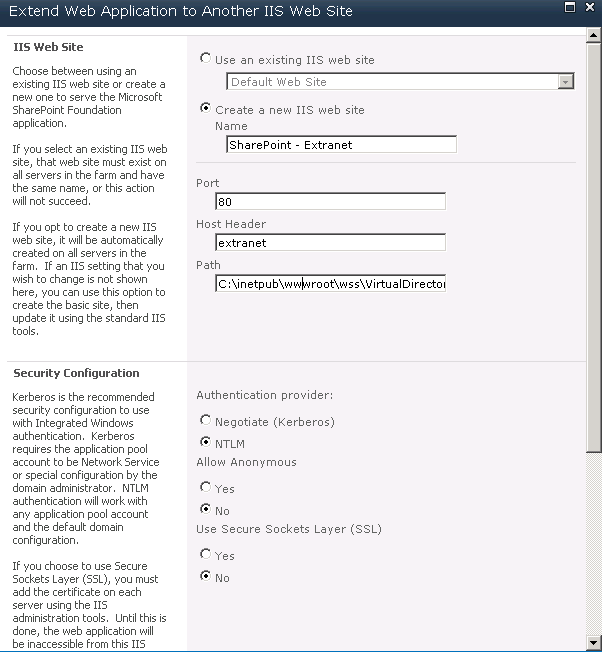
Now, time to configure the extended site. Give it a name, port, etc. (If you give it a DNS name, make sure you add in a DNS entry!)

image

image

Then select the Extranet zone. This doesn’t do anything but classify the extended web application, and allow us to modify the authentication methods used. Then click OK.

Now, once we have done that, you will notice, if you keep the web application selected in the list, click on Authentication Providers in the Ribbon, and then click on Extranet
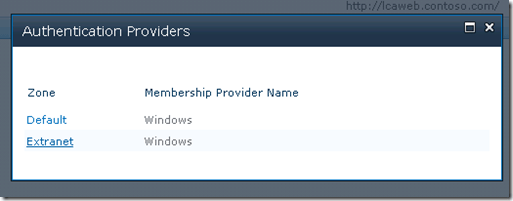
image

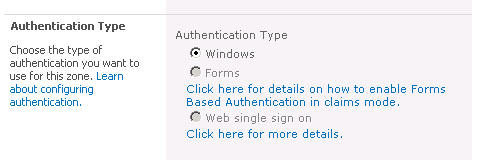
You will notice that we cannot change the authentication type from Windows to Forms.
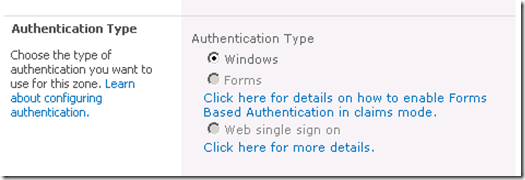
image

Don’t worry, we have a fix for that. To convert the web application from Classic Authentication to Claims Based Authentication, open up the SharePoint 2010 Administration Console (PowerShell – as an administrator)
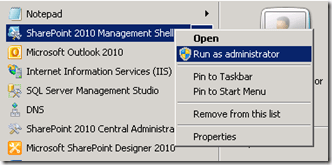
image

   1: $webApp = Get-SPWebApplication http://extranet

   2: $webApp.UseClaimsAuthentication = "true"

   3: $webApp.Update()

This will enable Claims authentication on our web application.

Now if we click on Authentication Providers on the ribbon again, you can see that they now show up as Claims Based Authentication

image

Click on the Extranet again, you will now see that we can change the authentication type for this web application. If you want to have both AD users as well as FBA users to be access the same portal with their respective accounts, go ahead and check both Enable Windows Authentication as well as Enable Forms Based Authentication. Remember how I listed the Membership Provider and the Role Manager at the beginning of this article? Now is when I make use of those.

image

Note:  If you want to create a custom login page, you can specify that option from here (right below the Claims Authentication Types section). Maybe in an addendum to this article down the road I will write a quick post on how to do that. It’s easy, but, this article is more IT Pro/Admin focused, so we’ll skip that for now 🙂

Now go to the bottom and click on Save.  SharePoint will deal with the configuration of this web application.


Extranet Web Application Configuration

Our next item of concern is the configuration for the extranet. We need to re-configure the web.config settings for this extended web application. To do so, open the web.config file for the extranet web application, in my example, it is located at (C:\inetpub\wwwroot\wss\VirtualDirectories\extranet80\web.config)

Search for </SharePoint>, which should appear right before <system.web>, and insert the following code, after </SharePoint>, and before <system.web>.

   1: <connectionStrings> 

   2:   <add name="SQLConnectionString" connectionString="data source=DEMO2010A;Integrated Security=SSPI;Initial Catalog=aspnetdb" /> 

   3: </connectionStrings>

And where the two highlighted bits are above, insert your SQL server name, and FBA database name respectively. (see Part 1 for creating this database).

Once that is complete, locate the end of the </system.web>, mentioned above, where we just put the connectionStrings information above. It will be right above </system.webServer>. there are many other system.web declarations within this file, so be sure to use the right one. You should see tags in the XML for membership and rolemanager there.

We will leave these AS-IS! No need to modify those lines. Now, we need to add the following code within the <providers> and </providers> tags within the <membership> element, as directed in the image below

image

   1: <add connectionStringName="SQLConnectionString" 

   2: passwordAttemptWindow="5" 

   3: enablePasswordRetrieval="true" 

   4: enablePasswordReset="true" 

   5: requiresQuestionAndAnswer="true" 

   6: applicationName="/" 

   7: requiresUniqueEmail="true" 

   8: passwordFormat="Hashed" 

   9: description="Stores and Retrieves membership data from SQL Server" 

  10: name="SQL-MembershipProvider" 

  11: type="System.Web.Security.SqlMembershipProvider, System.Web, Version=2.0.3600.0, Culture=neutral, PublicKeyToken=b03f5f7f11d50a3a" />

Make sure that the connectionStringName and name attributes match the connection string we used above, as well as the membership provider name we used in SharePoint respectively.

Next, the piece of xml we are going to use will fit in between the <providers> and </providers> tags within the <roleManager> element, as directed in the image below

image

   1: <add connectionStringName="SQLConnectionString" 

   2: applicationName="/" 

   3: description="Stores and retrieves roles from SQL Server" 

   4: name="SQL-RoleManager" type="System.Web.Security.SqlRoleProvider, System.Web, Version=2.0.3600.0, Culture=neutral, PublicKeyToken=b03f5f7f11d50a3a" /> 

again, making sure that the connectionStringname and name attributes match the connection string we used above, as well as the role manager name we used in SharePoint respectively.

Then save the web.config file.

Central Administration Web Application Configuration

We now need to modify the Central Administration web.config file as well. In our example here, our Central Admin web.config file is located at: C:\inetpub\wwwroot\wss\VirtualDirectories\44535\web.config

We will be editing in the same places within the config file that we did for our extranet web application above, but with just a few slight changes.

So, first, locate the closing </SharePoint> tag, and the opening <system.web>. Just as we did above, we are going to paste in our connection strings here.

   1: <connectionStrings> 

   2:   <add name="SQLConnectionString" connectionString="data source=DEMO2010A;Integrated Security=SSPI;Initial Catalog=aspnetdb" /> 

   3: </connectionStrings> 

And next, as you may have guessed, just before we close out the </system.web> tag in this web.config, we need to put in our membership provider and role information. This is slightly different from the one we used for the extranet web.config above, notice the default membership provider. Don’t change this – leave this as-is. It is NOT a typo.

   1: <roleManager defaultProvider="AspNetWindowsTokenRoleProvider" enabled="true" cacheRolesInCookie="false"> 

   2:   <providers> 

   3:     <add connectionStringName="SQLConnectionString" applicationName="/" description="Stores and retrieves roles from SQL Server" name="SQL-RoleManager" type="System.Web.Security.SqlRoleProvider, System.Web, Version=2.0.3600.0, Culture=neutral, PublicKeyToken=b03f5f7f11d50a3a" /> 

   4:   </providers> 

   5: </roleManager> 

   6: <membership defaultProvider="SQL-MembershipProvider"> 

   7:   <providers> 

   8:     <add connectionStringName="SQLConnectionString" passwordAttemptWindow="5" enablePasswordRetrieval="false" enablePasswordReset="false" requiresQuestionAndAnswer="true" applicationName="/" requiresUniqueEmail="true" passwordFormat="Hashed" description="Stores and Retrieves membership data from SQL Server" name="SQL-MembershipProvider" type="System.Web.Security.SqlMembershipProvider, System.Web, Version=2.0.3600.0, Culture=neutral, PublicKeyToken=b03f5f7f11d50a3a" /> 

   9:   </providers> 

  10: </membership> 


Security Token Web Service Application Configuration

Last, but certainly not least, we must also update the web.config for the SecurityToken service.

Within your SharePoint Root folder, under WebServices\SecurityToken (generally found at C:\Program Files\Common Files\Microsoft Shared\Web Server Extensions\14\WebServices\SecurityToken), you will find another web.config file. Before the end <configuration> </configuration> section, add in the following… again, tailored to your configuration which we have specified above.

   1: <connectionStrings> 

   2:     <add name="SQL-ConnectionString" connectionString="data source=DEMO2010A;Integrated Security=SSPI;Initial Catalog=aspnetdb" /> 

   3: </connectionStrings> 

   4: <system.web> 

   5:     <roleManager defaultProvider="c" enabled="true" cacheRolesInCookie="false"> 

   6:         <providers> 

   7:             <add name="c" type="Microsoft.SharePoint.Administration.Claims.SPClaimsAuthRoleProvider, Microsoft.SharePoint, Version=14.0.0.0, Culture=neutral, PublicKeyToken=71e9bce111e9429c" /> 

   8:             <add connectionStringName="SQL-ConnectionString" applicationName="/" description="Stores and retrieves roles from SQL Server" name="SQL-RoleManager" type="System.Web.Security.SqlRoleProvider, System.Web, Version=2.0.3600.0, Culture=neutral, PublicKeyToken=b03f5f7f11d50a3a" /> 

   9:         </providers> 

  10:     </roleManager> 

  11:     <membership defaultProvider="i"> 

  12:         <providers> 

  13:             <add name="i" type="Microsoft.SharePoint.Administration.Claims.SPClaimsAuthMembershipProvider, Microsoft.SharePoint, Version=14.0.0.0, Culture=neutral, PublicKeyToken=71e9bce111e9429c" /> 

  14:             <add connectionStringName="SQL-ConnectionString" passwordAttemptWindow="5" enablePasswordRetrieval="false" enablePasswordReset="false" requiresQuestionAndAnswer="true" applicationName="/" requiresUniqueEmail="true" passwordFormat="Hashed" description="Stores and Retrieves membership data from SQL Server" name="SQL-MembershipProvider" type="System.Web.Security.SqlMembershipProvider, System.Web, Version=2.0.3600.0, Culture=neutral, PublicKeyToken=b03f5f7f11d50a3a" /> 

  15:         </providers> 

  16:     </membership> 

  17: </system.web>

Once you do that, it would be healthy to restart IIS as well (just humor me on this one, while not required, as changes to the web.config will cause the application pools to recycle, I’ve seen issues where a reset to IIS has been known to do good).

And lastly, once you visit your site, you should get one of these nice choice boxes:


image

You should be configured, and ready to roll!

Now stay tuned for Part 3… get access to this test environment!
Planning and Configuring Extranets in SharePoint 2010–Part 1

extranetFor my SharePoint Saturday Boston session on April 9th, I will be delivering a presentation on Planning and Configuring Extranets in SharePoint 2010. As I am building up my virtual environment for this presentation, I thought I would also write a blog series on the subject. The abstract for the session is below, and, if you can make it to SharePoint Saturday Boston, I hope you’ll come and see the presentation.

Most companies, large or small, require contact and collaboration with external entities, whether they are vendors, clients, or contractors. SharePoint gives us the ability to open up portals for collaboration with these external entities – this session will show you how to accomplish this using SharePoint 2010.

We will review what is required to make SharePoint “open” to the external world, discuss scenarios regarding security and privacy, as well as walk through configuring Forms Based Authentication, Claims Based Authentication, as well as using Business Connectivity Services in SharePoint 2010, to authenticate, and manage our external users.

Once completing this session, you should have a firm grasp on how to configure an extranet environment using SharePoint 2010, as well as what should be considered during the planning of your extranet scenarios.

At the conclusion of this series, as well as after the presentation at SPS Boston, I will include my slide deck here, as well as links to the actual virtual environment I am creating for this via cloudshare, as well as follow-up answers to questions asked during the session. I am using this to build up the shareable version of my presentation, because, it doesn’t use any local resources, I can access it from anywhere, and, I can share it with an unlimited amount of people, and I can update it from time to time.

So, let’s get started. To give some background on what we are going to be accomplishing here as our end game – we are going to configure the SharePoint 2010 Information Worker image with FBA, using the ASP.NET membership database as our backend. As well as using some built-in and home-grown tools to manage those users.

So now, really this time, lets get started… oh wait, before I do, notice the two images that start off this blog post? get it? an “extra net”, hah! Wow, did I strike a funny bone on that one.

Ok, I am seriously serious about moving forward on this. Let’s go.

Creating the ASP.NET Membership Database

So, first, we will need to be able to authenticate users. In the imaginary (but none-the-less exciting!) extranet planning that took place for Contoso, we decided we wanted to not have our external users, our partners, to have Active Directory accounts. Sure, we can secure AD users, and create a sub-domain to support them, but, just in case, we want to make sure that with the username and password they are given, they cannot access any other resource at all, no matter what, within our organization. Even if they came into our office and plopped down onto a computer connected to our internal network, and started typing away. A SQL-based authentication source will guarantee that.

To do this, we are going to follow this resource here (http://go.gvaro.net/AN2Mbr) to create our authentication database (pay no attention to the fact that the content is outdated – it is not for our purposes!). If we visit that link, and scroll down to Using the SQLMemberShipProvider, and look at Step 2, we have the commands needed to configure our ASP.NET Membership Database.

aspnet_regsql.exe -E -S localhost -A -all

If you do not have aspnet_reqsql.exe in your path, it can be found in C:\Windows\Microsoft.NET\<FRAMEWORK VERSION>\<versionNumber>\aspnet_regsql.exe

image

This will create all of the tables needed (we might need roles, web part personalization, etc. so that is why I chose the “All” option. Information on all of the above options can be found here at the Creating the Application Services Database for SQL Server link from technet.

Once that completes, if you check SQL, you should have a new database named aspnetdb, as well as the tables.

image

And time to leave you hanging until Part 2… until then, stay tuned for more extranet fun in SharePoint 2010!

Registration Open for SharePoint Saturday Boston – 4/9/11

I am pleased to announce that registration is now open for SharePoint Saturday Boston! Register today to reserve your spot. Registration is on a first-come, first-serve basis.

Event Details

SharePoint administrators, end users, architects, developers, and other professionals that work with Microsoft SharePoint Technologies will meet for the 4th SharePoint Saturday Boston event on Saturday, April 9th, 2011 at the Microsoft Office located at 201 Jones Road in Waltham, MA, 02451. SharePoint Saturday is an educational, informative, and lively day filled with sessions from respected SharePoint professionals and MVPs, covering a wide variety of SharePoint-orientated topics. SharePoint Saturday is FREE, open to the public and is your local chance to immerse yourself in SharePoint! Follow us on twitter @SPSBoston. Register today to reserve your spot before they are all gone.

Our sponsors will be providing breakfast, lunch, and a snack. Microsoft is providing the facility. Many other sponsors will be providing wonderful giveaways at the end of the day.

We have speakers from around New England plus speakers flying into Boston from around the globe to provide the best event for learning cutting edge skills and techniques for implementing SharePoint at your company. SharePoint Saturday is also a great way to network with like-minded professionals.

For up to date schedule and agenda see our web site at:

http://www.sharepointsaturday.org/boston

Don’t forget to print your ticket and bring it with you to the event in order to use the Rapid Registration Line.

When is SharePoint Saturday Boston?

Saturday, April 9th, 2011
8:00AM – 6:00PM

Where will SharePoint Saturday Boston be held?

SharePoint Saturday Boston will be held at the Microsoft Waltham office at 201 Jones Rd., Sixth Floor, Waltham, MA 02451

http://www.bing.com/maps/default.aspx?v=2&style=r&lvl=100&where1=201%20Jones%20Road%2CWaltham%2CMA%2C02451


Who is organizing this event?

ThirdM and Grace-Hunt

How do I register?

Registration is limited and based on first come first serve basis. http://spsboston.eventbrite.com

New England Give Camp 2011

image

At a Glance

When: April 29th – May 1st, 2011

Where: Microsoft New England Research and Development Center, 1 Memorial Drive, Cambridge, MA

Contact Email: negc2010@hotmail.com

Twitter: @NEGiveCamp

Coding for Charity

New England GiveCamp is a charitable event at which software developers, designers, and other technical volunteers donate their skills and expertise to support area non-profit organizations.

During GiveCamp weekend about 100 software professionals from around New England will converge in Cambridge, Massachusetts, to develop pro bono custom software solutions for multiple New England charities.

Three Ways to Participate

Non-Profit Organizations

Has your organization been struggling to establish a web site? Do you need help setting up a registration list, keeping track of donations, developing a logo or other graphical assets, or implementing a little bit of office automation? If so, New England GiveCamp can come to your rescue!

Visit the non-profits page at the New England GiveCamp web site to get an idea of the types of projects that are candidates for GiveCamp — then submit your own project for consideration. If you need help defining your project, let us know; we have volunteer business analysts that can help!

Two dozen area New England charities benefitted last year, now’s your chance!

Volunteers

Volunteers are the life-blood of GiveCamp. Regardless of your technical background or the amount of time you have to contribute, there’s a place for you to help.

If you’re a technical professional that can set aside the entire weekend, we invite you to work as part of a development team assigned to a specific non-profit’s project. All experience levels and technology backgrounds are welcome.

If you can’t commit for the entire weekend, or if you’d like to help in a non-technical capacity, there’s plenty of other options to participate in this event—both on site and as part of the planning effort.

Sponsors

An event of this scale requires significant coordination and financial support. Microsoft has already donated use of its facility for the entire GiveCamp, but there are a number of other ways you can help.

Sponsorships are needed to cover meals, snacks, and drinks for the volunteers on site at the three-day event, as well as to defray costs for supplies, giveaways, and other miscellaneous expenses.

As a sponsor, you will receive recognition on the New England GiveCamp web site and Eventbrite registration page. Your logo will also be prominently displayed at the event.

For More information, To Help, Volunteer, or to Sponsor, please visit http://www.newenglandgivecamp.org

Follow New England Give Camp on twitter at @NEGiveCamp

SPTechCon 2011 San Francisco Recap and Slides

M5
 
Need I say more? I had never been out to San Francisco before, so, I had a couple of chances to get out and explore the city. Knocking off the following on my trip:
  • M5 Industries (Mythbusters!)
  • The Winchester Mystery House
  • Fisherman’s Wharf
  • The Golden Gate Bridge
  • Marin Headlands
    • WWII-era forts
  • Lombard Street
  • Alcatraz
Oh right, and also, there was this SharePoint Technology Conference going on. SPTechCon San Francisco was a great conference. Kudos to the BZ Media Team again for putting on one heck of a show!
 
I had a great time meeting new speakers, vendors, and attendees, as well as catching up with old friends, as well as go to a few great sessions.
 
A big thank you needs to go out to SPTechCon for having me there, as well as to all of the attendees of my sessions. Thank you for coming and hearing what I had to say, as well as hopefully learning a thing or two.
 
Below are my decks (WordPress does not incorporate these too good from slideshare, so please follow the links) from both of my sessions.


Just Freakin’ Work! Overcoming Hurdles and Avoiding Pain – Co-Presented with Mark Rackley


Creating Custom Actions in SharePoint 2010

 
Any questions or comments on the material from the conference – as well as any feedback from the session (please!), please leave it in the comments!

SharePoint Saturday Hartford Recap and Session Materials

altI was pleasantly surprised when about a week or so before SharePoint Saturday Hartford came around on January 29th, to hear the news that the event had sold out! We have had lots of success with SharePoint Saturday Boston, however, I was unsure if this was going to be overkill for the region, if it would all be SPS Boston attendees looking for their “fix” between our 6-8 month cycle there of events, I honestly was not sure what to expect, but, wanted to help get it going anyways, so I offered up Grace Hunt to sponsor the event.

And what a great event it was! Over 150 people attended, plus speakers and sponsors, which, by the size of the venue, was a perfect amount to fit in there comfortably. I made some great new connections with speakers and attendees alike, and had a chance to spend some time with some old friends.

165538_10150133897807642_612892641_8214470_4415448_nI presented two sessions at this event, and also helped out in our vendor-led session at lunch time.

My first session of the day was on “Creating Custom Actions in SharePoint 2010”. I had a great group in the room, which asked some very good questions, and even dealt fine with the State Service in one of my demonstrations was broken, so I could not complete a custom action running a workflow (sorry about that!)

Thank you to all my attendees for that session, and even more importantly, having some fans of the Hartford Whalers in there. Below is my slide deck from my Custom Actions presentation.

My next session was done with Tim Farrell, also of Grace Hunt. We presented “Building a Custom Solution from the Ground Up” Since Tim did most of the heavy lifting in this session – I’ll refer to his blog for the session materials (Permalink to SPS-Hartford Presentation pt1 – The Beginning).

A big thanks to SB Chattergee, Talbott Crowell, Pradeepa Siva, and Bob Ohlheiser for putting together this great event, all of the attendees and sponsors of SharePoint Saturday Hartford, and the Grace Hunt team that made it to the event!

A giant lobster crawls out of Boston harbor…

Joel Oleson approached me at the SharePoint Technology Conference in Boston, and asked me to answer a few questions. This would be the result of that…

image

For some odd reason, I want to head down to Providence to Hemenway’s for some Lobster. I have no idea why…

Slides from SharePoint Saturday EMEA 2011 Presentation

Although it happened quite early for me in the morning yesterday (January 22st, 2011), SharePoint Saturday EMEA was a great event to be a part of. Although it lacked some of the main aspects I love at SharePoint Saturdays, such as networking, meeting new people, interacting with the crowd, etc., it was kind of nice to wake up, slug down a few cups of coffee, and present my session.

The EMEA team did a great job of managing this virtual SharePoint Saturday, and I hope to be able to present at future sessions. A big thanks to the attendees of my session, as well as the team that put the event together:

  • Mark Miller (@eusp)
  • Toni Frankola (@ToniFrankola)
  • Isaac Stith (@MrIsaac)
  • Ayman El-Hattab (@aymanelhattab)
  • Natasha Felshman (@TeamEUSP)


Below is a copy of my slide deck from the presentation. Any questions on any of the material, please leave a comment below!