We’re a small group of SharePoint professionals, to get together with a topic, and just talk. No presenters, no sponsors – just a SharePoint get together with food and drink.
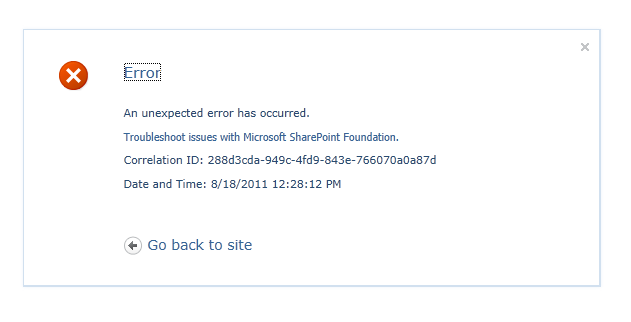
If you’ve ever seen this error before, chances are, you are attempting to delete a Managed Metadata navigation in your list(s) in SharePoint 2010.
The answer to this is simple – you have indexing enabled on your column, and you are indexing multiple columns together, to create a composite index. The fix? Also simple. Go into the settings for your list or library, and under General Settings, click on Metadata navigation settings. As shown highlighted below.
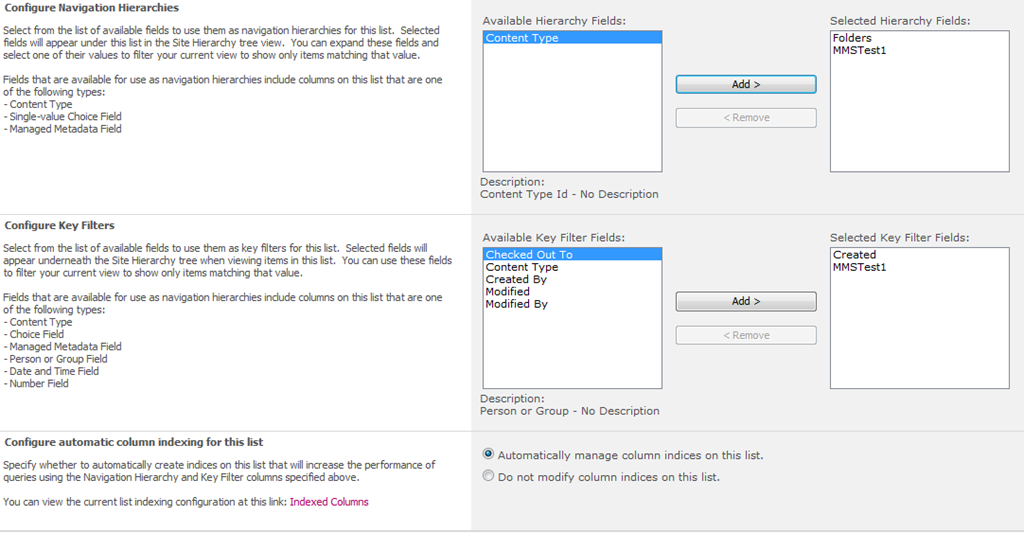
Now if we look at the page, we can see what we’ve configured for Managed Metadata Services for this list. In my example, I allowed the default Folders and my custom column, MMSTest1 to allow for Managed Metadata Navigation within this Document Library, as well as used the MMSTest1 and Created columns as key filters.
Now, if you look at the bottom of the Metadata navigation settings screen, you will see this:
By default, if you haven’t changed this, any of the columns you use in the Metadata navigation settings, will be automatically indexed, and if you are selecting multiple columns to filter against under Key Filters, or under Configure Navigation Hierarchies, then you are creating an index with multiple columns – a composite index.
So you have two solutions to fix this…
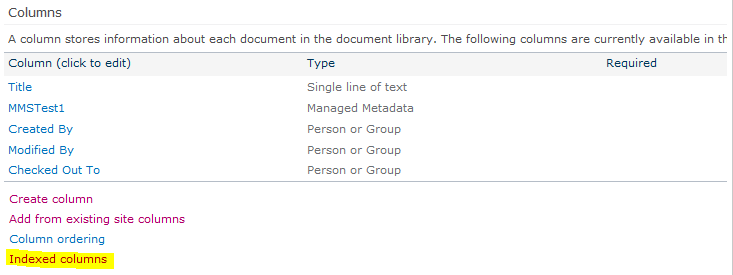
You can manually remove the indexes, either by clicking the Indexed Columns link under Configure automatic column indexing for this list, or, from the Document Library Settings page, clicking on Indexed Columns link under the Columns setting of the page (shown highlighted below)
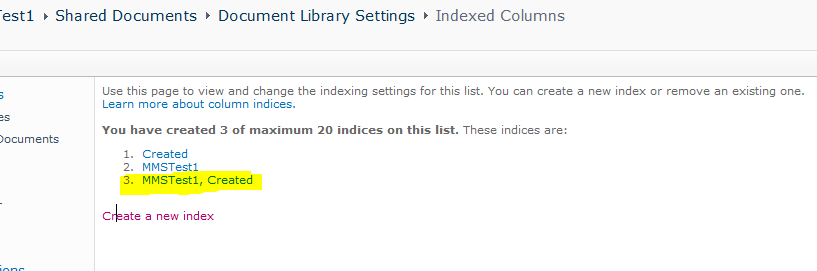
Once you are there, you will see something like this:
Where number 3 on the index list shows the composite index.
Or, if you leave the auto-indexing on under Metadata navigation settings, removing the column from the key filters, and/or from the navigation configuration, then this will remove the composite index.
I may do a quick follow-up post to this soon to describe how columns are indexed using the metadata navigation screen at some point in the near future, and will link back to here, as it takes a little playing around to understand how it all works 😉
Thank you all who attended my Week3webinar today! I always enjoy chances to speak, and enjoy being involved in Week3. Generally my sessions are more technical than not, and Week3 gives me a great chance to bring it down to the business user level.
As promised – here are the slides from my session today. Please leave me feedback letting me know how you thought it went, and if you have any questions!
Be sure to catch other Week3 webinars in the coming months – lots of good content from great speakers. Within the next couple of days, a recording of today’s webinar will be available here: http://www.week3.org/Pages/Sessions.aspx
SharePoint Saturday New Hampshire was a great event! A job well done by the organizers. This was the first SharePoint Saturday New Hampshire, and there seemed to be a great turnout, and the location worked out well. Saw a lot of familiar faces, as well as was able to meet a bunch of great new people. This was also my first official event as a Jornata employee, even though today is officially my first day 🙂
This next part of this post is special for those who attended my session, it’s out little inside joke.
My session was very well attended, and I got nothing but great remarks.
Thank you all again for attending, and for the standing ovation – really, you didn’t have to. But thank you none-the-less. Below you will find my slides from the event.
And if you missed my session, or just want to see it again, come see me in a couple weeks at the Granite State SharePoint Users Group, where I will be presenting the same session, on October 13th.
An unexpected error has occurred. Yep. Very helpful! Recently, when attempting to use the Manage Content and Structure tool (found under Site Actions > Manage Content and Structure), I received the above error. Looking into the ULS logs, all I was able to get ahold of was a System.NullReferenceException. Again, not really handy, or useful, at all.
I was able to determine that it had to probably be due to a list… turns out, we had deactivated and retracted several features from our farm recently, several of which relied on custom lists to store the data. If I go to View All Site Content (Site Actions > View All Site Content), and click on one of these lists, I get a similar error to the above.
Luckily, one of the times when attempting to launch the Manage Content and Structure Tool, I was able to get this error in the ULS logs.
Failed to determine the setup path of the list schema for feature {553B9E4F-C7EA-4442-845F-94390C1EAE44}, list template 10000.
So, basically, we need to remove these lists. We cannot get into the “Delete this List” option within the List management screen – otherwise you’ll get an error similar to the above. I also attempted to use SharePoint Manager 2010, which also gave an error. I just couldn’t delete the list using traditional means…
You have two options here…
Write some code to delete the list (C#, PowerShell… whatever you desire)
Either of those should do the trick! Now, to get the List URL is simple, the lists should still appear under View All Site Content, just right-click and copy the shortcut to the list view, for example: http://sharepointsite.com/Lists/SomeCustomList/AllItems.aspx
Use that when calling those commands with the URL parameter, and you’re good to go.
Organizing and maintaining a SharePoint Saturday can be hard work. LOTS of hard work. Luckily, the way we run SharePoint Saturday Boston, we have less hard work than other SPS events. We put the responsibility of ordering shirts, pads, pens, food, etc. on the sponsor, so we do not only have to deal with the event, speakers, sponsors, etc., so we do not also have to order shirts, food, etc. It makes life a lot easier.
Then there are other SharePoint Saturday events, such as SharePoint Saturday New York, they take it to the next level, and deal with all of that. Now, these are just single day events.
Now, with SharePoint Saturday – The Conference, this was a 3-day event, they had roughly 1800 people registered, well over a thousand attend. IMAGINE STUFFING 1800 ATTENDEE AND SPEAKER BAGS?! GAH! They had LOTS of volunteers however. It was not the best well-oiled machine, but, there was no chance of the motor seizing up on this one. They did one heck of a job. This is not to slight the conference in any way, the organizers of this event actually have day jobs, that are not all about planning and putting together conferences, so this was done in their spare time, if they had any.
I was amazed at the level of sophistication that a basically free ($39-$59 for a 3 day event is the best price out there for a SharePoint conference of this size). They had the ability to change name tags on the fly, lots of volunteers had radios, there were session and schedule updates on monitors around the campus, people all over the place directing traffic and offering help getting from building to building, and if for some reason your session time and date had changed, people to find you and drag you to them! (more on that in a moment).
Great job by everyone involved! I was happy to be a speaker and attendee at the conference, and look forward to another one down the road!
With that, I delivered 3 sessions. Below is information on each, as well as slide decks. Thank you to all who attended my sessions!
9 Ways to Become a (SharePoint) Rock Star
This was supposed to take place on Saturday, not Friday. So, when I arrived at the conference on Friday at 5 after 11 in the morning, I saw the lunch table, and headed over… got a plate of food, and then all of a sudden, I was approached by one of the volunteers, and a friend of mine, Jennifer, and the interaction went something like this…
Jennifer: “C’mon! You’re 15 minutes late for your session!”
Me: “What? I don’t have a session until the end of the day”
Jennifer: “No, you have one now”
Me: “Ok then, what session is it?”
Jennifer: “9 Ways to Become a (SharePoint) Rock Star”
[EDITORS NOTE: She did not exactly use parenthesis when she said it.]
Me: “That’s not until tomorrow”
Jennifer: “There are 40 people waiting in there for you now”
Me: “Uh oh, [expletive deleted] [expletive deleted] [expletive deleted] [expletive deleted] [expletive deleted] [expletive deleted] [expletive deleted], Let me grab my bag!”
Jennifer: ”Let’s go!”
[winded dash to another building … then walking, well, being dragged into the classroom]
Me: “Sorry I am late everyone! I slept late and am hung over, you know, living the rock star lifestyle”
…and then we began the session, after my laptop booted up. So we only got through about 6 of the 9 steps. Luckily, Christian Buckley (the band broke up before the session, so he wasn’t there), is starting a blog series at EndUserSharePoint.com here 9 Ways to Become a SharePoint Rock Star, which will cover each of our “9 Ways”.
For some background on “the best fake SharePoint band EVER, EVER”…
Our lightning talk from SPTechCon in Boston in June, 2011
Horse’s End–Behind the Music
Legal Notice from Christian for SPSTCDC
and without further ado… the slide deck.
Just Freakin’ Work! Overcoming Hurdles in SharePoint Development
This basically boils down to a best practices around SharePoint development. As well as a fun edu-tainment session with my co-presenter, Mark Rackley. We had a blast, had some good questions, and got through the entire session. Here’s the deck!
Planning and Configuring Extranets in SharePoint 2010
And my last session, which after this was delivered, I had to run to the airport to head home. Again, a great session, great questions, and again, finished up on time. I hope to have that Cloudshare virtual image up and running soon.
I have to hand it to the organizers of the event, Becky Isserman (@MossLover), Jason Gallicchio (@PrincetonSUG), Greg Hurlman (@ghurlman), and Tasha Scott (@TashasEv) as well as their volunteers, for putting together once of the best organized SharePoint Saturdays I have been to. Great job! Lots of great sessions, sponsors, and speakers made this quite the memorable event! I was able to connect with old friends, and meet plenty of new ones.
The organizers also did something very special and unique with the speaker, volunteer, and organizer shirts – each of them either had a patch for the NYPD, NY Port Authority, or FDNY, remembering the attacks on the World Trade Center, as in just over a month from now, will be the 10th anniversary of that tragic day, in which thousands of lives were lost. This shirt will be definitely one of the conference shirts that I will be holding on to. There were lots of conversations about that day – the people we knew, where we were, and what we were doing… and how it has affected our lives since.
I had a great time giving my session (once I caught my breath after literally running around right up until the starting bell, searching for a power adapter, as mine would not work!), and had a lot of great questions from the crowd! With that, here are my slides from the event, with one important update – the CloudShare link no longer works… found the expiration notice in my junk mail folder the day after the environment was removed 😦 I will work on getting a new one up and running within the next couple of weeks – then the link should be functional again.
Thank you all for attending, if you were able to make it. Someone was even there due to my extranets blog post series (Part 1, Part 2, Part 3), so I know at least once person is reading this!
If you’ve read my last post on the matter, or, if you are reading this for the first time, or, just do not remember anything I write… the schedule (or “shedjule” if you’re British, or, just are into non-American English dialect), has been posted for SharePoint Saturday – The Conference in (well, near) Washington, D.C.
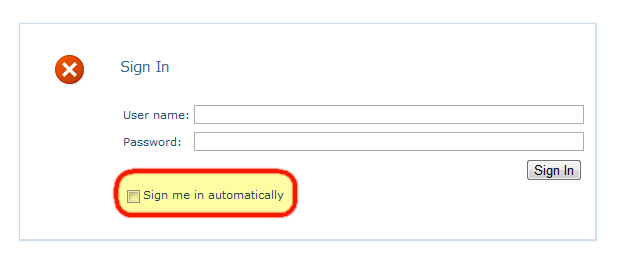
Now this is not just limited to SharePoint, but, since my main focus is SharePoint, this is where I come across this issue the most. When you log in with SharePoint via Forms Based Authentication, there is that little “Sign me in automatically” checkbox below the FBA login form. If you check this, you may realize that a few hours later, when you go to log back into the site, it does not seem to actually remember you at all. That is because by default, it will only remember you for 30 minutes. We can change this quite easily however… This option is controlled within your web application configuration file (web.config) on the server.
If you open this file directly, search for <authentication mode=”Forms”>under <system.web>, you will see, by default, this:
You can also look in IIS as well, under the Configuration Editor feature in the Management section of the web application
If we expand system.web, and click on authentication
Now, the two options we want to look at in here are timeout, and sliding expiration…
The definitions for both of these settings are below, taken from MSDN.
When the SlidingExpiration is set to true, the time interval during which the authentication cookie is valid is reset to the expiration Timeout property value. This happens if the user browses after half of the timeout has expired. For example, if you set an expiration of 20 minutes by using sliding expiration, a user can visit the site at 2:00 PM and receive a cookie that is set to expire at 2:20 PM. The expiration is only updated if the user visits the site after 2:10 PM. If the user visits the site at 2:09 PM, the cookie is not updated because half of the expiration time has not passed. If the user then waits 12 minutes, visiting the site at 2:21 PM, the cookie will be expired. (from: http://msdn.microsoft.com/en-us/library/system.web.configuration.formsauthenticationconfiguration.slidingexpiration.aspx)
I suggest setting this to something much higher… if your users will generally log in once a month, setting this to a couple of months, will ensure they are remembered, and with sliding expiration configured, if they log in during the 3rd month, then the system will reset the time on that cookie, remembering them for another 3 months from that date. For sites which have users logging in less often, setting this to a year will be a decent bet that this will remember them for some time. A year in minutes would be: 525600
Hopefully this helps in your configuration of FBA for SharePoint, as well as other FBA applications.










 Geoff Varosky's Blog