SPTechCon & October 21st BASPUG re-cap and materials

alt

I know, I know… I still need to publish my post on this past SharePoint Saturday Boston… however, since SPTechCon is slightly more fresh in my mind, and, because I promised materials to one of the lucky folks who attended my sessions by the end of the day, SPTechCon has taken the driver’s seat.

All I can say is what a great conference! Unfortunately, I was meeting people and companies, and talking to session-goers, catching up with friends, and meeting new ones, for the entire event, that the only sessions I was able to make it to, were my own!

I would first like to extend my thanks, yet again, to David Rubinstein, Stacy Burris, Kathy Bruin, and the rest of the BZ Media team, for not only taking me on as a speaker, but, for also graciously hosting the October meeting of the Boston Area SharePoint Users Group! With the conference in town, and by David’s suggestion months earlier, we managed to put together a fantastic panel of speakers from some of the SharePoint rock stars that were on hand at SPTechCon. We wanted to put together a focused panel on the new hotness, SharePoint 2010. While the conversations drifted a bit, we had a very energetic crowd, and very energetic panel. The free drinks at the attendee exhibit hall exception MAY have had something to do with that…

The panel consisted of none other than Bill English of Mindsharp, Andrew Connell of Critical Path Training, Joel Oleson of Quest, Heather Solomon of SharePoint Experts, Dux Raymond Sy of Innovative-e, and Mark Miller of EndUserSharePoint.com. (I’ll get the video posted soon enough!).

My next set of thanks is going to the BASPUG attendees and speakers – thank you all so much for making yet another highly successful meeting of the BASPUG! We had over 70 in attendance, and there was barely a seat available! To each and every one of our speakers, you are always welcome back in Boston to the users group!

Some of the comments from the BASPUG I’d like to share.. a few images below – LOTS of talk about the #BASPUG. Thank you all!

image

image

image

image

To close out the BASPUG @ SPTechCon, here is the slide deck from that night. Video, as mentioned above, still to come!

Next, I’d like to thank all of those who attended my two sessions at SPTechCon. The first session, bright and early before Steve Fox’s keynote, was “Just Freakin’ Work! Overcoming Hurdles and Avoiding Pain” with Mark Rackley. We had almost a full room, even with the change in time, as well as for being quite early at 8:15am.

Below is our slide deck from that presentation.

My next session closed off the conference at 4:00 on Friday, and I delivered to a great crowd, “Creating Custom Actions in SharePoint 2010”. Thank you again for all who attended, and let me know if you have any questions here in the comments, so I can share them with the rest of the world, or rather, the small portion of people that view my blog 🙂 Below is my deck from that session.

Thank you again everyone at the conference. I have to say, in all honesty, that this was one of the best conferences I have ever had the privilege to attend!

Looking to see these sessions again? Join me in February next year at SPTechCon San Francisco!

Clippy Jr.

image

Just a short post on the offspring of Clippy – Clippy Jr. You know him well, even if you do not think so. He exists within SharePoint. Don’t believe me? He’s been hiding in plain sight the whole time! Just look at the images taken by a private detective below. I promise, these are not doctored (except for the arrows… those definitely were not in the original images.)

image 

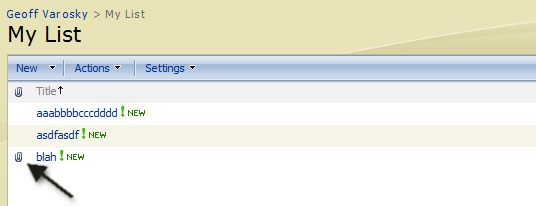
See? There he is! Right in the title bar below the toolbar within this list view!

image

There he is again, on your new list item form!

image

And again, hanging out next to your list items! Always trying to let you know something. However, Clippy Jr. has definitely learned a few things from this mistakes of his father, Clippy Sr.

Ok, now to get onto the meat and potatoes of this post. No, this is not to let you know that there is an attachments for icons, but, a simple little piece of XSL that can be used in your dataview web parts to denote if there are attachments on a list item or not, and then, show Clippy Jr., happily telling you that there is an attachment on the item.

   1: <xsl:if test="@Attachments!='0'">

   2:     <center><img src="/_layouts/images/attach.gif" /></center>

   3: </xsl:if>

And that is all there is to it! @Attachments returns a boolean value that will either be a value of 0, if there are NOT attachments on the list item, or, 1 if there are.

Simple, straight-forward, and extremely handy. Thank you Clippy Jr.!

Calculating Site Collection Usage via SQL

I have been slow on the informational posts lately, sorry about that! Have had lots happening in the work world over the past few months, and have not been able to get much done in that arena, between SharePoint Saturday Boston, The SharePoint Technology Conference, Best Practices Conference, business development, the SharePoint Saturday Boston Webinar Series, the Boston Area SharePoint Users Group, writing chapters for a book, as well as client work (last, but certainly not least), my blog entries have become few and far between.

I also need to get my feedburner redirected from live spaces, and oh so much more…

However, I thought I would write a quick post! I use this quick SQL statement from time to time, and used it again today, and wanted to share it quickly with the few souls that actually read this blog 🙂

   1: SELECT FullUrl AS URL,(DiskUsed/1024) AS SiteCollectionUsedKB from Sites


Simple, but, it gets the job done. From your content database, running this query will return the URL of the site collection, as well as its storage allocation. Handy, and useful!

Announcing the SharePoint Saturday Boston #3 Webinar Series!

Missed a session at the last SharePoint Saturday Boston event on September 25th, 2010?  Well, now is your chance to see it again! Grace-Hunt and ThirdM will be hosting webcasts by most of the speakers from the event, so you will have a chance to view the sessions over again, as well as ask the presenters questions.

We will be hosting weekly lunchtime sessions on Mondays and Fridays, so you can kick back with your lunch and take in some great speakers and topics on SharePoint.

Agenda is as follows:

11:45 AM EST – 11:55 AM EST Welcome and Sign-In
11:55 AM EST – 12:00 PM EST Speaker Introduction
12:00 PM EST – 1:00 PM EST Presentation

Below are the list of sessions, dates and times they will be available. Follow the corresponding links below to register for each webinar.

Schedule updates will be posted here: http://www.sharepointsaturday.org/boston/Pages/SPSBos3WebinarSeries.aspx and registration is OPEN TO ALL, not just those who signed up for SharePoint Saturday Boston!


Session Presenter(s) Date/Time Register
SharePoint Development &
Customization: Overcoming Hurdles and Avoiding Pain
Geoff
Varosky & Mark Rackley
10/25/10
11:45 AM
Register
Things that should be easy in SharePoint
Development
Eugene
Rosenfeld
10/29/10
11:45 AM
Register
SharePoint in the
Cloud
Matt
Lathrop
11/1/10
11:45 AM
Register
The Seven Most Important (Non-Technical)
SharePoint Success Factors
Richard
Harbridge
11/5/10
11:45 AM
Register
See Beyond The Numbers: Data
Visualization in SharePoint 2010
Sadalit
Van Buren & Chris McNulty
11/8/10
11:45 AM
Register
Driving end user adoption for SharePoint
2010
Chris
Bortlik
11/15/10
11:45 AM
Register
Sandboxed Solutions: Developing
High-Powered Solutions with Low-Trust code
Bob
German
11/19/10
11:45 AM
Register
Dashboards for
SharePoint
Susan
Lennon
11/22/10
11:45 AM
Register
SharePoint 2010: Service
Applications
Jason
Gallicchio
11/29/10
11:45 AM
Register
Governance Best Practices in SharePoint
2010
Scott
Jamison
12/3/10
11:45 AM
Register
11 Strategic Considerations for
SharePoint Migration
Christian
Buckley
12/6/10
11:45 AM
Register
Implementing SharePoint for Enterprise
Search: Methodology and Mechanics
Nicholas
Bisciotti
12/10/10
11:45 AM
Register
Project, Project Server, and SharePoint
2010: Which to Use When
Brittany
Kwait
12/13/10
11:45 AM
Register
Advanced Development on the 2010
Ribbon
Shai
Petel
12/17/10
11:45 AM
Register
Assuring Accessibility and Privacy
Compliance in SharePoint Sites and Social Computing
Larry
Concannon
1/3/2011
11:45 AM
Register
Get more Social with
SharePoint
Jeff
Willinger
1/10/11
11:45 AM
Register
SharePoint Security: Through the Looking Glass
V2
David
J Pileggi, Jr.
1/14/11
11:45 AM
Register
Automating SharePoint with
PowerShell
Talbott
Crowell
1/21/11
11:45 AM
Register
The Best of Both Worlds – Connecting SharePoint to the
rest of the Enterprise using BizTalk
Andrew
Babiec
1/24/11
11:45 AM
Register
Traversing The Term
Store
Russ
Edelman
1/28/11
11:45 AM
Register
SURVEY RESULTS: How is your company
using SharePoint?
Mark
Miller & Derek Weeks
1/31/11
11:45 AM
Register

Quick Command Line Tip – Preserving Your History…

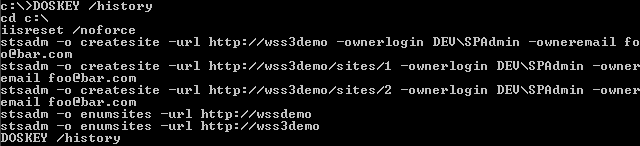
A lot of administration work can be done from the command line using STSADM. Adding and retracting solutions, resetting IIS, interfacing with GACUTIL, adding users, creating sites and webs, and the list goes on and on and on… after a while, you may want to keep a record of the operations that you had performed. This is very helpful in keeping a server log together, so you can always go back and trace what has been done.

By using the following command: DOSKEY /history, you can do just that. Looking to find out what DOSKEY is? Check Wikipedia of course 🙂 But, if you don’t want to go elsewhere to find out, we’ll just quote Wikipedia, they say it better than I can.

“DOSKey is a utility for MS-DOS and Microsoft Windows that adds command history, macro functionality, and improved editing features to the command line interpreters COMMAND.COM and cmd.exe. It was included as a TSR program with MS-DOS and PC-DOS versions 5 and later, and with Microsoft’s Windows 95/98/Me.”

image

If you’d like to save that off to a file? Also not a problem, just run: DOSKEY /history c:\STSADM.042010.txt and you’re ready to go. Your command history will be backed up in C:\STSADM.042010.txt.


Title Field GUID in WSS 3.0 and MOSS 2007

This is just a quick reference post. I often find myself looking for the GUID of the Title column, which is a default column on all lists. The GUID for this is the same in WSS and MOSS, as it is part of the Item content type, and will always have this GUID, at least as far as I know, in WSS 3.0 and MOSS 2007. So, here it is!

{fa564e0f-0c70-4ab9-b863-0177e6ddd247}


Locate a List Template Identifier in SharePoint 2007

I received a comment on the GraceHunt.SharePoint.Features.CompleteTask project on CodePlex yesterday, and while responding, I thought I would also put together a post on locating the List Template ID for a list within the SharePoint UI.

Quick note – you will need to have the permissions to create new lists on the site to be able to do this.

First, go to Site Actions > Create

image

Next, hover over the the list template that you would like to know the internal List Template ID for, as shown below. For example, the Project Tracking – Project Tasks List, which is part of the IT Team Workspace template, available within Microsoft’s “Fab 40” Application Templates.

image

Next, look down in the status bar of your browser, or, click on the link, you will see the last variable in the query string for that link is named ListTemplate, and that will display the List Template ID for that list type.

image


AvePoint Releases FREE BLOB Management Tool for SharePoint 2007 and 2010

AvePoint - SharePoint Backup and Administration Software

A few weeks back, I had written a quick post about BLOB (Binary Large OBject) storage in SharePoint. Well, one of our partners, AvePoint, released yet another of their tools for FREE, the DocAve Extender, for SharePoint 2007 and 2010, to aid in this matter.

Straight from their website – here is some more information on the groundbreaking release of this tool, for free.

“Databases like SQL Server are designed to handle relational data of relatively small size (typically less than 1MB). However, when it comes to larger, non-relational data streams, known as Binary Large Objects (or BLOBs), databases like SQL are not optimal. This is because managing BLOB I/O calls takes up substantial SQL CPU and memory resources.

Since more than 95% of the data a typical organization uploads into SharePoint are BLOBS, SharePoint’s SQL resources become quite overburdened, and have less capacity to perform transactional data operations and queries.

To avoid this, organizations have a few options. The first option is to spend money on additional SQL Server resources. But SQL Server licensing is relatively expensive when compared to file-based storage, so this is not the most cost-effective route.

The second, more cost-efficient option is to extend this BLOB content directly to file-based storage, while providing unfettered user access to the BLOB content via SharePoint.  To do this, administrators can either:

  • Write custom code that leverages Microsoft’s APIs to create their own BLOB management functionality
  • Buy some expensive third party tool
  • Use AvePoint’s FREE DocAve Extender.

With DocAve Extender, BLOBs are never stored on the SQL Server database, meaning SharePoint can perform optimally, your SQL Server resources can be utilized efficiently, and your database costs can be kept to an absolute minimum.”

The utility allows you to literally have terabytes of data within a single content database. It can be encrypted and compressed as well for secure and trimmed storage, and stored on file servers, NAS, SAN, or even Cloud storage mediums.

So if you are looking to offload large file storage in SharePoint from your SQL server – look no further. http://www.avepoint.com/sharepoint-storage-extender-docave/.


Can a Single Custom Action Work Across All List Types?

A good friend of mine, Mark Rackley, posed a question to me yesterday…

Can I create one Custom Action that will work on all list types or do I have to create a separate custom action for each list type?

Which was a great question, and one that throughout all of the times I have spoken at various events and user groups on Custom Actions, I had never heard asked. So, I thought I would post a blog on this, and answer the question for others as well. Thanks for the ? (“question, Mark”)

Well, why don’t we see what we can do – I’ll take you through the trial and error process, to see if we can make this work.

So, let’s fire up Visual Studio, and get started, and let’s create a new blank WSP Builder Project (as I know Mark is a big fan of STSDEV)

image

Lets build out our folder structure, and add in our feature.xml file, as well as our element manifest

image

In our Feature file, let’s scope this out to the Site Collection, and fill in some of the other details…

   1: <?xml version="1.0" encoding="utf-8" ?>
   2: <Feature xmlns="http://schemas.microsoft.com/sharepoint/" 
   3:          Id="{842E1000-139E-4e3e-A747-F6E01B2A5AAE}" 
   4:          Title="MarksCustomAction" 
   5:          Description="Mark's Custom Action" 
   6:          Scope="Site" 
   7:          Version="1.0.0.0" 
   8:          Hidden="false" 
   9:          ImageUrl="GraceHunt\Grace-Hunt.gif">
  10:  <ElementManifests>
  11:    <ElementManifest Location="manifest.xml" />
  12:  </ElementManifests>
  13: </Feature>
  14:  

Now, to populate our ElementManifest, which will contain our CustomAction Element, let’s refer to the CustomAction Element section of the Windows SharePoint Services 3.0 SDK.

   1: <?xml version="1.0" encoding="utf-8" ?>
   2: <Elements xmlns="http://schemas.microsoft.com/sharepoint/">
   3:   <CustomAction
   4:       Id="MarksCustomAction"
   5:       Location="EditControlBlock"
   6:       Title="Grace-Hunt Website"
   7:       RegistrationType="List"
   8:       Sequence="12345">
   9:     <UrlAction Url="http://www.grace-hunt.com" />
  10:   </CustomAction>
  11: </Elements>
  12:  

Now, we know, especially if you’ve been to any of my sessions on Custom Actions, that the only thing you REALLY need in here is the Title attribute, but, we’ll add an Id, Location  – the Edit Control Block, a Title, set the RegistrationType to List, and, let’s give it a sequence number of 12345, and set the UrlAction to be http://www.grace-hunt.com.

Now, let’s deploy, and see what happens…

Using STSADM, let’s add the solution to our Farm. This will also give us a sanity check, to make sure that we have no errors in our feature. Otherwise, it would kinda yell at us…

image

Ok, that went well. Now, let’s deploy the solution…

image 

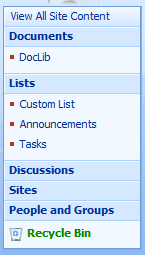
I’ll create a Custom List, Document Library, Announcements List, and a Task List.

image

And, then activate the feature…

image 

And now, let’s go check the EditControlBlock of our lists…

Checking Tasks… nope.

image

How about our Custom list…. nope. Not looking good at this point…

 image

And also checking the others…nothing. Well, this didn’t pan out too well. Let’s try something different. Since all content types inherit from the System content type, whose ID is 0x, let’s see if we map to that content type, if we have some success… so, let’s update our ElementManifest to the following…

   1: <?xml version="1.0" encoding="utf-8" ?>
   2: <Elements xmlns="http://schemas.microsoft.com/sharepoint/">
   3:   <CustomAction
   4:       Id="MarksCustomAction"
   5:       Location="EditControlBlock"
   6:       Title="Grace-Hunt Website"
   7:       RegistrationType="ContentType"
   8:       RegistrationId="0x"
   9:       Sequence="12345">
  10:     <UrlAction Url="http://www.grace-hunt.com" />
  11:   </CustomAction>
  12: </Elements>
  13:  

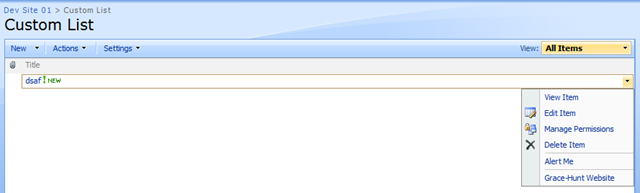
and re-deploy, and see what happens. Let’s check our Custom List…

image

There it is! Let’s try our Document Library…

image

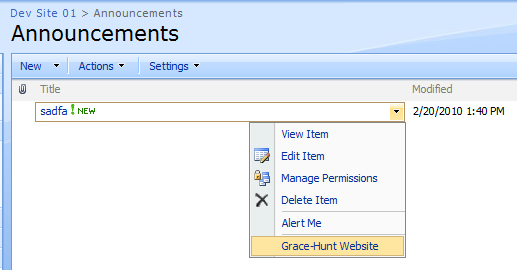
There as well! And our Tasks List? Bingo!

image

And also our Announcements List

image

So, as you can see, you can get a Custom Action to appear across all list types, by binding your Custom Action to the registration type of List, and  the base content type of 0x, and you can get a Custom Action to work across all list types, as all content types inherit from the System content type, 0x.

For more Custom Action resources, try this search against my blog.


BLOB Content in SharePoint – How Much Fat Can Be Trimmed?

I’ve been hearing a lot of chatter recently regarding BLOB (Binary Large OBject) storage in SQL. In fact, people have been talking about it many years. Thankfully, there are quotas which can be enforced, however, you still need to store BLOBs (photos, images, videos, documents – basically any attachments or files uploaded into SharePoint are BLOBs) in SharePoint, and SQL disk space can be, and is expensive.

Now, there are a lot of companies, some who are partners with Grace-Hunt, which make use of functionality within the SharePoint API to store files out of band from SQL, maintaining these BLOBs just as if they were in SQL. One of those companies, StoragePoint. They have a free tool, called BLOBulator, which is definitely geared towards their product, however, it is a great tool to peer into your SharePoint environment, and see how much space you actually can save by using an out of band BLOB storage solution such as theirs.

This is not a marketing effort – however, more of a reference point for myself to remember this tool, and share it with others who may have some use for it.