Registration Open for Boston Area SharePoint Users Group on 11/9/11

BASPUG_195square_initialsRegistration is now open for the November 9th, 2011 meeting of the Boston Area SharePoint Users Group, at the Microsoft Waltham office located on the 6th floor at 201 Jones Road, Waltham, MA.

November 9th, 2011 Meeting Information – Waltham

PRESENTER
The presenter for our next meeting is Manmeet Chaudhari, Sr. Project Advisor for Advisicon Inc. She will be presenting "Project Management" – showcasing Project Server 2010 and its integration with SharePoint 2010.

Session Abstract
This session will introduce the integration of collaboration strategies and features of Microsoft Project Server 2010 for participants in a project management office (PMO)/project portfolio management (PPM) environment.

It will also showcase what Microsoft SharePoint Server 2010 has to offer with features such as Project Sites and Workspaces, version control, task synchronization between Project Server 2010 and SharePoint Server 2010, governance workflows, tagging, wikis, discussion boards, integration of connectivity with remote team, and business intelligence for dynamic reporting.

About Manmeet
I am a Senior technology consultant with a career history in diverse aspects of information technology, enterprise level IT, business analysis implementation and training. I have led the delivery of complex business processes and enterprise solutions to fortune 100 companies in Asia-Pacific, India and North American markets.
My expertise is in providing technology consulting services with life cycle implementations for a variety of industries including Health Care, Airline, Financial, Manufacturing, and Energy.
I am proficient in architecture design, development, and delivery of business intelligence using business portals & collaborations systems. In depth knowledge of Microsoft based technologies including SharePoint, Business Intelligence platforms such as Project and Portfolio Server and various software development methodologies.
I have been awarded as Microsoft’s Most Valuable Professional (MVP) for 3 consecutive years since 2009 for my contribution towards the Microsoft Project community.
(I am based out of Cambridge and I am a home worker).

MEETING SPONSOR – Commvault
Headquartered in Oceanport, New Jersey, CommVault is a publicly traded data management software company passionately committed to giving companies a better way to organize, protect, and access business information.
CommVault was founded in 1996 and first made its mark with the industry’s leading backup software product. But what we ultimately provide for our 13,500+ customers goes far beyond backup. Our unique Solving Forward® philosophy and one-of-a-kind Simpana® software deliver complete data management solutions with infinite scalability and unprecedented control over data and costs.

CommVault has recently been positioned in the "Leaders" quadrant in Gartner’s 2011 Magic Quadrant for Enterprise Disk-Based Backup/Recovery. And leading technology companies worldwide have formed strategic partnerships with us, including Dell, HDS, HP, Microsoft, NetApp, VMWare, Novell, Oracle, Sun Microsystems, and Bull.

A wealth of accolades and revenue growth greater than three times the software industry average further reflect the industry’s need and enthusiasm for CommVault’s revolutionary approach to data management.

To learn much more about CommVault, our Solving Forward philosophy, and Simpana Software, download a brochure from the menu to the right, tour the rest of our Web site, or simply contact us. We’re confident you’ll like what you discover.

SUSTENANCE
Food and beverages will be provided at the event.


RAFFLE PRIZES

We will be handing out raffle tickets at the BASPUG meetings.

LOCATION
We will be meeting at the Microsoft New England Research and Development center at One Memorial Drive, Cambridge, MA.


LINKED IN
Join our group on LinkedIn today to connect with the rest of the BASPUG members, and spread the word!


FACEBOOK

We are also on facebook! http://www.facebook.com/#!/pages/Boston-Area-SharePoint-User-Group/113652405354617


TWITTER
Follow news about the Boston Area SharePoint Users Group on twitter by following us @BASPUG, and by using the hashtag #BASPUG


WEB
Visit the Boston Area SharePoint Users Group website at http://www.bostonsharepointug.org

Taking Screenshots and Extracting Text from Images

imageOneNote has become integral in my day-to-day work. Whether I am doing internal work, work for clients, or, writing a blog. Two of the main features I make use of are OneNote’s screenshot capability, as well as the capability for OneNote to extract text from images.

I regularly show people these things, since they seem to be features people are unaware of, so, I thought I would put together a quick blog post about it.

I was today, going through sites at a customer site, to review them for specific features and functionality. In doing so, I needed a list of those sites, as well as a way to create a checklist of them, so I could keep track of my progress – OneNote provides that solution.

For this example –I will just use the Jornata website.

image

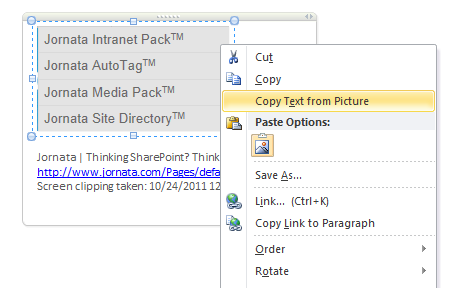
I first expanded the menu for Products, and took a screenshot of just the products listed. To do this, all you need to do is press Windows Key + S – One Note needs to be open, or, running from the system tray.

image

And, OneNote will automatically copy this to a previously defined section of my notes (I generally choose Unfiled Notes under my Personal notebook), as well as copy it to my clipboard.

Once it is in OneNote, all toy need to do is right-click on the image, and choose Copy text from Picture

image

And it will do just that. I can then paste that into a new note in OneNote, and create them as ToDo items, using the appropriate tags. You might need to clean up the text a bit, but, for the most part, it saves a lot of typing of information readily available to you.

image

Cool, huh? How do you use OneNote? Any features which save your bacon, or make your life easier and more productive each day? Please share!

Secure Your SharePoint Extranet!

Or any extranet really… I presented tonight at the Baltimore SharePoint Users Group on Planning and Configuring Extranets in SharePoint 2010, and had the idea to make a quick post like this.

If you are opening your organizations virtual doors to the outside world, please, please,  PLEASE, only open up port 443, and use a secure certificate (or Secure Sockets Layer certificate), a/k/a, SSL certificate, to secure it.

Even if you do not have anything resembling a budget – you can still be secure. GoDaddy offers SSL certificates for as little as $12.99 – just use this link.

Why? Well… take this scenario. Say you are connecting to your extranet from a café, and they do not have a secure WiFi setup, and you can just connect and browse. I bet you that somewhere in there, there is some pimply kid with his Macbook his parents bought him, in his Misfits T-Shirt, sniffing the unsecured WEP network, and watching you log into your Forms Based Authentication extranet, over an unencrypted port 80. Not only does he see the URL you are visiting, and your username and password. He can also see everything you do. Confidential documents, payroll information – you name it. And there you go, your company’s data has been breached.

Now, if you take the extra time, and spend a few dollars – this would not have happened. SSL encrypts the connection from the end user’s browser, all the way to the server, so all the pimply faced hacker would see is just gobbledygook.

So a login session may just look like this (encrypted using SSL):

OIHP(@Q*YPR*Y@*(Y@C*(YR(*@YUP&@G&*T(*@&^$&@()&*CNHUSHLKSJLSHGLRWCTBLSUGL*r(*n^N(*#9693r562095876209387652097cUYTOIWESOFIY#3tyiuGi IWOLIWJdILW#T&@RLIU@HDIWUYR(Q*&#@yrOiu32H  lu hr*#@y*ry b@r*hsdiu wOIU8H9WQ83H RL iuliug # iqq&*g(iU3RG qiu

That looks a lot better than this (unencrypted – not using SSL):

http://intranet.mytopsecretcompany.comJohnSmithPass@word1secretdocument1.txt012-34-5678

While I do not have specific details, certificate providers also can actually insure your SSL certificates, in case a data breach does take place. GoDaddy, Network Solutions, GeoTrust, Thawte, etc. Look around, find what is right for you. And secure your extranet. Not tomorrow, but NOW. Pay for some security, it is worth it to pay money up front and be secure, than be involved in lawsuits, and corporate losses, all due to a yearly fee of up to a couple of hundred dollars. Protect your company, protect yourself, and protect your clients.

Boston SharePoint Salon–Power View and Visualization

The Boston Area SharePoint Users Group, SharePoint Saturday Boston, and The SharePoint Technology Conference Boston. We have a lot of SharePoint around here. And just when you think that there cannot possibly be any more local SharePoint events… think again.

Next  Thursday, October 27th, the 3rd meeting of the Boston SharePoint Salon will be taking place at Eastern Standard in Boston.

We’re a small group of SharePoint professionals, to get together with a topic, and just talk. No presenters, no sponsors – just a SharePoint get together with food and drink.

Interested in going? Go here for more information… I’m just spreading the word.

sharepoint%20salon

Resources and Slides from Granite State SharePoint Users Group Meeting

GSSPUGI had the pleasure of presenting my Planning and Configuring Extranets in SharePoint 2010 session at the Granite State SharePoint Users Group this past Thursday evening.

After a pleasant drive up to Nashua, I was met with a good sized crowd, and had fun presenting, as well as interacting with the crowd.

I would like to thank the #NHSPUG for allowing me to come up and present – and hope I get a chance to do it again soon!

Below is my deck from the session. Please feel free to contact me directly, or, via the comments below with any questions on the material!


Slides from Week3 Session–Who? What? Where? Searching in SharePoint

Thank you all who attended my Week3 webinar today! I always enjoy chances to speak, and enjoy being involved in Week3. Generally my sessions are more technical than not, and Week3 gives me a great chance to bring it down to the business user level.

As promised – here are the slides from my session today. Please leave me feedback letting me know how you thought it went, and if you have any questions!

Be sure to catch other Week3 webinars in the coming months – lots of good content from great speakers. Within the next couple of days, a recording of today’s webinar will be available here: http://www.week3.org/Pages/Sessions.aspx

Slides and Resources from SharePoint Saturday New Hampshire

SharePoint Saturday New Hampshire was a great event! A job well done by the organizers. This was the first SharePoint Saturday New Hampshire, and there seemed to be a great turnout, and the location worked out well. Saw a lot of familiar faces, as well as was able to meet a bunch of great new people. This was also my first official event as a Jornata employee, even though today is officially my first day 🙂

This next part of this post is special for those who attended my session, it’s out little inside joke.

My session was very well attended, and I got nothing but great remarks.

Thank you all again for attending, and for the standing ovation – really, you didn’t have to. But thank you none-the-less. Below you will find my slides from the event.

And if you missed my session, or just want to see it again, come see me in a couple weeks at the Granite State SharePoint Users Group, where I will be presenting the same session, on October 13th.

And if you’re in the Baltimore area, I will be presenting this at the Baltimore SharePoint Users Group on October 20th.

Without further ado – here is my slide deck from the event.

In the slide deck is also the updated URL for access to the demonstration environment (http://go.gvaro.net/ExtranetsVM3).

One of the neater utilities I have come across lately…

On twitter last night, Ruven Gotz had posted a link for a utility from The Garage, called Mouse Without Borders.

image

That’s all I will say on the topic, just watch the video, then download and install… absolutely amazing, and it works wonderfully.

http://blogs.technet.com/b/next/archive/2011/09/09/microsoft-garage-download-mouse-without-borders.aspx

Thanks Ruven!

The end of an era, and the start of a new one.

Today marks the end of an era. An almost 7-year era for me…

I started with GraceHunt in early October, 2004, brought in by a former colleague and good friend of mine. Up until that point, I had not done much on the consulting side, except for a private web development business I ran on the side for years. I had jobs in the industry prior to GraceHunt has a Systems Engineer, Systems Administrator, Data Center Manager, Network Engineer, and yes, even a dial up support technician very early on.

All of these things came together well for me when I came across SharePoint, shortly after joining GraceHunt, especially from having created complex intranet applications by hand for years on Perl and PHP. After a day of playing with SharePoint – at the time – I referred to it as “an intranet in a box”. Since then, and especially in the past four years, SharePoint became my main focus, and I have not even bothered looking back, just barreling head on into SharePoint more and more each day (there is always something new to learn!).

jornata

With that, and as a progression of my career, I am pleased to announce, that starting next week, I will be joining up with the great team over at Jornata. I having had several conversations with Scott Jamison, everything just made sense. I look forward to still being heavily involved in the SharePoint community, and maybe even a bit more than I have been over these past few years, and looking forward to many great years with Jornata.

I worked with a great group of people at GraceHunt, a good amount of whom had been there since the beginning like myself. I wish them all the best of luck, and will miss working each day along side them. I am definitely looking forward to have those same kind of extended-family connections at Jornata.

My first official day will be September 26, 2011 – and I cannot wait to get started.