What’s New in Office 365 for Business – January 2014

January brought a host of updates in Office 365. See the listing below for what is new and improved for Office 365 for Business! These updates are being rolled out in phases worldwide to all Office 365 for Business customers, so you may not see all of these updates as of yet.

Office

Microsoft teamed up with GW Micro to provide new functionality for those who are blind or have vision problems, so that subscribers of Office 2010 or Office 2013 can download a free copy of Windows-Eyes, GW Micro’s screen reading software.

Word Web App

A new function called Tell Me provides the ability combining search and natural language questions to help users find what they need to to and work faster and smarter. Footnotes and endnotes can also now be edited directly within the Word Web App. The ribbon has been updated as well to match the other Office Web Apps, and also allows easier sharing and renaming of documents.

OneNote Web App

The navigation pane has been updated to provide a better and easier way to navigate between sections and pages.

Lync Mobile

Lync Mobile for Windows Phones and iOS apps have been updated so users can now upload presentations during meetings so others can access the slide decks directly. Windows Phone users can now control the application using voice commands, making it almost hands free. iOS users also received a new interface update.

Outlook Web App

This has been updated with a new People View, which allows you to view messages quickly from people that matter, based on your most frequent contacts.

Partner Administration

Partners now have a central area to view all of their customers, view their service health, administer their tenants, manage support issues, as well as the ability to send trial and subscription offers to their customers, to help build business.

InfoPath and SharePoint Forms

InfoPath 2013 and InfoPath Forms Services will be the last versions of InfoPath, as it is phased out.

Source: http://blogs.office.com/2014/02/03/whats-new-january-2014/

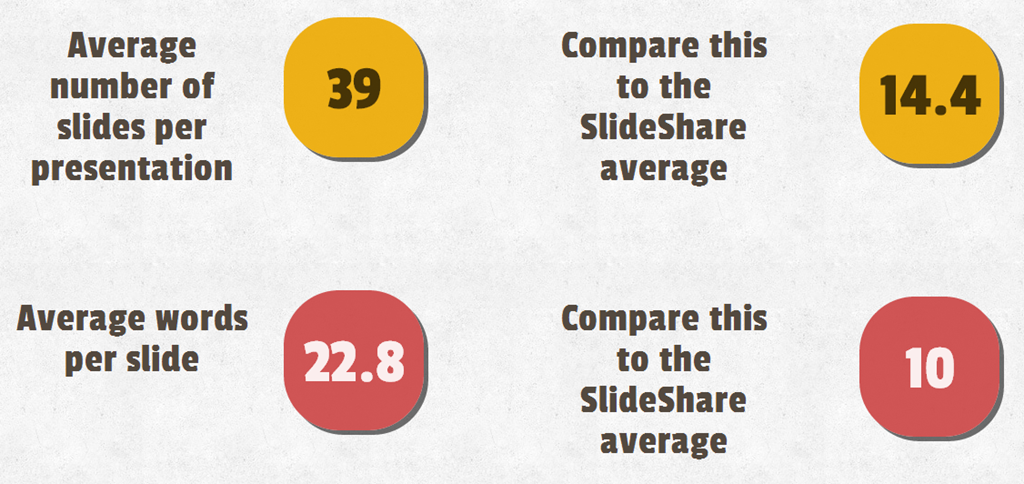
The Top 3% of Most Viewed on SlideShare in 2013!

image

Found out a couple of weeks back that my content just happens to be in the top 3% of content viewed on SlideShare in 2013! Pretty cool statistic. Click the link above to see what presentations were the most popular, and to browse my content on SlideShare.

image

image

White Paper – Office 365: Features, Benefits, and Considerations

imageI am pleased to announce the first in a series of white papers from Jornata on Future-Proofing your Business. The first in this series – Features, Benefits, and Considerations of Moving to Office 365 is now available on the Jornata website.

Please feel free to share with whomever you think may be interested in this topic, and watch this space, and the Jornata website for more white papers coming soon!

Boston Area SharePoint Users Group February 12th, 2014 Meeting

BASPUG_195square_initials

The Boston Area SharePoint Users Group (BASPUG) was founded to bring together like minds to network and share their experiences, triumphs, and tribulations around Microsoft SharePoint, to provide a community platform for Boston area SharePoint users, administrators, developers, architects, of all experience levels, even brand new to SharePoint, to share their knowledge with the community. We meet on the 2nd Wednesday of every month at the Microsoft New England Research and Development Center in Cambridge, MA.

Joel Oleson will be presenting "Your Yammer Enterprise Social Journey"
Session Abstract

So much to think about. In this session we’ll break it down. SharePoint 2013, Yammer and Office 365 product families bring new capabilities for content sharing, finding, organizing, and authoring. They also create new challenges. The move to the cloud and the integration of SharePoint and Yammer—the enterprise social network—have made this release very profound and disruptive to the business. In this session, we’ll dig into planning and strategy for social architectures around both business process and the technologies to help ensure compliance and success. Social enterprise technology is transformative and will lead to more agile business when used correctly but disaster and chaos when not used properly.

About Joel…

Blogger, traveller, and top social media influencer, Joel has built communities all over the world and travelled to over 140 countries since 2008, including keynotes on all continents. Joel is director of technical evangelism at ViewDo Labs, a social analytics platform. He was the first SharePoint administrator ever and spent seven years at Microsoft, including a few years on the SharePoint team. This past year, as a 13-year SharePoint veteran, he was awarded top SharePoint blog and #1 influencer in the community by Forbes study. Joel is co-founder of many community efforts—SPYam Yammer community (4500 members strong) and Sharing The Point (a community building and training group designed to help underserved countries). You can find his popular technical bog at http://www.collabshow.com and his travel blog at http://travelingepic.com and on Twitter: @joeloleson

MEETING SPONSOR – ViewDo Labs

ViewDo Labs offers a federated view of what’s happening with Yammer, SharePoint, Chatter, and other ESNs — across the enterprise, and around the world – so companies can increase adoption while lowering the risks of collaboration. Through our technology, we help organizations fuel innovation, better leverage their business data and intellectual property.

SUSTENANCE

Food and beverages will be provided at the meeting free of charge from our meeting sponsor. Food arrives at about 5:45. We generally have pizza (with and without meat), as well a salad, water, and sodas.

RAFFLE PRIZES

We will be handing out raffle tickets at the BASPUG meetings.

LOCATION

We will be meeting at Robert Half Technology, 125 High Street, 20th Floor, Boston MA 02110.

LINKED IN
Join our group on LinkedIn today to connect with the rest of the BASPUG members, and spread the word!

FACEBOOK
We are also on facebook! http://www.facebook.com/#!/pages/Boston-Area-SharePoint-User-Group/113652405354617

TWITTER
Follow news about the Boston Area SharePoint Users Group on twitter by following us@BASPUG, and by using the hashtag #BASPUG

WEB
Visit the Boston Area SharePoint Users Group website athttp://www.bostonsharepointug.org

ORGANIZERS
Event meetings are organized by Geoff Varosky of Jornata, Eugene Rosenfeld of Black Blade Associates, Dan Diachenko of UnoSquare, and Talbott Crowell of Third Millenium

Office 365 Admin App

imageOn November 21st, Microsoft announced the release of the Office 365 Admin App for Windows 8 phones, allowing administrators to check on the health status of their tenant while on the go.

As of December 12th, Microsoft quickly followed up with apps for both Android and iOS.

For Android (4.2.1 and up), download the app from Google Play.

For iOS 7, download the app from the Apple App Store.

Determining if You Are Using Office 365 After the Service Upgrade

Office 365 is continually being updated (based on their 90 day release schedule). Since Microsoft deploys updates in a phased manner, it can be difficult to tell if your tenant has been upgraded or not. To answer that question, Microsoft has put together a great reference on determining if you are running the latest Office 365 version. Below is a quick summary of the changes you can look for.

To read the full article, click here.

Additional References

Call for Speakers is Now Open for SharePoint Saturday Boston 2014!

It’s that time of year again, when we start to think about spring, and more importantly, SharePoint Saturday Boston!

I am pleased to announce that the call for speakers for SharePoint Saturday Boston 2014 is now open! We are beta testing the new SPSEvents website, so please report us any issues you encounter as well. Go here for more information on how to register to speak at the event: http://beta.spsevents.org/city/boston/april2014 

What’s SharePoint Saturday you ask? Go here to find out: http://beta.spsevents.org/about

Microsoft SkyDrive is now Microsoft OneDrive

In case you missed the news today, Microsoft SkyDrive will soon be renamed to Microsoft OneDrive, and OneDrive for Business (SkyDrive and SkyDrive Pro respectively). There are no major changes to note as of this point, but it is something to be aware of.

http://blogs.office.com/2014/01/27/skydrive-and-skydrive-pro-are-now-onedrive-and-onedrive-for-business/

As the post above notes, be sure to go to the Microsoft SharePoint Conference from March 3-6 in Las Vegas to see what is coming down the pipe for OneDrive.

If you cannot make it, be sure to follow my blog here, as I will be posting lots of information on SharePoint and Office 365 from the conference and following it.

Speaking at the Granite State SharePoint Users Group on February 21, 2013

Granite State SharePoint Users Group (GSSPUG) NHI am pleased to announce that I will be speaking again at the Granite State SharePoint Users Group on February 21, 2013. I will be presenting “Automating your Enterprise Application Deployments with PowerShell”

Session Abstract

In enterprise application deployments to SharePoint, there are generally farms, or web applications that host specific applications for specific groups, rather than having just an all-in-one deployment. Often times, you do not have access to these other environments, and will need to pass the deployment baton off to the system administrators of those farms.

This session will walk you through how you can deploy your applications, without needing to have the administrator who will be deploying the application, have to do much more than type a few keys into the SharePoint Administration Console and press enter – and having full configuration and deployment of your custom SharePoint applications to other environments.

Meeting Location

Eaton Richmond Center, Room 122 at Daniel Webster College, Nashua, NH

Meeting Time

6P – 8P

Meeting Registration

Click here to register: http://granitestatesharepoint.eventbrite.com/?ref=ebtn

User Group Information

For more information on the Granite State SharePoint Users Group, visit them at: http://www.granitestatesharepoint.org

Hope to see you there!

Speaking at SPTechCon San Francisco in March 2013

imageI have the privilege to announce that I will be presenting again in lovely San Francisco at The SharePoint Technology Conference on March 3-6th, 2013.

Information on the event and the sessions I will be presenting is below. I hope to see you there! San Francisco is a beautiful place, and I cannot wait to get back down (and over… diagonally really) there.


Event Description

SPTechCon: The SharePoint Technology Conference – is the largest independent SharePoint conference in the world – for IT professionals, business managers, analysts, and developers. Choose from more than 90 Classes and Workshops!!! Learn from the brightest minds in the SharePoint universe – more than 40 Expert Speakers and Microsoft MVPs! There’s a shortage of SharePoint experts! Develop your skills, and improve your own professional standing! "I would recommend SPTechCon to SharePoint admins and developers. By far the best Tech Event I have attended." Venki Oruganti , Software Developer – Pitney Bowes


Planning and Configuring Extranets in SharePoint 2010

Monday, March 4 – 11:15 AM – 12:30 PM

Most companies, large or small, require contact and collaboration with external entities, whether they are vendors, clients, or contractors. SharePoint gives us the ability to open up portals for collaboration with these external entities, and this session will show you how to accomplish this using SharePoint 2010.
We will review what is required to make SharePoint “open” to the external world and discuss scenarios regarding security and privacy. We will also walk through configuring Forms-Based Authentication, Claims-Based Authentication, as well as using Business Connectivity Services in SharePoint 2010 to authenticate and manage our external users. Once completing this session, you should have a firm grasp on how to configure an extranet environment using SharePoint 2010, as well as what should be considered during the planning of your extranet scenarios.

Level: Advanced
Topic Area: IT Pro Essentials

Automating Your Enterprise Application Deployments With PowerShell

Tuesday, March 5 – 4:00 PM – 5:15 PM

In enterprise application deployments to SharePoint, there are generally farms or Web applications that host specific applications for specific groups, rather than having just an all-in-one deployment. Oftentimes, you do not have access to these other environments, and will need to pass the deployment baton off to the system administrators of those farms.
This class will walk you through how you can deploy your applications—without needing to have the administrator who will be deploying the application—have to do much more than type a few keys into the SharePoint Administration Console and press enter, and having full configuration and deployment of your custom SharePoint applications to other environments.

Level: Advanced
Topic Area: IT Pro Essentials