Presentations from SharePoint Saturday New Orleans 3/24/12

Yes a month late… but, hey, it’s been a busy month!

Had a grand time in New Orleans – a well put on event as always, that I was happy to be a part of, in one of the greatest cities in the world.

http://www.sharepointsaturday.org/neworleans

Below are my two presentations from the event.

Planning and Configuring Extranets in SharePoint 2010


Creating Custom Actions in SharePoint 2010

Registration Open for SharePoint Saturday Boston – 4/28/12

I am pleased to announce that registration is now open for SharePoint Saturday Boston! Register today to reserve your spot. Registration is on a first-come, first-serve basis.

Event Details

SharePoint administrators, end users, architects, developers, and other professionals that work with Microsoft SharePoint Technologies will meet for the 5th SharePoint Saturday Boston event on Saturday, April 28th, 2012 at the Microsoft Office located at 201 Jones Road in Waltham, MA, 02451. SharePoint Saturday is an educational, informative, and lively day filled with sessions from respected SharePoint professionals and MVPs, covering a wide variety of SharePoint-orientated topics. SharePoint Saturday is FREE, open to the public and is your local chance to immerse yourself in SharePoint! Follow us on twitter @SPSBoston. Register today to reserve your spot before they are all gone.

Our sponsors will be providing breakfast, lunch, and a snack. Microsoft is providing the facility. Many other sponsors will be providing wonderful giveaways at the end of the day.

We have speakers from around New England plus speakers flying into Boston from around the globe to provide the best event for learning cutting edge skills and techniques for implementing SharePoint at your company. SharePoint Saturday is also a great way to network with like-minded professionals.

For up to date schedule and agenda see our web site at:

http://www.sharepointsaturday.org/boston

Don’t forget to print your ticket and bring it with you to the event in order to use the Rapid Registration Line.

When is SharePoint Saturday Boston?

Saturday, April 28th, 2012
8:00AM – 6:00PM

Where will SharePoint Saturday Boston be held?

SharePoint Saturday Boston will be held at the Microsoft Waltham office at 201 Jones Rd., Sixth Floor, Waltham, MA 02451 http://www.bing.com/maps/default.aspx?v=2&style=r&lvl=100&where1=201%20Jones%20Road%2CWaltham%2CMA%2C02451

Who is organizing this event?

Jornata, ThirdM, Microsoft, and Sympraxis Consulting

How do I register?

Registration is limited and based on first come first serve basis http://spsbos.eventbrite.com

Boston Area SharePoint Users Group March 14, 2012 Meeting

BASPUG_100square_initialsMarch 14th, 2012 Meeting Information – Waltham

The Boston Area SharePoint Users Group (BASPUG) was founded to bring together like minds to network and share their experiences, triumphs, and tribulations around Microsoft SharePoint, to provide a community platform for Boston area SharePoint users, administrators, developers, architects, of all experience levels, even brand new to SharePoint, to share their knowledge with the community. We meet on the 2nd Wednesday of every month at either the Microsoft New England Research and Development Center in Cambridge, MA, or at the Microsoft office in Waltham on Jones Road.

PRESENTER
The presenter for our next meeting is Jason Keller, President of TekDog Inc. He will be presenting "Building Out of the Box Business Solutions".

Session Abstract
Sometimes living in the box can be sexy too. SharePoint 2010 offers a powerful and flexible platform that can be quickly adopted to automate business processes without the need to write code. In this presentation TekDog’s own Jason Keller will walk through a client business problem and how TekDog solved the problem using native SharePoint functionality. This presentation will walk through the business problem and how to develop a quick solution in SharePoint using List, Libraries and Views.

About Jason
Jason Keller is the president of TekDog Inc., of Columbus, Ohio. Jason has over 14 years of experience in IT and has been working with Microsoft SharePoint technologies since 2001. Jason’s SharePoint experience includes roles as a Technical Instructor, Business Analyst, SharePoint Consultant, Project Manager and Solutions Architect. Jason also specializes in Business Process Automation and works on a daily basis with clients to understand their business needs to architect SharePoint and Workflow solutions that resolve business inefficiencies and bottlenecks. Jason has a deep passion for SharePoint technologies and for sharing the knowledge of how SharePoint can help businesses run more effectively and efficiently.

MEETING SPONSOR – F5 Networks
F5 Networks, the global leader in Application Delivery Networking (ADN), ensures the secure, reliable, and fast delivery of applications. F5’s framework enables innovation that helps organizations enhance IT agility. F5’s vision of unified application and data delivery redefines the management of resources, streamlining application delivery and reduce costs. For more information, visit www.f5.com.


RAFFLE PRIZES

We will be handing out raffle tickets at the BASPUG meetings.

LOCATION
We will be meeting at the Microsoft Waltham office, located on the 6th floor, at 201 Jones Road, Waltham, MA.

LINKEDIN
Join our group on LinkedIn today to connect with the rest of the BASPUG members and spread the word!

FACEBOOK
We are also on facebook! http://www.facebook.com/#!/pages/Boston-Area-SharePoint-User-Group/113652405354617

TWITTER
Follow news about the Boston Area SharePoint Users Group on twitter by following us @BASPUG, and by using the hashtag #BASPUG.

WEB
Visit the Boston Area SharePoint Users Group website at http://www.bostonsharepointug.org

Presentation from SharePoint Saturday Virginia Beach

A big thank you to the organizers, sponsors, and attendees of SharePoint Saturday Virginia Beach! The event was well put-on, and it is a great location, with a great layout! I cannot believe it took me 4 years to get down there, I wish I had gone much sooner!

I am looking forward to the next #SPSVB, but in the meantime, you can find my presentation from my session, Planning and Configuring Extranets in SharePoint 2010 below… please leave any questions you have in the comments!


Internet Explorer Registry Shortcuts for Enabling and Disabling Scripting Error Notifications

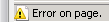
If you develop for websites, such as SharePoint, you probably are often enabling and disabling the Display a notification about every script error in Internet Explorer (especially version 9) often when testing and debugging JavaScript code in sites (see image below for reference).

SNAGHTML518bd738

While it is not the end of the world, it can be a few tedious extra clicks to enable and disable this as it is needed, as with IE9, it does not have the small icon with the Error on page text in the task bar like it did in previous versions, that will just allow you to click on it and view the error image.

To change this option in IE, you are required to go to Tools > Internet Options > Advanced > scroll down to Browsing, and check or uncheck this option.

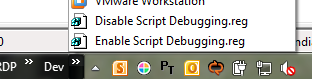
To save a few clicks to make my life easier, I’ve created two registry files to turn this option on and off, you can see them below, along with the contents of the file below if you would rather just copy and paste it into your own .reg file.

Disable Script Debugging.reg: https://skydrive.live.com/redir.aspx?cid=b06529fd3fc75473&resid=B06529FD3FC75473!1527&parid=B06529FD3FC75473!134

Windows Registry Editor Version 5.00

[HKEY_CURRENT_USER\Software\Microsoft\Internet Explorer\Main]
"Error Dlg Displayed On Every Error"="no"

Enable Script Debugging.reg: https://skydrive.live.com/redir.aspx?cid=b06529fd3fc75473&resid=B06529FD3FC75473!1526&parid=B06529FD3FC75473!134

Windows Registry Editor Version 5.00

[HKEY_CURRENT_USER\Software\Microsoft\Internet Explorer\Main]
"Error Dlg Displayed On Every Error"="yes"

Simple, but effective! I actually have a custom toolbar on my Windows 7 desktop that links right to here, to make them even easier to access:

image

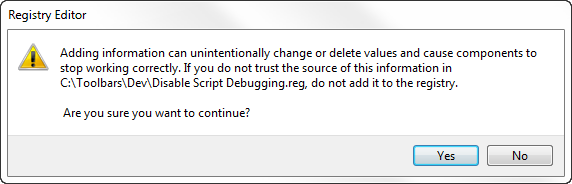
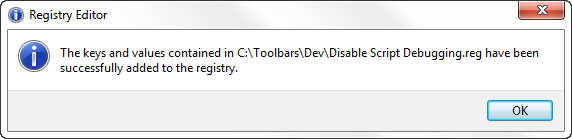
The one caveat however, is that you need to click on two confirmation boxes:

SNAGHTML5194f37e

SNAGHTML51952db0

I find this less intrusive to debugging than having to click through to the internet options screen, your mileage, however, may vary.

SharePoint Search and RTF File Indexing

image

Found out today while answering a #SPHelp question for my buddy Eric Harlan, that SharePoint 2010 does not natively index RTF files, it requires an iFilter.

Luckily, there is an easy answer to it, which came back in a Google Books preview of Pro SharePoint 2010 Search. Click the link for details – http://go.gvaro.net/tLqruO

I also learned that FAST search does however index RTF files by default, thanks to @NauplisTrevor

image

The good news is – you can still learn something new every day! And by all means, if you do learn something new about SharePoint, share it with the rest of the world by blogging, tweeting, or, the old school method of writing it in sidewalk chalk on your driveway (you may want to put a tarp over it if it rains however, as it will wash away. I found this out the hard way…).

The New England SharePoint Community List

New England is a bustling SharePoint community, and I am happy that I just happen to live in the area, and can experience most or all of what the New England area offers as far as SharePoint is concerned.

Since this is the season of giving, being the holidays and all, I thought this was a great time to inventory the resources in the New England area to allow people to give and to receive SharePoint community goodness. In building this list, I also learned that there are more SPUGs in New England that I did not even know existed – so I hope this does the same for you!

Please feel free to add to the comments on this post with any other resources I may have missed, I know I must have! Also please feel free to send any updates for information below. All group and event information has been culled from their respective websites and other various sources.

UPDATED 8/3/12:

  • Added Rhode Island SharePoint User Group
  • Removed New England Regional SharePoint User Group

UPDATED 2/6/13:

  • Added Women in SharePoint – Boston Chapter

UPDATED 4/18/14:

  • Removed Boston SharePoint Salon
  • Added Connecticut SharePoint Users Group
  • Added Boston Office 365 Users Group

Massachusetts

Boston Area SharePoint Users Group (BASPUG)

ABOUT: The Boston Area SharePoint Users Group (BASPUG) was founded to bring together like minds to network and share their experiences, triumphs, and tribulations​ around Microsoft SharePoint, to provide a community platform for Boston area SharePoint users, administrators, developers, architects, of all experience levels, even those brand new to SharePoint, to share their knowledge with the community. We (usually) meet the 2nd Wednesday of every month at either Microsoft’s New England Research & Development Center in Cambridge, MA, or at the Microsoft Office in Waltham at 201 Jones Road.

MEETING FREQUENCY: Monthly, second Wednesday of the month

MEETING LOCATION(S): Microsoft New England Research & Development Center (NERD), 1 Memorial Drive, Cambridge, MA and Microsoft Waltham, 201 Jones Road, 6th Floor, Waltham, MA

WEBSITE: http://www.bostonsharepointug.org

Boston Office 365 Users Group (BOS365)

ABOUT: The Boston Office 365 User Group is a community focused on sharing knowledge around Microsoft’s Office 365’s ever-growing, always changing suite of technologies. The group will focus on every level of interest, from those who are just “kicking the tires” to business users, Office 365 administrators and IT pros.

Discussions (and coming in May, meetings) will focus on every angle of the Microsoft platform, covering topics around Yammer, Exchange, Lync and SharePoint Online.

Topics may range from introductory sessions for new users — even experienced hands can pick up new tips and tricks — as well as more advanced technical subjects such as migrations strategies and integration. This is your group.

MEETING FREQUENCY: Monthly, third Thursday of the month

MEETING LOCATION(S): Microsoft New England Research & Development Center (NERD), 1 Memorial Drive, Cambridge, MA and Microsoft Waltham, 201 Jones Road, 6th Floor, Waltham, MA

WEBSITE: http://www.bostono365usergroup.com


SharePoint Saturday Boston (SPSBos)

ABOUT: SharePoint Saturday Boston is a free community‐focused SharePoint event dedicated to educating and engaging members of the local technical community. SharePoint Saturday draws upon the expertise of local SharePoint IT professionals, developers and solutions architects who come together to share their real world experiences, lessons learned, best practices, and general knowledge with other like‐minded individuals.

MEETING FREQUENCY: Yearly

MEETING LOCATION(S): Microsoft Waltham, 201 Jones Road, 6th Floor, Waltham, MA

WEBSITE: http://www.sharepointsaturday.org/boston

Women in SharePoint – Boston Chapter (WSPBos)

ABOUT: The purpose of the Women in SharePoint Boston chapter is to connect the many women in the New England area currently working with SharePoint. This group is also intended to build the SharePoint community alongside the other local SharePoint groups including the Boston Area SharePoint Users Group (BASPUG), the Granite State SharePoint Users Group, and local SharePoint Saturdays.

MEETING FREQUENCY: Monthly

MEETING LOCATION(S): Meadhall, 4 Cambridge Center, Cambridge, MA

WEBSITE: http://www.womeninspboston.com

The SharePoint Technology Conference (SPTechCon Boston)

ABOUT: The SharePoint Technology Conference is the world’s premier independent event for Microsoft Office SharePoint Server technology and services. The format includes 90+ technical classes, workshops and breakout classes with content geared to IT professionals, business managers and developers.  It features a top Microsoft MVPs, dozens of expert MS speakers and solutions from 50+ exhibitors.

MEETING FREQUENCY: Yearly

MEETING LOCATION(S): Various

WEBSITE: http://www.sptechcon.com

Connecticut

Connecticut SharePoint Users Group (CTSPUG)

ABOUT: ​Welcome to the Connecticut SharePoint Users Group (CTSPUG) a place for professionals to come together and share their successes, near-successes, and almost-successes with the Microsoft SharePoint Platform. Our goal is to replicate the magic of the Boston Area SharePoint Users Group with the scenic views and quaint New England charm of Hartford Connecticut.

We meet monthly at the Microsoft Farmington Office at 74 Batterson Park Road.

MEETING FREQUENCY: Monthly

MEETING LOCATION(S): Microsoft Farmington CT Office, 74 Batterson Park Rd, Farmington, CT

WEBSITE: http://www.ctspug.org

Fairfield County SharePoint Users Group (FCSPUG)

ABOUT: The mission of this group is to establish a local community for the FCSPUG members to discuss and collaborate on SharePoint best practices and evolving technologies. The vision is to empower the users with the resources and better understanding of how to build applications/solutions for their organizational needs leveraging Microsoft SharePoint.

MEETING FREQUENCY: Monthly, second Wednesday of the month

MEETING LOCATION(S): Bigelow Tea, 1 Constant Comment Way, Fairfield, CT

WEBSITE: http://www.sharepointusergroup.com/FCSPUG/

SharePoint Saturday Hartford (SPSHFD)

ABOUT: SharePoint Saturday Hartford is a free community‐focused SharePoint event dedicated to educating and engaging members of the local technical community. SharePoint Saturday draws upon the expertise of local SharePoint IT professionals, developers and solutions architects who come together to share their real world experiences, lessons learned, best practices, and general knowledge with other like‐minded individuals.

MEETING FREQUENCY: Yearly

MEETING LOCATION(S): New Horizons Learning, 340 West Newberry Road, Bloomfield, CT

WEBSITE: http://www.sharepointsaturday.org/hartford

New Hampshire

Granite State SharePoint Users Group (NHSPUG)

ABOUT: We’re about tip sharing and making connections in the industry without having to head south of the border.

MEETING FREQUENCY: Monthly, second Thursday of the month

MEETING LOCATION(S): Daniel Webster College, 20 University Drive , Eaton Richmond Center, Room 122, Nashua, NH

WEBSITE: http://www.granitestatesharepoint.org

SharePoint Saturday New Hampshire (SPSNH)

ABOUT: SharePoint Saturday New Hampshire is a free community‐focused SharePoint event dedicated to educating and engaging members of the local technical community. SharePoint Saturday draws upon the expertise of local SharePoint IT professionals, developers and solutions architects who come together to share their real world experiences, lessons learned, best practices, and general knowledge with other like‐minded individuals.

MEETING FREQUENCY: Yearly

MEETING LOCATION(S): Southern New Hampshire University (SNHU), Manchester, NH

WEBSITE: http://www.sharepointsaturday.org/nh

Vermont

Vermont SharePoint Users Group (VTSPUG)

ABOUT: The Vermont SharePoint Users Group is an open and independent forum for evaluating and extending the knowledge of the SharePoint Products and Technologies architecture, technologies, tools and business applications for its membership. Its purpose is to provide information and guidance to the full breadth of its capabilities.

MEETING FREQUENCY: Monthly

MEETING LOCATION(S): White River  Craft Center, 50 Randolph Avenue, Randolph, VT

WEBSITE: http://www.vermontspug.com

Maine

SharePoint User Group of Maine (SPUGME)

ABOUT: Swap tips and tricks with other local SharePoint professionals. Share problems and solutions at an old-school user group, meant to support everyone’s knowledge of this extensive application. Our goal is to bring the local SharePoint community together to share tips, tricks and ideas on the uses of the various SharePoint products and technologies.

MEETING FREQUENCY: Monthly

MEETING LOCATION(S): Winxnet Offices, 5th Floor, 84 Marginal Way, Portland, ME

WEBSITE: http://www.winxnet.com/spugme

Rhode Island

Rhode Island SharePoint User Group (RISPUG)

ABOUT: The Rhode Island SharePoint User Group (RISPUG) is a community based organization focused on driving awareness and support for the Sharepoint Community in Rhode Island and its surrounding areas.

MEETING FREQUENCY: Monthly, First Wednesday of the Month

MEETING LOCATION(S): Providence College, Moore Hall, Room 1, 1 Cunningham Plaza, Providence, RI

WEBSITE: http://www.meetup.com/RISPUG/

How much storage space is my site collection using?

NOTE: This post is just covering SharePoint 2010, and not earlier versions of the product.

imageA common question administrators have in their SharePoint environment is “How much storage space is my site collection using?”

Well, fear not, trusty SharePoint administrators! There are a few ways to skin this cat – and we’re going to take a look at them.


SharePoint Designer

SharePoint Designer – what was once something administrators and power users shuddered at the mere mention of the tool in prior versions of the product, has gotten a makeover. And, also has a lot of additional functionality. For today’s lesson however, we are only going to look at one specific feature of it – the ability to view the storage used for an entire site collection!

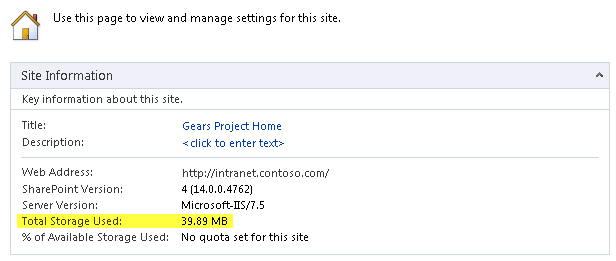
If you open up SharePoint Designer to the root site of your site collection, in the main window, once the site is opened under Site Information, you will see, as highlighted below, that it will conveniently display the Total Storage Used of your entire site collection! There! As the big red button on my desk often says after a good firm press… “That was easy!”.

image

Let’s look at a couple of other methods of getting this information, shall we?

StorMan.aspx – SharePoint 2010 Service Pack 1+

This one requires Service Pack 1 to be installed to be able to utilize this feature. It was not in the RTM version. At the root of your site collection, if you go to Site Actions > Site Settings > Site Collection Administration > Storage Metrics, this will give you details on the usage – such as what sites, lists, libraries, and items are taking up the most space, however, it will not give you a total like our trusty SharePoint Swiss Army Knife – SharePoint Designer does, but, it will allow you to drill down into the usage.

image

I will also urge you to view Bill Baer’s article on Storage Metrics in Service Pack 1 – which has some great screenshots of the functionality, as well as an overview, available here: http://blogs.technet.com/b/wbaer/archive/2011/06/28/service-pack-1-storage-metrics-storman-aspx.aspx

PowerShell

imagePowerShell, one of the other power tools in SharePoint 2010, much more akin to the Ginsu knife, can also serve up the details, and, like the Ginsu knife, allow you to slice and dice the information in a myriad of ways.

Below is an example script to connect to your site collection, and read out all of the usage information.

$site = Get-SPSite http://my.sitecollection.com
$site.Usage;
$site.Dispose();

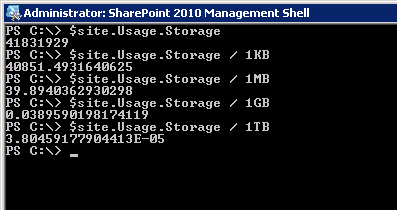
Which gives the following output (storage shown highlighted below in bytes):

image

To view just the Storage property, and not Bandwidth, Visits, Hits, and DiscussionStorage, you can call this:

$site = Get-SPSite http://my.sitecollection.com
$site.Usage.Storage;
$site.Dispose();

And only the Storage property with the total bytes will be displayed. You can also do some other cool tricks, such as calculating kilobytes, megabytes, gigabytes and terabytes right from the command line as well, to make the results a bit more readable:

image

Want more? OK! We can give it to you! Keep reading! (Because, reading is fundamental, you know.)

Web Analytics

Another option to view the storage used, as well as some additional metrics around it, if you have Web Analytics enabled, you can view your usage over time. To see this, go to Site Actions > Site Settings > Site Actions > Site Collection Web Analytics reports

image

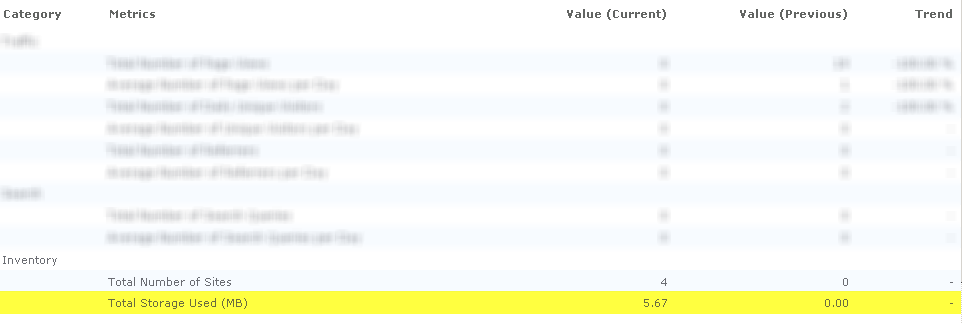
Once there, in the main screen, you can view a summary of the Total Storage Used under Inventory.

image

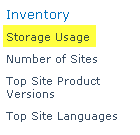
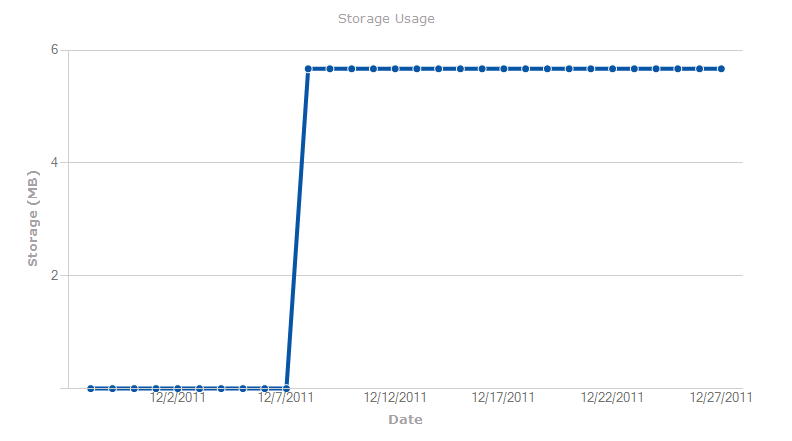
And if you click on Storage Usage under Inventory within the quick launch navigation on the left, you can then view reports on storage utilization for your site collection, with a graph of the values so you cane easily visualize the trend in storage usage.

image

image

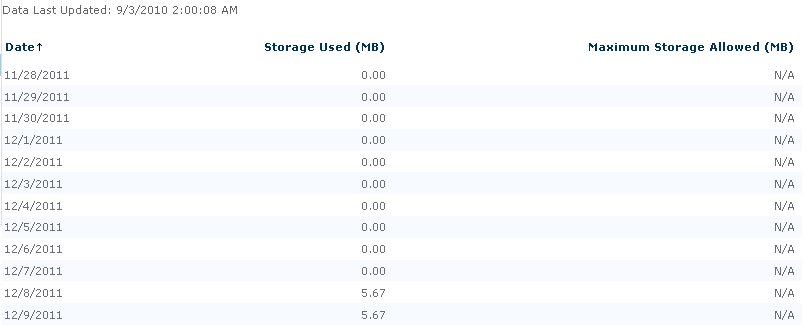
As well as a daily breakdown of the storage used, so you can see how this grows or falls over time.

image

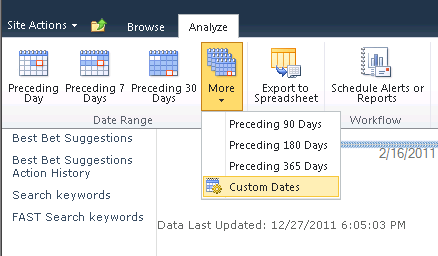
You can also run reports for any date range since Web Analytics have been enabled, as well as run workflows against this data for alerting and reporting.

image

I hope you were able to learn something new today… have another method in which you get your site collection storage metrics? Leave it in the comments below for everyone else!

Stay away from my search result pages [insert search engine name here] bot!!

imageNow, this is a bit overkill, but, there are almost as many different ways a search crawler makes use of a robots.txt file as there are search engines (this may be highly over-exaggerated, but anyways…).

Now, one thing you probably do not want with your public facing site, is for the search engine to waste it’s time crawling your search pages. You don’t exactly want a high page rank for your site’s search results, do you?

What to do, what to do?

Well, if your search results pages happen to live under /search/pages/results.aspx, here is an example. This again is a bit overkill, but it should get the job done. Now the search engines can focus on what you want to be getting searched for – your content!

Some search bots allow for wildcards, some are case insensitive, some are case sensitive – hence the number of variations below. Add this into your robots.txt, and you should be good to go.

Disallow: /search/pages/results.aspx
Disallow: /Search/Pages/Results.aspx
Disallow: /Search/Pages/results.aspx
Disallow: /Search/pages/Results.aspx
Disallow: /search/Pages/Results.aspx
Disallow: /search/pages/Results.aspx
Disallow: /Search/pages/results.aspx
Disallow: /search/Pages/results.aspx
Disallow: /search/
Disallow: /Search/
sallow: /search/pages/
Disallow: /Search/Pages/
Disallow: /Search/pages/
Disallow: /search/Pages/
Disallow: /*Results.aspx
Disallow: /*results.aspx

Any additions? Please share them here in the comments!

Office 365 + Outlook + My Site Social Connector – Hotfix Released 12/13/11!

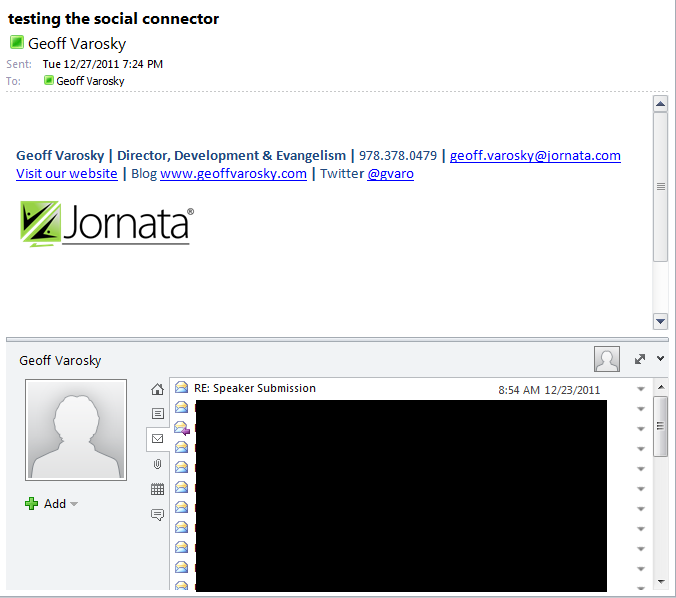
One of the features I have grown to love in Outlook 2010 is the Social Connector – that window below your emails which you can enable to view aggregations of social network updates (My Site, Facebook, LinkedIn, to name a few) as well as past conversations, calendar items, attachments, and more.

image

Up until this month however, if you were a user of Microsoft Office 365, then you could not connect to your My Site hosted on SharePoint Online, you would get this lovely error after entering in all of the credential information:

image

Being a user of Office 365 – this was an issue for me, especially since I use the Social Connectors in Outlook daily.

I am pleased to announce, that as of December 13th, 2011,  that it has finally been fixed! You can download and install the hotfix from here (Outlook x64 only): http://support.microsoft.com/kb/2597051/

Works perfectly now!