Planning and Configuring Extranets in SharePoint 2010–Part 1

extranetFor my SharePoint Saturday Boston session on April 9th, I will be delivering a presentation on Planning and Configuring Extranets in SharePoint 2010. As I am building up my virtual environment for this presentation, I thought I would also write a blog series on the subject. The abstract for the session is below, and, if you can make it to SharePoint Saturday Boston, I hope you’ll come and see the presentation.

Most companies, large or small, require contact and collaboration with external entities, whether they are vendors, clients, or contractors. SharePoint gives us the ability to open up portals for collaboration with these external entities – this session will show you how to accomplish this using SharePoint 2010.

We will review what is required to make SharePoint “open” to the external world, discuss scenarios regarding security and privacy, as well as walk through configuring Forms Based Authentication, Claims Based Authentication, as well as using Business Connectivity Services in SharePoint 2010, to authenticate, and manage our external users.

Once completing this session, you should have a firm grasp on how to configure an extranet environment using SharePoint 2010, as well as what should be considered during the planning of your extranet scenarios.

At the conclusion of this series, as well as after the presentation at SPS Boston, I will include my slide deck here, as well as links to the actual virtual environment I am creating for this via cloudshare, as well as follow-up answers to questions asked during the session. I am using this to build up the shareable version of my presentation, because, it doesn’t use any local resources, I can access it from anywhere, and, I can share it with an unlimited amount of people, and I can update it from time to time.

So, let’s get started. To give some background on what we are going to be accomplishing here as our end game – we are going to configure the SharePoint 2010 Information Worker image with FBA, using the ASP.NET membership database as our backend. As well as using some built-in and home-grown tools to manage those users.

So now, really this time, lets get started… oh wait, before I do, notice the two images that start off this blog post? get it? an “extra net”, hah! Wow, did I strike a funny bone on that one.

Ok, I am seriously serious about moving forward on this. Let’s go.

Creating the ASP.NET Membership Database

So, first, we will need to be able to authenticate users. In the imaginary (but none-the-less exciting!) extranet planning that took place for Contoso, we decided we wanted to not have our external users, our partners, to have Active Directory accounts. Sure, we can secure AD users, and create a sub-domain to support them, but, just in case, we want to make sure that with the username and password they are given, they cannot access any other resource at all, no matter what, within our organization. Even if they came into our office and plopped down onto a computer connected to our internal network, and started typing away. A SQL-based authentication source will guarantee that.

To do this, we are going to follow this resource here (http://go.gvaro.net/AN2Mbr) to create our authentication database (pay no attention to the fact that the content is outdated – it is not for our purposes!). If we visit that link, and scroll down to Using the SQLMemberShipProvider, and look at Step 2, we have the commands needed to configure our ASP.NET Membership Database.

aspnet_regsql.exe -E -S localhost -A -all

If you do not have aspnet_reqsql.exe in your path, it can be found in C:\Windows\Microsoft.NET\<FRAMEWORK VERSION>\<versionNumber>\aspnet_regsql.exe

image

This will create all of the tables needed (we might need roles, web part personalization, etc. so that is why I chose the “All” option. Information on all of the above options can be found here at the Creating the Application Services Database for SQL Server link from technet.

Once that completes, if you check SQL, you should have a new database named aspnetdb, as well as the tables.

image

And time to leave you hanging until Part 2… until then, stay tuned for more extranet fun in SharePoint 2010!

TEST OUT YOUR POWERSHELL SCRIPTS FIRST IN A NON-PRODUCTION ENVIRONMENT FIRST

You may be wondering why I applied such bad grammar to the title of this post, it came from a comment on this: https://www.nothingbutsharepoint.com/sites/itpro/Pages/Seven-Virtues-for-the-SharePoint-IT-Pro.aspx

PowerShell is a beast. Sure, it’s hard to learn the syntax, and there are 600+ commands that come along with SharePoint 2010. But, it also gives you direct access to the API for SharePoint. Never, ever, ever, ever, ever, ever, ever, ever, ever, ever, ever, ever, ever, ever, ever, under any circumstances what-so-ever, run un-tested PowerShell code in a production environment. ever. ever. ever. ever. ever. ever. ever. ever. ever. ever. ever. ever. ever. ever. ever.

What may have worked for one person, in which they have posted it on their blog, mailing list, or company-wide fax – it should be tested first, in a non-production environment.

It may work fine, sure, but, it may also grind everything to a halt, and end your career.

In closing, re-read the above, and make it your mantra. No go fourth, SharePoint admins (and devs – yes you too), and prosper.

Description Meta Tag in SharePoint Publishing Pages

I guess the title is a bit misleading, because in SharePoint 2007 and SharePoint 2010, the Description meta tag does not exist.

After a bit of googling on Bing, I came up with several free solutions people have written, such as Waldek Mastykarz Mavention Meta Fields, WCM Utilities on Codeplex, to name a few. But the solution I landed on was so simple, so easy, so perfectly perfect, I went with it. I found it here: http://social.msdn.microsoft.com/Forums/en/sharepointecm/thread/d3583140-62de-4e5d-9a84-d0a1f9bff08d

Buried as an unmarked answer, within this thread. This works for both SharePoint 2007, and 2010 publishing pages, and it works well. Below is the reply I am referencing. So, Praggers, whoever you are, thank you.

image

A note for 2010 (and possibly 2007, I did not take the 2 minutes it would require to find out, sorry!), the “Description” field’s internal name is Comments. So be sure to change FieldName=”Description” to FieldName=”Comments” within the code for your page layout.

Thank you Praggers!

Delete a master page in SharePoint using PowerShell

Had one of my group approach me today inquiring about deleting a master page from a site collection using PowerShell. Quick and simple way to do it…


   1: $web = Get-SPWeb "http://prototype"

   2: $lib = $web.GetFolder("_catalogs/masterpage")

   3: $file = $lib.Files["v4_copy(1).master"];

   4: $file.Delete();

   5: $web.dispose();


So I thought I would share. Enjoy!

Registration Open for SharePoint Saturday Boston – 4/9/11

I am pleased to announce that registration is now open for SharePoint Saturday Boston! Register today to reserve your spot. Registration is on a first-come, first-serve basis.

Event Details

SharePoint administrators, end users, architects, developers, and other professionals that work with Microsoft SharePoint Technologies will meet for the 4th SharePoint Saturday Boston event on Saturday, April 9th, 2011 at the Microsoft Office located at 201 Jones Road in Waltham, MA, 02451. SharePoint Saturday is an educational, informative, and lively day filled with sessions from respected SharePoint professionals and MVPs, covering a wide variety of SharePoint-orientated topics. SharePoint Saturday is FREE, open to the public and is your local chance to immerse yourself in SharePoint! Follow us on twitter @SPSBoston. Register today to reserve your spot before they are all gone.

Our sponsors will be providing breakfast, lunch, and a snack. Microsoft is providing the facility. Many other sponsors will be providing wonderful giveaways at the end of the day.

We have speakers from around New England plus speakers flying into Boston from around the globe to provide the best event for learning cutting edge skills and techniques for implementing SharePoint at your company. SharePoint Saturday is also a great way to network with like-minded professionals.

For up to date schedule and agenda see our web site at:

http://www.sharepointsaturday.org/boston

Don’t forget to print your ticket and bring it with you to the event in order to use the Rapid Registration Line.

When is SharePoint Saturday Boston?

Saturday, April 9th, 2011
8:00AM – 6:00PM

Where will SharePoint Saturday Boston be held?

SharePoint Saturday Boston will be held at the Microsoft Waltham office at 201 Jones Rd., Sixth Floor, Waltham, MA 02451

http://www.bing.com/maps/default.aspx?v=2&style=r&lvl=100&where1=201%20Jones%20Road%2CWaltham%2CMA%2C02451


Who is organizing this event?

ThirdM and Grace-Hunt

How do I register?

Registration is limited and based on first come first serve basis. http://spsboston.eventbrite.com

PerfomancePoint Dashboard Designer “Code blocks are not allowed in this file”

image

If you are configuring PerformancePoint in SharePoint 2010, and you are attempting to launch the Dashboard Designer ClickOnce application from the Business Intelligence Center site you have created, you may encounter this error. Some books and blog posts on the subject of configuring and running PerformancePoint services do not seem to touch on this – SharePoint by default, does not allow in-page code.

To get around this, you will need to modify the web.config file for the web application in which PerformancePoint lives, by inserting the following code in the <SharePoint><SafeControls><PageParserPaths> section as shown below.

<SharePoint>
  <SafeMode MaxControls="200" CallStack="false" DirectFileDependencies="10" TotalFileDependencies="50" AllowPageLevelTrace="false">
     <PageParserPaths>
       <PageParserPath VirtualPath="/BICenter/Pages/ppssample.aspx" CompilationMode="Always" AllowServerSideScript="true" />
     </PageParserPaths>
  </SafeMode>
</SharePoint>


Where the VirtualPath listed above is the relative URL to the ppsample.aspx page within your BI Center.

SharePoint Site Collection backup failed–site left locked.

Ran into an issue the other day. Was running a site collection backup from Central Administration, when it just flat out failed with a generic error. Didn’t think much of it, until a user could not add any data, nor see the Site Actions menu within a site under that site collection.

image

I started to investigate – all signs pointed to the content database being locked, but no matter where I looked, I was unable to find just where it was locked up.

First, in Central Administration, I checked to see the status of the site collection. This can be found under Application Management > Site Collections > Configure quotas and locks

image

The site collection was showing as "Not locked”.

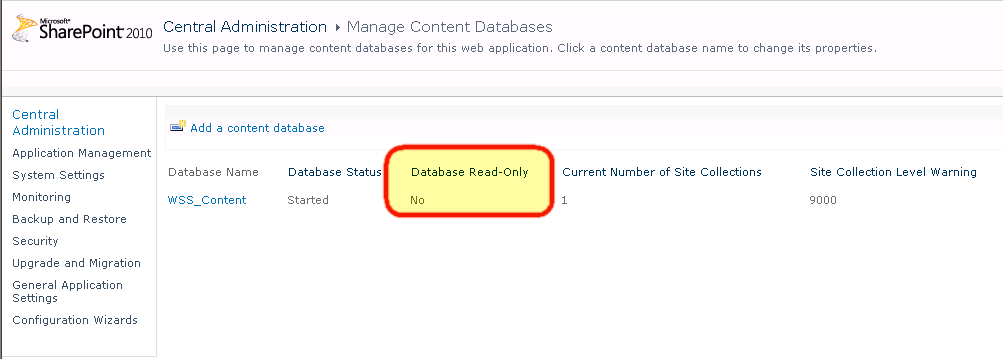
Then, while in Central Admin, I checked to see if the database itself was locked. Under Application Management > Manage content databases
image

As you can see above – it was not Read-Only.

I then took a look at the database, seeing if it was set to single user, read-only, or if the database was not in ‘NORMAL’ state.

image

Everything looked fine here. I did some troubleshooting, and could not find the source of the problem. So, I threw out an #SPHelp request on twitter, and sure enough, twitter saves the day again. Sean McDonough (@spmcdonough) replied with the following suggestion.

image

This is the STSADM equivalent of setting the site collection lock status under Application Management > Site Collections > Configure quotas and locks which we first looked at. I set the database read-only. And then set it back to none, and everything was back and working again! Thanks Sean!

image

So, in closing, this post has two objectives to it. Number 1 is to show you where you can check/set lock statuses for site collections and content databases. And number 2, if you encounter the same issue I did, how to resolve it, so hopefully after a bit of searching if you run into this error, you can save some sweat and hair, and get your site collection back up and functional.

And then plan to perform the site collection backup off-hours, just in case 🙂

SPTechCon 2011 San Francisco Recap and Slides

M5
 
Need I say more? I had never been out to San Francisco before, so, I had a couple of chances to get out and explore the city. Knocking off the following on my trip:
  • M5 Industries (Mythbusters!)
  • The Winchester Mystery House
  • Fisherman’s Wharf
  • The Golden Gate Bridge
  • Marin Headlands
    • WWII-era forts
  • Lombard Street
  • Alcatraz
Oh right, and also, there was this SharePoint Technology Conference going on. SPTechCon San Francisco was a great conference. Kudos to the BZ Media Team again for putting on one heck of a show!
 
I had a great time meeting new speakers, vendors, and attendees, as well as catching up with old friends, as well as go to a few great sessions.
 
A big thank you needs to go out to SPTechCon for having me there, as well as to all of the attendees of my sessions. Thank you for coming and hearing what I had to say, as well as hopefully learning a thing or two.
 
Below are my decks (WordPress does not incorporate these too good from slideshare, so please follow the links) from both of my sessions.


Just Freakin’ Work! Overcoming Hurdles and Avoiding Pain – Co-Presented with Mark Rackley


Creating Custom Actions in SharePoint 2010

 
Any questions or comments on the material from the conference – as well as any feedback from the session (please!), please leave it in the comments!

SharePoint Saturday Hartford Recap and Session Materials

altI was pleasantly surprised when about a week or so before SharePoint Saturday Hartford came around on January 29th, to hear the news that the event had sold out! We have had lots of success with SharePoint Saturday Boston, however, I was unsure if this was going to be overkill for the region, if it would all be SPS Boston attendees looking for their “fix” between our 6-8 month cycle there of events, I honestly was not sure what to expect, but, wanted to help get it going anyways, so I offered up Grace Hunt to sponsor the event.

And what a great event it was! Over 150 people attended, plus speakers and sponsors, which, by the size of the venue, was a perfect amount to fit in there comfortably. I made some great new connections with speakers and attendees alike, and had a chance to spend some time with some old friends.

165538_10150133897807642_612892641_8214470_4415448_nI presented two sessions at this event, and also helped out in our vendor-led session at lunch time.

My first session of the day was on “Creating Custom Actions in SharePoint 2010”. I had a great group in the room, which asked some very good questions, and even dealt fine with the State Service in one of my demonstrations was broken, so I could not complete a custom action running a workflow (sorry about that!)

Thank you to all my attendees for that session, and even more importantly, having some fans of the Hartford Whalers in there. Below is my slide deck from my Custom Actions presentation.

My next session was done with Tim Farrell, also of Grace Hunt. We presented “Building a Custom Solution from the Ground Up” Since Tim did most of the heavy lifting in this session – I’ll refer to his blog for the session materials (Permalink to SPS-Hartford Presentation pt1 – The Beginning).

A big thanks to SB Chattergee, Talbott Crowell, Pradeepa Siva, and Bob Ohlheiser for putting together this great event, all of the attendees and sponsors of SharePoint Saturday Hartford, and the Grace Hunt team that made it to the event!

Helpful Resources for Troubleshooting Issues with Membership Providers in SharePoint

When configuring membership providers for Forms Based Authentication in SharePoint – you often run into some troubles. These are just a couple of links that I have found useful in the past to assist in the configuration process.