Registration open: Boston SharePoint Users Group August 8th Meeting

BASPUG_195square_initialsThe​ Boston Area SharePoint Users Group (BASPUG) was founded to bring together like minds to network and share their experiences, triumphs, and tribulations around Microsoft SharePoint, to provide a community platform for Boston area SharePoint users, administrators, developers, architects, of all experience levels, even brand new to SharePoint, to share their knowledge with the community. We meet on the 2nd Wednesday of every month at either the Microsoft New England Research and Development Center in Cambridge, MA, or at the Microsoft office in Waltham on Jones Road.

PRESENTER
The presenter for our next meeting is Christian Buckley, a SharePoint MVP and Director of Product Evangelism for Axceler. He will be presenting "Building End User Productivity into your SharePoint Planning".

Session Abstract
SharePoint Myth #1 is that out of the box will give you everything your teams need to be productive. SharePoint Myth #2 is that you need to customize to make your teams productive. But how can this be? While these things may sound mutually exclusive, the real problem is your approach to solving your business problems. Far too many SharePoint plans begin with a specific outcome in mind (deploy SharePoint) rather than a clear picture of the business problems to be solved. When you understand the business problems, you can begin to plan out your solutions. This session will outline some of the leading productivity solutions in SharePoint 2010 (with a peek into 2013) and cover some planning best practices to help your team get more out of SharePoint – more quickly.

About Christian
Christian Buckley is Director of Product Evangelism for Axceler, where he drives partner and community development. Christian previously worked at Microsoft as a Senior Program Manager on the enterprise hosted SharePoint platform team (now part of BPOS), and also managed an engineering team in advertising operations. Prior to Microsoft, Christian was managing director of a regional consulting firm in the San Francisco East Bay, participated in several startups, and worked with IBM, HP, Cisco, Matsushita, Solectron, Seagate and other large hi-tech and manufacturing firms to deploy collaboration and supply chain solutions. He is co-author of three books on IBM Rational Software configuration management and defect tracking solutions, and can be found online at www.buckleyplanet.net and www.twitter.com/buckleyplanet

MEETING SPONSOR – K2
K2® offers three software products to help you increase business efficiency and simplify work. K2’s visual tools allow people of various technical and non-technical backgrounds to create applications that automate processes and streamline operations. And when something in the business changes, modifying the applications to keep up is easy.

K2 tools are built on Microsoft technology and because K2 users actually complete work in the Microsoft programs they already know — like SharePoint and Visual Studio — little training is required and user buy-in is quick. In fact, K2 provides more Microsoft integration points than any other software product in the space.

SUSTENANCE
Food and beverages will be provided at the event. Pizza generally arrives 15 minutes before the start of the meeting.

RAFFLE PRIZES

We will be handing out raffle tickets at the BASPUG meetings.

LOCATION
We will be meeting at the Microsoft New England Research and Development center at One Memorial Drive, Cambridge, MA.

LINKED IN
Join our group on LinkedIn today to connect with the rest of the BASPUG members, and spread the word!

FACEBOOK

We are also on facebook! http://www.facebook.com/#!/pages/Boston-Area-SharePoint-User-Group/113652405354617

TWITTER
Follow news about the Boston Area SharePoint Users Group on twitter by following us @BASPUG, and by using the hashtag #BASPUG

WEB
Visit the Boston Area SharePoint Users Group website at http://www.bostonsharepointug.org

ORGANIZERS
Event meetings are organized by Geoff Varosky of Jornata, Eugene Rosenfeld of Black Blade Associates, Dan Diachenko of Baufest, and Talbott Crowell of Third Millenium

Registration open: Boston SharePoint Users Group July 24th Meeting

The​ Boston Area SharePoint Users Group (BASPUG) was founded to bring together like minds to network and share their experiences, triumphs, and tribulations around Microsoft SharePoint, to provide a community platform for Boston area SharePoint users, administrators, developers, architects, of all experience levels, even brand new to SharePoint, to share their knowledge with the community. We meet on the 2nd Wednesday of every month at either the Microsoft New England Research and Development Center in Cambridge, MA, or at the Microsoft office in Waltham on Jones Road.

Meeting Information

ABSTRACT

The SharePoint Technology Conference is back in town, and we will once again be co-hosting our meeting with them and the Granite State SharePoint Users Group at the conference.

This process involves two registrations – one here through EventBrite so that we can track how many people are planning to attend, as well as registration with SPTechCon.

To be able to attend, you MUST register through the SPTechCon site here:
https://www.cvent.com/events/sptechcon-boston-2012/registration-814c3acf95db4758b4b7fd5d51734b1a.aspx

And you must select EXHIBIT HALL ADMISSION ONLY through that link. This will be a free registration. If you do not do this, the SPTechCon staff WILL turn you away.

PRESENTERS

We will have a panel of speakers on general SharePoint topics. We will update the list on our site as the event draws closer.

MEETING SPONSOR – The SharePoint Technology Conference (SPTechCon) www.sptechcon.com

The SharePoint Technology Conference, July 22-25 in Boston, is the world’s premier independent event for Microsoft Office SharePoint. The format includes 90+ technical classes, workshops and breakout classes with content geared to IT professionals, business managers and developers. It features top Microsoft MVPs, dozens of expert MS speakers and solutions from 50+ exhibitors (exhibits admission is FREE!). Boston SPUG members and newsletter subscribers can receive a $200 discount off either the 4-day or 3-day pass by inserting the code SPUG when prompted on the eRegistration page linked from www.sptechcon.com.

SUSTENANCE

Join the conference at 5:15PM on July 24th for free food and drinks at the SPTechCon attendee exhibit reception.

MEETING TIME

The BASPUG panel will be from 7PM to 9PM in the Staffordshire room.

RAFFLE PRIZES

We will be handing out raffle tickets at the BASPUG meetings.

LOCATION

We will be meeting at the The Westin Copley Place Hotel, located at 10 Huntington Avenue, Boston, MA. For more information on the facility, as well as directions, please visit here: http://www.sptechcon.com/Boston2012/hotelandtravel.html

LINKED IN

Join our group on LinkedIn today to connect with the rest of the BASPUG members, and spread the word!

FACEBOOK

We are also on facebook! http://www.facebook.com/#!/pages/Boston-Area-SharePoint-User-Group/113652405354617

TWITTER

Follow news about the Boston Area SharePoint Users Group on twitter by following us @BASPUG, and by using the hashtag #BASPUG

WEB

Visit the Boston Area SharePoint Users Group website at http://www.bostonsharepointug.org

ORGANIZERS

Event meetings are organized by Geoff Varosky of Jornata, Eugene Rosenfeld of Black Blade Associates, Talbott Crowell of Third Millenium, and Dan Diachenko of Baufest.

SharePoint 2013 Preview – First Look – SharePoint…went metro.

While playing around with a cloudshare 2013 Preview environment, the first thing we see is Central Administration when we log in to this pre-configured environment.

First things first – SharePoint went Metro. Sure it is not all tiles, but the theme definitely went that direction. The CA quick launch menu and action groups are exactly the same as SharePoint 2010 – so no new big changes there.

image

The Ribbon got a minor cosmetic facelift, with fancy drop-in and out effects, but, not too much different there as well.

image

Some bigger changes however right off the bat… are the links and new icons available in the upper-right hand corner.


Newsfeed

image

The Newsfeed takes you to your profile page newsfeed. SharePoint 2013 definitely has a lot more “social” functionality to it, such as following people, sites, documents, and tags.

image


SkyDrive

image

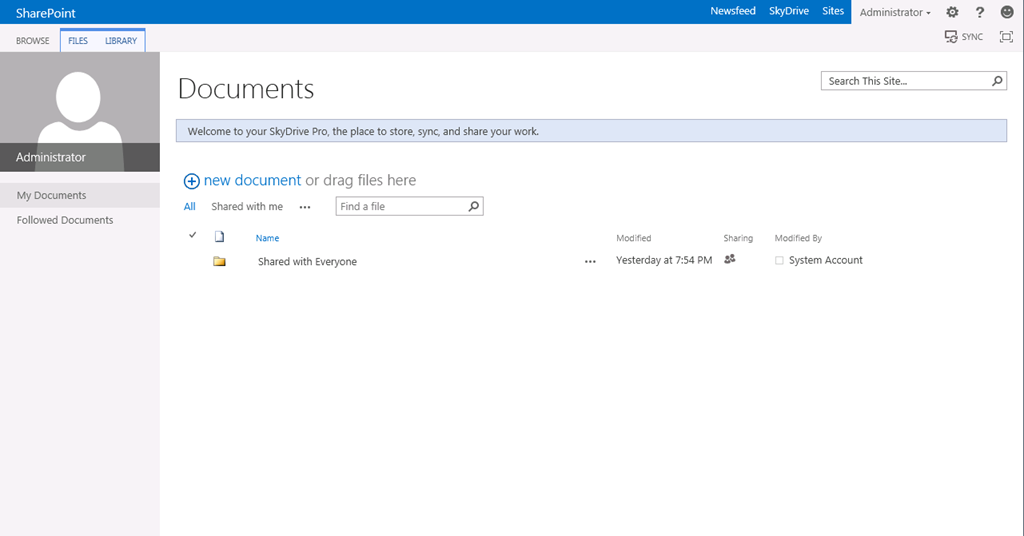
The SkyDrive link, basically is your documents from your My Site. My guess here is that this can be synced to a Windows Live SkyDrive, because they are using the same naming convention.

image

One thing to note however… is the ability to drag files right onto the UI, without needing to any additional work. I see that has a huge timesaver, and painkiller for a lot of users.

When you drag a file in, it brings up a drop-zone which you can easily add files to the library:

image

What would SharePoint be without an error though?

image

Much prettier than the BIG BLANK WHITE SCREEN OF ERROR in SharePoint 2010, and definitely better than 2007.


Welcome Menu

image

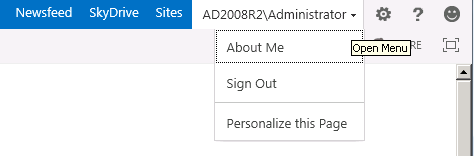
Next is the welcome menu… blah blah blah…

what I find more interesting is what comes next.


The settings wheel/cog thingy

image

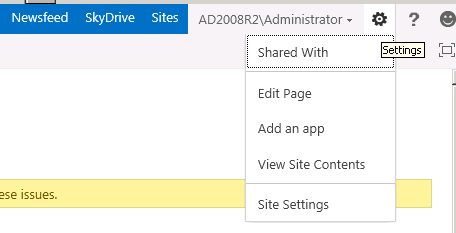
Edit Page – simple and easy enough. Does not appear much has changed there.

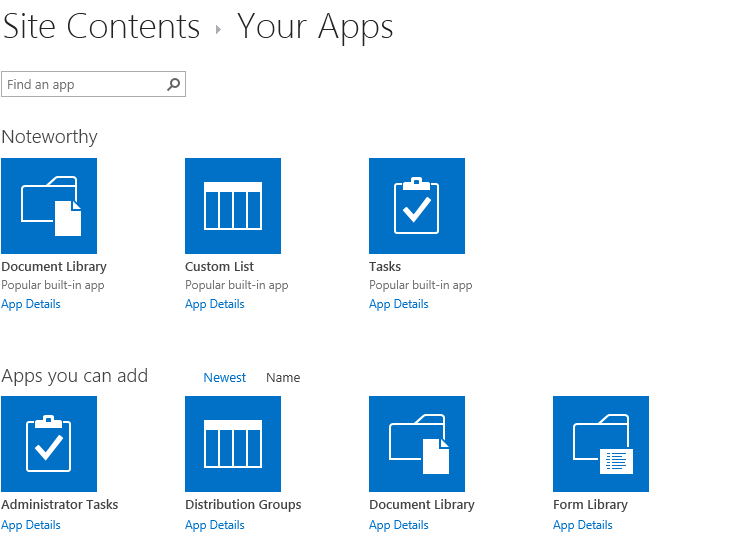
Add an app –  great! We now have apps… in SharePoint. Yay.

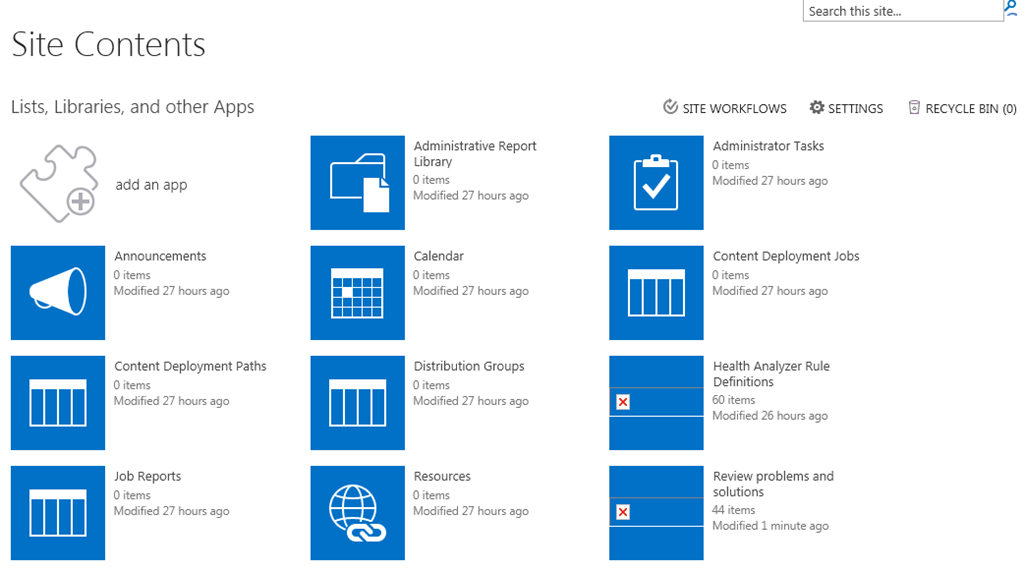
View Site Contents and Site Settings – Finally, they have been able to simplify the menus down to 1! Only took a few versions of the product for this to happen! Those are exactly what they were in 2010. Except for this… that nice grid view we had in 2010, 2007, 2003… is now… tiles.

image

Not that psyched about it. I loved the breakdown by list/library type. Now they are all just different “apps”.

Clicking on Add an app (great icon, I am puzzled too why they went with “apps” – oh right! buzzword! Worked for that company that is the name of a tasty fruit….)

Give you a long list of tiles again… I liked where Microsoft went with the Silverlight controls in 2010 for adding lists/libraries, searching, filtering… but, am not impressed by the tile view… makes creating lists and libraries more difficult and less user friendly IMHO… but that’s just me.

image

and once we are in there… I noticed one other thing… The SharePoint Store!

image

Seems they need to work on this… could just be the preview, or the preconfigured image I am using… but, it appears broken, but, there is a 2010 logo on there 🙂

image


Senor Smiley

The smiley face, that’s for sending feedback on the beta. I plan to use that. a lot.

image


Sharing is caring, and also a headache for administrators

image

Our next icon to poke at is the Share icon. This allows you to invite people to content, sites, etc. Now. This is a good thing – allows you to easily share content with others. This is also a bad thing. I am guessing you (hopefully – oh please god say its so) need proper permissions to give access… and if that is the case, that is great. But, if not, and anyone with contribute permissions can invite everyone to everything – permission management will become a nightmare. We’ll see how that pans out…


Focus Danielson… Focus

image

This hides the quick launch. ‘Nuff said.

Until next time… when I get a chance to show off some more stuff….

image

SharePoint 2013 Preview now available!

In case you live under a rock and have NOT heard the news, as of yesterday, the public beta preview for SharePoint 2013 is now available!

Download it here, along with finding out more information on the next release!

http://technet.microsoft.com/en-US/evalcenter/hh973397.aspx?wt.mc_id=TEC_121_1_33

Also, if you are attending SPTechCon in Boston next week, be sure to swing by the BASPUG meeting on 7/24 from 7P-9P in the Staffordshire room at the conference for a panel on what’s new in SP15! Come loaded with your questions!

Encoding Encoded Characters in XSLT for Deployment

Let’s say you are deploying out some pages, which may include some custom forms out to a list. In that case, it is pretty straight forward (example: http://www.3guysonsharepoint.com/?p=1004), just do a find and replace in your XLST for < and >, and replace with &lt; and &gt; respectively, paste it within the XSL property (<property name="Xsl" type="string">).

One thing that may trip you up, is if you actually need to keep a < or > sign in your XSLT – but, you cannot deploy the code with that, or else you’ll run into issues…

The fix? Quite simple, just encode the encoded characters, changing the ampersand (&) to &amp;lt; and &amp;gt;, also respectively.

Presentations from SharePoint Saturday New Orleans 3/24/12

Yes a month late… but, hey, it’s been a busy month!

Had a grand time in New Orleans – a well put on event as always, that I was happy to be a part of, in one of the greatest cities in the world.

http://www.sharepointsaturday.org/neworleans

Below are my two presentations from the event.

Planning and Configuring Extranets in SharePoint 2010


Creating Custom Actions in SharePoint 2010

Registration Open for SharePoint Saturday Boston – 4/28/12

I am pleased to announce that registration is now open for SharePoint Saturday Boston! Register today to reserve your spot. Registration is on a first-come, first-serve basis.

Event Details

SharePoint administrators, end users, architects, developers, and other professionals that work with Microsoft SharePoint Technologies will meet for the 5th SharePoint Saturday Boston event on Saturday, April 28th, 2012 at the Microsoft Office located at 201 Jones Road in Waltham, MA, 02451. SharePoint Saturday is an educational, informative, and lively day filled with sessions from respected SharePoint professionals and MVPs, covering a wide variety of SharePoint-orientated topics. SharePoint Saturday is FREE, open to the public and is your local chance to immerse yourself in SharePoint! Follow us on twitter @SPSBoston. Register today to reserve your spot before they are all gone.

Our sponsors will be providing breakfast, lunch, and a snack. Microsoft is providing the facility. Many other sponsors will be providing wonderful giveaways at the end of the day.

We have speakers from around New England plus speakers flying into Boston from around the globe to provide the best event for learning cutting edge skills and techniques for implementing SharePoint at your company. SharePoint Saturday is also a great way to network with like-minded professionals.

For up to date schedule and agenda see our web site at:

http://www.sharepointsaturday.org/boston

Don’t forget to print your ticket and bring it with you to the event in order to use the Rapid Registration Line.

When is SharePoint Saturday Boston?

Saturday, April 28th, 2012
8:00AM – 6:00PM

Where will SharePoint Saturday Boston be held?

SharePoint Saturday Boston will be held at the Microsoft Waltham office at 201 Jones Rd., Sixth Floor, Waltham, MA 02451 http://www.bing.com/maps/default.aspx?v=2&style=r&lvl=100&where1=201%20Jones%20Road%2CWaltham%2CMA%2C02451

Who is organizing this event?

Jornata, ThirdM, Microsoft, and Sympraxis Consulting

How do I register?

Registration is limited and based on first come first serve basis http://spsbos.eventbrite.com

Boston Area SharePoint Users Group March 14, 2012 Meeting

BASPUG_100square_initialsMarch 14th, 2012 Meeting Information – Waltham

The Boston Area SharePoint Users Group (BASPUG) was founded to bring together like minds to network and share their experiences, triumphs, and tribulations around Microsoft SharePoint, to provide a community platform for Boston area SharePoint users, administrators, developers, architects, of all experience levels, even brand new to SharePoint, to share their knowledge with the community. We meet on the 2nd Wednesday of every month at either the Microsoft New England Research and Development Center in Cambridge, MA, or at the Microsoft office in Waltham on Jones Road.

PRESENTER
The presenter for our next meeting is Jason Keller, President of TekDog Inc. He will be presenting "Building Out of the Box Business Solutions".

Session Abstract
Sometimes living in the box can be sexy too. SharePoint 2010 offers a powerful and flexible platform that can be quickly adopted to automate business processes without the need to write code. In this presentation TekDog’s own Jason Keller will walk through a client business problem and how TekDog solved the problem using native SharePoint functionality. This presentation will walk through the business problem and how to develop a quick solution in SharePoint using List, Libraries and Views.

About Jason
Jason Keller is the president of TekDog Inc., of Columbus, Ohio. Jason has over 14 years of experience in IT and has been working with Microsoft SharePoint technologies since 2001. Jason’s SharePoint experience includes roles as a Technical Instructor, Business Analyst, SharePoint Consultant, Project Manager and Solutions Architect. Jason also specializes in Business Process Automation and works on a daily basis with clients to understand their business needs to architect SharePoint and Workflow solutions that resolve business inefficiencies and bottlenecks. Jason has a deep passion for SharePoint technologies and for sharing the knowledge of how SharePoint can help businesses run more effectively and efficiently.

MEETING SPONSOR – F5 Networks
F5 Networks, the global leader in Application Delivery Networking (ADN), ensures the secure, reliable, and fast delivery of applications. F5’s framework enables innovation that helps organizations enhance IT agility. F5’s vision of unified application and data delivery redefines the management of resources, streamlining application delivery and reduce costs. For more information, visit www.f5.com.


RAFFLE PRIZES

We will be handing out raffle tickets at the BASPUG meetings.

LOCATION
We will be meeting at the Microsoft Waltham office, located on the 6th floor, at 201 Jones Road, Waltham, MA.

LINKEDIN
Join our group on LinkedIn today to connect with the rest of the BASPUG members and spread the word!

FACEBOOK
We are also on facebook! http://www.facebook.com/#!/pages/Boston-Area-SharePoint-User-Group/113652405354617

TWITTER
Follow news about the Boston Area SharePoint Users Group on twitter by following us @BASPUG, and by using the hashtag #BASPUG.

WEB
Visit the Boston Area SharePoint Users Group website at http://www.bostonsharepointug.org

Presentation from SharePoint Saturday Virginia Beach

A big thank you to the organizers, sponsors, and attendees of SharePoint Saturday Virginia Beach! The event was well put-on, and it is a great location, with a great layout! I cannot believe it took me 4 years to get down there, I wish I had gone much sooner!

I am looking forward to the next #SPSVB, but in the meantime, you can find my presentation from my session, Planning and Configuring Extranets in SharePoint 2010 below… please leave any questions you have in the comments!


SharePoint Search and RTF File Indexing

image

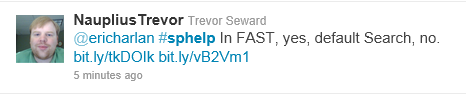
Found out today while answering a #SPHelp question for my buddy Eric Harlan, that SharePoint 2010 does not natively index RTF files, it requires an iFilter.

Luckily, there is an easy answer to it, which came back in a Google Books preview of Pro SharePoint 2010 Search. Click the link for details – http://go.gvaro.net/tLqruO

I also learned that FAST search does however index RTF files by default, thanks to @NauplisTrevor

image

The good news is – you can still learn something new every day! And by all means, if you do learn something new about SharePoint, share it with the rest of the world by blogging, tweeting, or, the old school method of writing it in sidewalk chalk on your driveway (you may want to put a tarp over it if it rains however, as it will wash away. I found this out the hard way…).