Secure Your SharePoint Extranet!

Or any extranet really… I presented tonight at the Baltimore SharePoint Users Group on Planning and Configuring Extranets in SharePoint 2010, and had the idea to make a quick post like this.

If you are opening your organizations virtual doors to the outside world, please, please,  PLEASE, only open up port 443, and use a secure certificate (or Secure Sockets Layer certificate), a/k/a, SSL certificate, to secure it.

Even if you do not have anything resembling a budget – you can still be secure. GoDaddy offers SSL certificates for as little as $12.99 – just use this link.

Why? Well… take this scenario. Say you are connecting to your extranet from a café, and they do not have a secure WiFi setup, and you can just connect and browse. I bet you that somewhere in there, there is some pimply kid with his Macbook his parents bought him, in his Misfits T-Shirt, sniffing the unsecured WEP network, and watching you log into your Forms Based Authentication extranet, over an unencrypted port 80. Not only does he see the URL you are visiting, and your username and password. He can also see everything you do. Confidential documents, payroll information – you name it. And there you go, your company’s data has been breached.

Now, if you take the extra time, and spend a few dollars – this would not have happened. SSL encrypts the connection from the end user’s browser, all the way to the server, so all the pimply faced hacker would see is just gobbledygook.

So a login session may just look like this (encrypted using SSL):

OIHP(@Q*YPR*Y@*(Y@C*(YR(*@YUP&@G&*T(*@&^$&@()&*CNHUSHLKSJLSHGLRWCTBLSUGL*r(*n^N(*#9693r562095876209387652097cUYTOIWESOFIY#3tyiuGi IWOLIWJdILW#T&@RLIU@HDIWUYR(Q*&#@yrOiu32H  lu hr*#@y*ry b@r*hsdiu wOIU8H9WQ83H RL iuliug # iqq&*g(iU3RG qiu

That looks a lot better than this (unencrypted – not using SSL):

http://intranet.mytopsecretcompany.comJohnSmithPass@word1secretdocument1.txt012-34-5678

While I do not have specific details, certificate providers also can actually insure your SSL certificates, in case a data breach does take place. GoDaddy, Network Solutions, GeoTrust, Thawte, etc. Look around, find what is right for you. And secure your extranet. Not tomorrow, but NOW. Pay for some security, it is worth it to pay money up front and be secure, than be involved in lawsuits, and corporate losses, all due to a yearly fee of up to a couple of hundred dollars. Protect your company, protect yourself, and protect your clients.

Boston SharePoint Salon–Power View and Visualization

The Boston Area SharePoint Users Group, SharePoint Saturday Boston, and The SharePoint Technology Conference Boston. We have a lot of SharePoint around here. And just when you think that there cannot possibly be any more local SharePoint events… think again.

Next  Thursday, October 27th, the 3rd meeting of the Boston SharePoint Salon will be taking place at Eastern Standard in Boston.

We’re a small group of SharePoint professionals, to get together with a topic, and just talk. No presenters, no sponsors – just a SharePoint get together with food and drink.

Interested in going? Go here for more information… I’m just spreading the word.

sharepoint%20salon

Resources and Slides from Granite State SharePoint Users Group Meeting

GSSPUGI had the pleasure of presenting my Planning and Configuring Extranets in SharePoint 2010 session at the Granite State SharePoint Users Group this past Thursday evening.

After a pleasant drive up to Nashua, I was met with a good sized crowd, and had fun presenting, as well as interacting with the crowd.

I would like to thank the #NHSPUG for allowing me to come up and present – and hope I get a chance to do it again soon!

Below is my deck from the session. Please feel free to contact me directly, or, via the comments below with any questions on the material!


Slides from Week3 Session–Who? What? Where? Searching in SharePoint

Thank you all who attended my Week3 webinar today! I always enjoy chances to speak, and enjoy being involved in Week3. Generally my sessions are more technical than not, and Week3 gives me a great chance to bring it down to the business user level.

As promised – here are the slides from my session today. Please leave me feedback letting me know how you thought it went, and if you have any questions!

Be sure to catch other Week3 webinars in the coming months – lots of good content from great speakers. Within the next couple of days, a recording of today’s webinar will be available here: http://www.week3.org/Pages/Sessions.aspx

Slides and Resources from SharePoint Saturday New Hampshire

SharePoint Saturday New Hampshire was a great event! A job well done by the organizers. This was the first SharePoint Saturday New Hampshire, and there seemed to be a great turnout, and the location worked out well. Saw a lot of familiar faces, as well as was able to meet a bunch of great new people. This was also my first official event as a Jornata employee, even though today is officially my first day 🙂

This next part of this post is special for those who attended my session, it’s out little inside joke.

My session was very well attended, and I got nothing but great remarks.

Thank you all again for attending, and for the standing ovation – really, you didn’t have to. But thank you none-the-less. Below you will find my slides from the event.

And if you missed my session, or just want to see it again, come see me in a couple weeks at the Granite State SharePoint Users Group, where I will be presenting the same session, on October 13th.

And if you’re in the Baltimore area, I will be presenting this at the Baltimore SharePoint Users Group on October 20th.

Without further ado – here is my slide deck from the event.

In the slide deck is also the updated URL for access to the demonstration environment (http://go.gvaro.net/ExtranetsVM3).

The end of an era, and the start of a new one.

Today marks the end of an era. An almost 7-year era for me…

I started with GraceHunt in early October, 2004, brought in by a former colleague and good friend of mine. Up until that point, I had not done much on the consulting side, except for a private web development business I ran on the side for years. I had jobs in the industry prior to GraceHunt has a Systems Engineer, Systems Administrator, Data Center Manager, Network Engineer, and yes, even a dial up support technician very early on.

All of these things came together well for me when I came across SharePoint, shortly after joining GraceHunt, especially from having created complex intranet applications by hand for years on Perl and PHP. After a day of playing with SharePoint – at the time – I referred to it as “an intranet in a box”. Since then, and especially in the past four years, SharePoint became my main focus, and I have not even bothered looking back, just barreling head on into SharePoint more and more each day (there is always something new to learn!).

jornata

With that, and as a progression of my career, I am pleased to announce, that starting next week, I will be joining up with the great team over at Jornata. I having had several conversations with Scott Jamison, everything just made sense. I look forward to still being heavily involved in the SharePoint community, and maybe even a bit more than I have been over these past few years, and looking forward to many great years with Jornata.

I worked with a great group of people at GraceHunt, a good amount of whom had been there since the beginning like myself. I wish them all the best of luck, and will miss working each day along side them. I am definitely looking forward to have those same kind of extended-family connections at Jornata.

My first official day will be September 26, 2011 – and I cannot wait to get started.

Generic Errors with Lists and Manage Content and Structure Tool

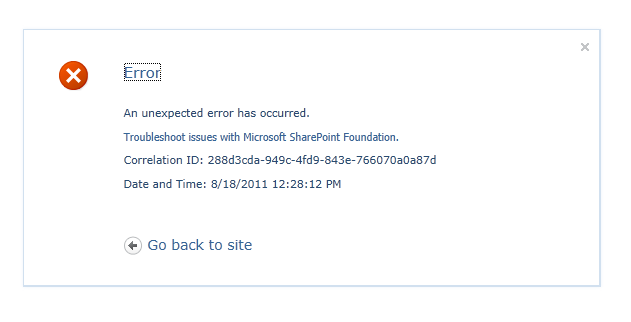
image

An unexpected error has occurred. Yep. Very helpful! Recently, when attempting to use the Manage Content and Structure tool (found under Site Actions > Manage Content and Structure), I received the above error. Looking into the ULS logs, all I was able to get ahold of was a System.NullReferenceException. Again, not really handy, or useful, at all.

I was able to determine that it had to probably be due to a list… turns out, we had deactivated and retracted several features from our farm recently, several of which relied on custom lists to store the data. If I go to View All Site Content (Site Actions > View All Site Content), and click on one of these lists, I get a similar error to the above.

Luckily, one of the times when attempting to launch the Manage Content and Structure Tool, I was able to get this error in the ULS logs.

Failed to determine the setup path of the list schema for feature {553B9E4F-C7EA-4442-845F-94390C1EAE44}, list template 10000.

So, basically, we need to remove these lists. We cannot get into the “Delete this List” option within the List management screen – otherwise you’ll get an error similar to the above. I also attempted to use SharePoint Manager 2010, which also gave an error. I just couldn’t delete the list using traditional means…

You have two options here…

  1. Write some code to delete the list (C#, PowerShell… whatever you desire)
  2. Use Gary LaPointe’s STSADM extensions and PowerShell scripts.
    1. Remove-SPList PowerShell Command
    2. gl-deletelist STSADM command

Either of those should do the trick! Now, to get the List URL is simple, the lists should still appear under View All Site Content, just right-click and copy the shortcut to the list view, for example: http://sharepointsite.com/Lists/SomeCustomList/AllItems.aspx

Use that when calling those commands with the URL parameter, and you’re good to go.

Recap and Resources from SharePoint Saturday–The Conference

image

Organizing and maintaining a SharePoint Saturday can be hard work. LOTS of hard work. Luckily, the way we run SharePoint Saturday Boston, we have less hard work than other SPS events. We put the responsibility of ordering shirts, pads, pens, food, etc. on the sponsor, so we do not only have to deal with the event, speakers, sponsors, etc., so we do not also have to order shirts, food, etc. It makes life a lot easier.

Then there are other SharePoint Saturday events, such as SharePoint Saturday New York, they take it to the next level, and deal with all of that. Now, these are just single day events.

Now, with SharePoint Saturday – The Conference, this was a 3-day event, they had roughly 1800 people registered, well over a thousand attend. IMAGINE STUFFING 1800 ATTENDEE AND SPEAKER BAGS?! GAH! They had LOTS of volunteers however. It was not the best well-oiled machine, but, there was no chance of the motor seizing up on this one. They did one heck of a job. This is not to slight the conference in any way, the organizers of this event actually have day jobs, that are not all about planning and putting together conferences, so this was done in their spare time, if they had any.

I was amazed at the level of sophistication that a basically free ($39-$59 for a 3 day event is the best price out there for a SharePoint conference of this size). They had the ability to change name tags on the fly, lots of volunteers had radios, there were session and schedule updates on monitors around the campus, people all over the place directing traffic and offering help getting from building to building, and if for some reason your session time and date had changed, people to find you and drag you to them! (more on that in a moment).

Great job by everyone involved! I was happy to be a speaker and attendee at the conference, and look forward to another one down the road!

With that, I delivered 3 sessions. Below is information on each, as well as slide decks. Thank you to all who attended my sessions!

9 Ways to Become a (SharePoint) Rock Star

This was supposed to take place on Saturday, not Friday. So, when I arrived at the conference on Friday at 5 after 11 in the morning, I saw the lunch table, and headed over… got a plate of food, and then all of a sudden, I was approached by one of the volunteers, and a friend of mine, Jennifer, and the interaction went something like this…

Jennifer: “C’mon! You’re 15 minutes late for your session!”

Me: “What? I don’t have a session until the end of the day”

Jennifer: “No, you have one now”

Me: “Ok then, what session is it?”

Jennifer: “9 Ways to Become a (SharePoint) Rock Star”

[EDITORS NOTE: She did not exactly use parenthesis when she said it.]

Me: “That’s not until tomorrow”

Jennifer: “There are 40 people waiting in there for you now”

Me: “Uh oh, [expletive deleted] [expletive deleted] [expletive deleted] [expletive deleted] [expletive deleted] [expletive deleted] [expletive deleted], Let me grab my bag!”

Jennifer: ”Let’s go!”

[winded dash to another building … then walking, well, being dragged into the classroom]

Me: “Sorry I am late everyone! I slept late and am hung over, you know, living the rock star lifestyle”

…and then we began the session, after my laptop booted up. So we only got through about 6 of the 9 steps. Luckily, Christian Buckley (the band broke up before the session, so he wasn’t there), is starting a blog series at EndUserSharePoint.com here 9 Ways to Become a SharePoint Rock Star, which will cover each of our “9 Ways”.

For some background on “the best fake SharePoint band EVER, EVER”…

Our lightning talk from SPTechCon in Boston in June, 2011


Horse’s End–Behind the Music


Legal Notice from Christian for SPSTCDC

and without further ado… the slide deck.

Just Freakin’ Work! Overcoming Hurdles in SharePoint Development

This basically boils down to a best practices around SharePoint development. As well as a fun edu-tainment session with my co-presenter, Mark Rackley. We had a blast, had some good questions, and got through the entire session. Here’s the deck!

Planning and Configuring Extranets in SharePoint 2010

And my last session, which after this was delivered, I had to run to the airport to head home. Again, a great session, great questions, and again, finished up on time. I hope to have that Cloudshare virtual image up and running soon.

Recap and Resources from SharePoint Saturday NYC

I have to hand it to the organizers of the event, Becky Isserman (@MossLover), Jason Gallicchio (@PrincetonSUG), Greg Hurlman (@ghurlman), and Tasha Scott (@TashasEv) as well as their volunteers, for putting together once of the best organized SharePoint Saturdays I have been to. Great job! Lots of great sessions, sponsors, and speakers made this quite the memorable event! I was able to connect with old friends, and meet plenty of new ones.

The organizers also did something very special and unique with the speaker, volunteer, and organizer shirts – each of them either had a patch for the NYPD, NY Port Authority, or FDNY, remembering the attacks on the World Trade Center, as in just over a month from now, will be the 10th anniversary of that tragic day, in which thousands of lives were lost. This shirt will be definitely one of the conference shirts that I will be holding on to. There were lots of conversations about that day – the people we knew, where we were, and what we were doing… and how it has affected our lives since.

I had a great time giving my session (once I caught my breath after literally running around right up until the starting bell, searching for a power adapter, as mine would not work!), and had a lot of great questions from the crowd! With that, here are my slides from the event, with one important update – the CloudShare link no longer works… found the expiration notice in my junk mail folder the day after the environment was removed 😦 I will work on getting a new one up and running within the next couple of weeks – then the link should be functional again.


Thank you all for attending, if you were able to make it. Someone was even there due to my extranets blog post series (Part 1, Part 2, Part 3), so I know at least once person is reading this!

If you’re in the DC area this week, be sure to catch my session at SharePoint Saturday – The Conference!