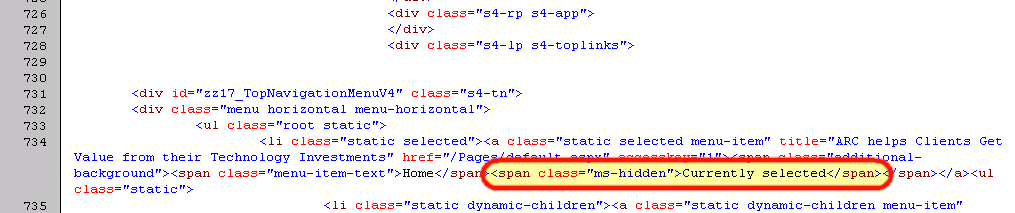
How SharePoint determines what node in the global navigation is currently “selected”

Simple – by placing a hidden span in there with the inner text of “Currently selected”. Just came across this today and thought it was a neat little find, and thought I’d share.


image

What’s that? You missed a Week3 Presentation??

Please, have no fear. In fact, instead of sitting on the couch, attempting to overcome your Turkey, Turducken (I could be so lucky…) or Tofurkey coma on Friday and over the weekend, it may be a good time to pick out the bits of cranberry sauce from your keyboard, and head on over to http://www.Week3.org, and catch some recorded webinars from Week3, specifically, at this page here: http://www.week3.org/Pages/Sessions.aspx

image

What is Week3? (Hint: it takes place on the 3rd week of the month…)

Week3 hosts webinar sessions on various relevant topics, using real-world information and case studies, during the third week of the month. We are sponsored by a team of companies that are dedicated to giving back to the collaborative community.

  • Monthly sessions are not “infomercials” or product promotions in disguise.
  • Our goal is to maintain a business focus around collaboration technologies.
  • We provide grounded, real-world information and case studies.

We encourage your suggestions and ideas to make sure Week3 sessions meet your need for balanced collaboration technology information.

There is some excellent content up there, that is not all developer or administrator focused, there is a high amount of business user content up there as well.

With that, be sure to sign up for the January Week3 event (we’re taking December off), where Grace-Hunt’s own Charlie Delong and Mike Davenport will be presenting: What is SharePoint 2010 and how can it help my Organization?

Currently there is a lot of buzz around SharePoint 2010 and all the great things it can do to help your Organization.  Join us and see real world examples of how SharePoint can enhance business process, streamline communications, and increase collaboration within your teams.  Through the context of these examples you will also be introduced some of the new features and functionality of SharePoint 2010.  If you can identify a particular pain point within your organization you will have a compelling argument to initiate a SharePoint project to improve your Organization.  These real world examples will help focus your project and send you down the path of  a successful deployment.  Your competitors are doing it why shouldn’t you?

For more information, and to sign up, visit: http://www.week3.org/Lists/Sessions/DispForm.aspx?ID=67

Microsoft SharePoint 2010 Firestarter Event in Waltham, MA.

image

I was at a “User Group for User Groups” (VERY simplified version – more on that to come soon!), and found out from our local Microsoft Evangelists, Chris Bowen and Dan Stolts, that there are some great local Firestarter events. These are described, on the site, as “Heat up your skills with the all-new Firestarter event series. Each day tackles a single Microsoft technology, including free sessions presented live by Microsoft developer and IT pro evangelists and technology specialists – with special appearances from community luminaries. Attend in person, via live meeting or download the webcast at your convenience.”

I am always interested into attending and participating in any event around SharePoint, especially if they are local, so, I wanted to help spread the word about this particular one. There are Firestarter events for Azure, Windows 7, ASP.NET, Windows Phone 7, and Silverlight. Basically, all of the new good things that have come out from Microsoft recently.

So, head on over to http://www.msdnevents.com/firestarter/ for more information and to register. And, if you are not in the Boston Area, they are happening elsewhere too. If you are in the Boston area, well then maybe I will see you there! Oh, and it takes place on December 2nd at the Microsoft Waltham office.

Registration open for Boston Area SharePoint Users Group on 12/8/10

BASPUG_100square_initialsRegistration is now open for the December 8th, 2010 meeting of the Boston Area SharePoint Users Group, back again on our home turf at the Microsoft NERD center in Cambridge, MA.


PRESENTER

Our presenter for our next meeting Is Marc Anderson, President and Founder of Sympraxis Consulting. He will be presenting "Developing in SharePoint’s Middle Tier".

SESSION ABSTRACT

While most of the market focus in SharePoint development lies with .NET skills and techniques, there is a rich middle ground which has been rapidly gathering a following. Developing in the Middle Tier with SharePoint Designer, Data View Web Parts (DVWPs), jQuery, and the SharePoint Web Services using SPServices, you can build rich solutions with no risk of deploying managed code to your SharePoint servers. 

In this session, Marc will show examples of Middle Tier development techniques and answer your questions about when Middle Tier development may prove to be a highly viable alternative to traditional .NET development.

About Marc

Marc is the Co-Founder and President of Sympraxis Consulting LLC, located in the Boston suburb of Newton, Mass. He has more than 25 years of experience in technology, professional services, and software development. Marc is the developer of the jQuery Library for SharePoint Web Services (aka SPServices) and a faculty member at the USPJ Academy focused on Middle Tier Development with SharePoint. Read Marc’s blog at http://sympmarc.com.


MEETING SPONSOR
TBA

SUSTENANCE
Food and beverages will be provided at the event.

RAFFLE PRIZES

We will be handing out raffle tickets at the BASPUG meeting for the following items.

LOCATION
We will be meeting at the Microsoft New England Research and Development Center, located in Cambridge, MA. For more information on the facility, as well as directions, please visit here: http://www.microsoftcambridge.com

LINKED IN
Join our group on LinkedIn today to connect with the rest of the BASPUG members, and spread the word!

FACEBOOK

We are also on Facebook! http://www.facebook.com/#!/pages/Boston-Area-SharePoint-User-Group/113652405354617

TWITTER
Follow news about the Boston Area SharePoint Users Group on twitter by following us @BASPUG, and by using the hashtag #BASPUG

WEB

Visit the Boston Area SharePoint Users Group website at http://www.bostonsharepointug.org

ORGANIZERS

Event meetings are organized by Geoff Varosky of Grace-Hunt, Eugene Rosenfeld of Black Blade Associates, Ryan Tacy of HP, and Talbott Crowell of Third Millenium.

“All People” view in SharePoint 2010

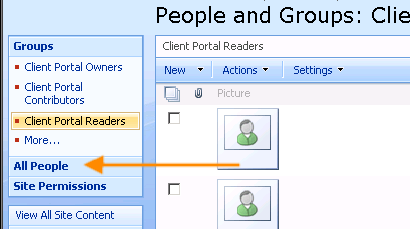
One thing we have seemed to have lost is the “All People” link when managing users and groups from SharePoint 2007 in 2010, as shown below from a 2007 site.

image

However, in SharePoint 2010, this link does not exist… Have no fear however. If you have copy & paste skills, you can get back there. It still exists. Just copy the URL from your 2007 site

http://my2007site.sharepointyankee.com/_layouts/people.aspx?MembershipGroupId=0&FilterField1=ContentType&FilterValue1=Person

And drop the protocol, port, and host sections of the URL out, and use that with the protocol, host, and port of your 2010 site, and you are good to go.

http://my2010site.sharepointyankee.com/_layouts/people.aspx?MembershipGroupId=0&FilterField1=ContentType&FilterValue1=Person

Simple and easy way to get back to that view. Then just add this as a favorite, or, even better yet, create a CustomAction to add it into the toolbar, or site settings page in 2010.

“Fab 40” Templates for SharePoint 2010

While I have not tested these out as of yet, I did want to share the link I came across from the Bamboo Solutions SharePoint Daily. This is a current topic for me, as it came up in a discussion with a prospective client on Monday. Khalil @ TechSol has either re-created or converted 32 out of the “Fab 40” templates released by Microsoft for SharePoint 2007. Nice work!

http://techsolutions.net/Blog/tabid/65/EntryId/17/Fab-40-Templates-for-MOSS-2010.aspx

Using PowerShell (and SQL) to Copy Users from SharePoint 2007 to 2010

imagePowerShell is a neat tool. There. I said it. What, you already knew that? Oh well… I still think it’s cool. You may have guessed, that due to recent posts (and a few yet to be posted), focused around PowerShell, I’ve been using it quite a bit. Today’s post is on how to get users out of your 2007 environment, and into 2010, specifically around FBA users.

I’ve been working with a new client recently, and we are migrating a 2007 based internet site to a 2010 based internet site, which has lots of FBA users. Now, I will not name the tool directly, but, with a certain migration tool, I spent the past week jumping through a lot of hoops to migrate the users over to 2010. A LOT of hoops. And no matter what we attempted to do, we just couldn’t get the users populated into the new 2010 site.

So, I rolled up my sleeves today and managed to complete the task in a short while… here’s what I did.

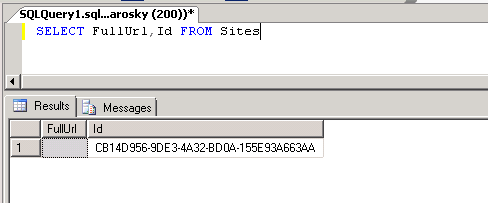
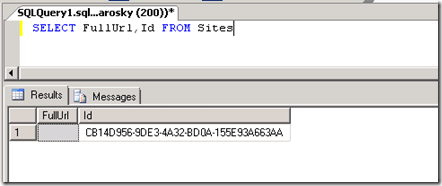
First, on the 2007 server, let’s call it SQL07.company.com, I went into SQL, and performed the following query to get the list of site collections within the content database of the web application in question. Luckily, there was only one site collection, so there was not much of a list here, but, I did need to get the GUID of the site collection, so, I did this:
image

Now that I had the site collection GUID, it was time to extract the users so we could add them to our 2010 server, which was some simple SQL code to build up the strings necessary. Now, I could have written more complex code, but, this just needed to get done (the select query is wrapped to display it all here).

   1: SELECT 'New-SPUser -UserAlias "' 

   2:     + REPLACE(tp_Login, 'acaspnetsqlmembershipprovider:', 'i:0#.f|sql-membershipprovider|') 

   3:     + '" -Web http://internet -DisplayName "' 

   4:     + tp_Title + '" -Email "' 

   5:     + tp_Email + '"'

   6: FROM UserInfo 

   7: WHERE tp_SiteID = 'CB14D956-9DE3-4A32-BD0A-155E93A663AA'

   8: AND tp_Login LIKE 'acaspnetsqlmembershipprovider%'

More information on the New-SPUser cmdlet in SharePoint 2010 can be found here: http://technet.microsoft.com/en-us/library/ff607868.aspx

And I switched the results view to Text in the query window in SQL, copied and pasted that into a text file, with a .ps1 extension, and called it from my SharePoint 2010 Administration Console (PowerShell), and off went the quick addition of thousands of FBA users into our new environment!

Now, what you will see here is a simple replace mechanism as well, for swapping all acaspnetsqlmembershipprovider: prefixed FBA users, to the new claims based format in 2010, i:0#.f|sql-membershipprovider|. The AND clause in the above SQL statement also only searches for FBA users, and not users out of the AD domain.

If you need to figure out what your prefix should be, add an FBA user to your site, and have a look at their profile page, it should list a funky username, that looks like the above: i:0#.f|membershipprovidername|.

Simple. Easy. And extremely effective.
Errors when writing applications for SharePoint 2010

So, you’ve opened Visual Studio 2010, say, for instance, a console application to start pecking away at writing some simple application via the API. Nothing major, maybe in fact you are just re-using code from 2007 you’ve written, but, you just want to play with the API, after you’ve finished drooling over the new UI. Great! So, you’ve written your code, you press F5 to debug run your program, and [insert failure sound from The Price is Right here] – you get an error. The error makes no sense? FileNotFoundException? You’re using the IW image from Microsoft. You know for a fact the site exists – its open in your browser on your other monitor?! And more importantly, you know this code words. You’ve muttered it out from your fingertips hundreds of times (or, have it pasted in through a code snippet – why re-invent the SPRequest object reference wheel?)

image

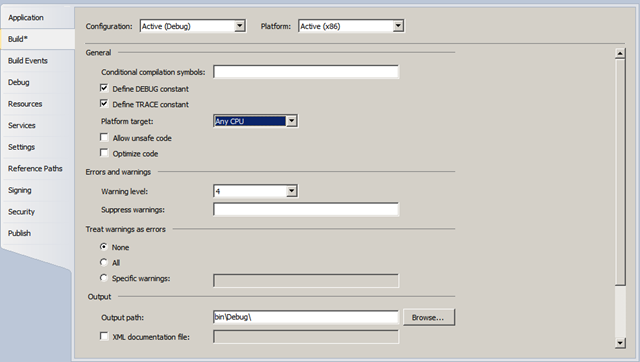
No need to worry – after you’ve no doubt put your hand through your nice looking but poorly made substitute-for-a-punching-bag IKEA Imon desk (its ok, they’re made that way so you don’t injure yourself! A few layers of wood putty will fix it up even better than before. Now your desk looks more “arty”. You’re hip now!), it is a simple fix. A console application by default in VS 2010 sets the platform target as x86. Not x64, not Any CPU, but x86. Which will NOT work with the 64-bit only SharePoint 2010. Set this back to Any CPU, or x64 if needed, and hit F5 again.

image

Now your cookin’ with gas! Simple, eh? A quick helpful hint – the Community Kit for SharePoint: Development Tools (CKS:DEV) project contains a project type called “SharePoint Console Application”, which sets all of this up for you, right off the bat.

SharePoint Saturday Boston #3 Webinar Series Recordings

altGood evening! We announced this on Friday during Richard Harbridge’s webinar on Friday, and I also wanted to push this out here. We have been recording the webinar series, and are now posting the recorded videos of the presentations by our great presenters, at the SharePoint Saturday Boston webinar series page here: http://www.sharepointsaturday.org/boston/Pages/SPSBos3WebinarSeries.aspx

Within a week after each session, barring any unforeseen obstacles (acts of god, clients, etc.), I will get these up and posted for everyone.

Please, also, let us know what you think of the webinar series! Either in my blog here, via e-mail at SPSBoston@live.com, or, on Twitter – use hashtag #SPSBos or tweet us directly @SPSBoston

Thank you!

Listing all available PowerShell commands in SharePoint 2010

Wanted to share this with my handful of readers, as it is a reference I use often, and also what comes back first in a search. The following blog has two commands for listing out all SharePoint-related PowerShell commands in 2010. In an effort not to steal his thunder, I’ll just post the link here so you can go get those commands.

http://sptwentyten.wordpress.com/2009/10/20/list-all-sharepoint-2010-powershell-commands/