The New England SharePoint Community List

New England is a bustling SharePoint community, and I am happy that I just happen to live in the area, and can experience most or all of what the New England area offers as far as SharePoint is concerned.

Since this is the season of giving, being the holidays and all, I thought this was a great time to inventory the resources in the New England area to allow people to give and to receive SharePoint community goodness. In building this list, I also learned that there are more SPUGs in New England that I did not even know existed – so I hope this does the same for you!

Please feel free to add to the comments on this post with any other resources I may have missed, I know I must have! Also please feel free to send any updates for information below. All group and event information has been culled from their respective websites and other various sources.

UPDATED 8/3/12:

  • Added Rhode Island SharePoint User Group
  • Removed New England Regional SharePoint User Group

UPDATED 2/6/13:

  • Added Women in SharePoint – Boston Chapter

UPDATED 4/18/14:

  • Removed Boston SharePoint Salon
  • Added Connecticut SharePoint Users Group
  • Added Boston Office 365 Users Group

Massachusetts

Boston Area SharePoint Users Group (BASPUG)

ABOUT: The Boston Area SharePoint Users Group (BASPUG) was founded to bring together like minds to network and share their experiences, triumphs, and tribulations​ around Microsoft SharePoint, to provide a community platform for Boston area SharePoint users, administrators, developers, architects, of all experience levels, even those brand new to SharePoint, to share their knowledge with the community. We (usually) meet the 2nd Wednesday of every month at either Microsoft’s New England Research & Development Center in Cambridge, MA, or at the Microsoft Office in Waltham at 201 Jones Road.

MEETING FREQUENCY: Monthly, second Wednesday of the month

MEETING LOCATION(S): Microsoft New England Research & Development Center (NERD), 1 Memorial Drive, Cambridge, MA and Microsoft Waltham, 201 Jones Road, 6th Floor, Waltham, MA

WEBSITE: http://www.bostonsharepointug.org

Boston Office 365 Users Group (BOS365)

ABOUT: The Boston Office 365 User Group is a community focused on sharing knowledge around Microsoft’s Office 365’s ever-growing, always changing suite of technologies. The group will focus on every level of interest, from those who are just “kicking the tires” to business users, Office 365 administrators and IT pros.

Discussions (and coming in May, meetings) will focus on every angle of the Microsoft platform, covering topics around Yammer, Exchange, Lync and SharePoint Online.

Topics may range from introductory sessions for new users — even experienced hands can pick up new tips and tricks — as well as more advanced technical subjects such as migrations strategies and integration. This is your group.

MEETING FREQUENCY: Monthly, third Thursday of the month

MEETING LOCATION(S): Microsoft New England Research & Development Center (NERD), 1 Memorial Drive, Cambridge, MA and Microsoft Waltham, 201 Jones Road, 6th Floor, Waltham, MA

WEBSITE: http://www.bostono365usergroup.com


SharePoint Saturday Boston (SPSBos)

ABOUT: SharePoint Saturday Boston is a free community‐focused SharePoint event dedicated to educating and engaging members of the local technical community. SharePoint Saturday draws upon the expertise of local SharePoint IT professionals, developers and solutions architects who come together to share their real world experiences, lessons learned, best practices, and general knowledge with other like‐minded individuals.

MEETING FREQUENCY: Yearly

MEETING LOCATION(S): Microsoft Waltham, 201 Jones Road, 6th Floor, Waltham, MA

WEBSITE: http://www.sharepointsaturday.org/boston

Women in SharePoint – Boston Chapter (WSPBos)

ABOUT: The purpose of the Women in SharePoint Boston chapter is to connect the many women in the New England area currently working with SharePoint. This group is also intended to build the SharePoint community alongside the other local SharePoint groups including the Boston Area SharePoint Users Group (BASPUG), the Granite State SharePoint Users Group, and local SharePoint Saturdays.

MEETING FREQUENCY: Monthly

MEETING LOCATION(S): Meadhall, 4 Cambridge Center, Cambridge, MA

WEBSITE: http://www.womeninspboston.com

The SharePoint Technology Conference (SPTechCon Boston)

ABOUT: The SharePoint Technology Conference is the world’s premier independent event for Microsoft Office SharePoint Server technology and services. The format includes 90+ technical classes, workshops and breakout classes with content geared to IT professionals, business managers and developers.  It features a top Microsoft MVPs, dozens of expert MS speakers and solutions from 50+ exhibitors.

MEETING FREQUENCY: Yearly

MEETING LOCATION(S): Various

WEBSITE: http://www.sptechcon.com

Connecticut

Connecticut SharePoint Users Group (CTSPUG)

ABOUT: ​Welcome to the Connecticut SharePoint Users Group (CTSPUG) a place for professionals to come together and share their successes, near-successes, and almost-successes with the Microsoft SharePoint Platform. Our goal is to replicate the magic of the Boston Area SharePoint Users Group with the scenic views and quaint New England charm of Hartford Connecticut.

We meet monthly at the Microsoft Farmington Office at 74 Batterson Park Road.

MEETING FREQUENCY: Monthly

MEETING LOCATION(S): Microsoft Farmington CT Office, 74 Batterson Park Rd, Farmington, CT

WEBSITE: http://www.ctspug.org

Fairfield County SharePoint Users Group (FCSPUG)

ABOUT: The mission of this group is to establish a local community for the FCSPUG members to discuss and collaborate on SharePoint best practices and evolving technologies. The vision is to empower the users with the resources and better understanding of how to build applications/solutions for their organizational needs leveraging Microsoft SharePoint.

MEETING FREQUENCY: Monthly, second Wednesday of the month

MEETING LOCATION(S): Bigelow Tea, 1 Constant Comment Way, Fairfield, CT

WEBSITE: http://www.sharepointusergroup.com/FCSPUG/

SharePoint Saturday Hartford (SPSHFD)

ABOUT: SharePoint Saturday Hartford is a free community‐focused SharePoint event dedicated to educating and engaging members of the local technical community. SharePoint Saturday draws upon the expertise of local SharePoint IT professionals, developers and solutions architects who come together to share their real world experiences, lessons learned, best practices, and general knowledge with other like‐minded individuals.

MEETING FREQUENCY: Yearly

MEETING LOCATION(S): New Horizons Learning, 340 West Newberry Road, Bloomfield, CT

WEBSITE: http://www.sharepointsaturday.org/hartford

New Hampshire

Granite State SharePoint Users Group (NHSPUG)

ABOUT: We’re about tip sharing and making connections in the industry without having to head south of the border.

MEETING FREQUENCY: Monthly, second Thursday of the month

MEETING LOCATION(S): Daniel Webster College, 20 University Drive , Eaton Richmond Center, Room 122, Nashua, NH

WEBSITE: http://www.granitestatesharepoint.org

SharePoint Saturday New Hampshire (SPSNH)

ABOUT: SharePoint Saturday New Hampshire is a free community‐focused SharePoint event dedicated to educating and engaging members of the local technical community. SharePoint Saturday draws upon the expertise of local SharePoint IT professionals, developers and solutions architects who come together to share their real world experiences, lessons learned, best practices, and general knowledge with other like‐minded individuals.

MEETING FREQUENCY: Yearly

MEETING LOCATION(S): Southern New Hampshire University (SNHU), Manchester, NH

WEBSITE: http://www.sharepointsaturday.org/nh

Vermont

Vermont SharePoint Users Group (VTSPUG)

ABOUT: The Vermont SharePoint Users Group is an open and independent forum for evaluating and extending the knowledge of the SharePoint Products and Technologies architecture, technologies, tools and business applications for its membership. Its purpose is to provide information and guidance to the full breadth of its capabilities.

MEETING FREQUENCY: Monthly

MEETING LOCATION(S): White River  Craft Center, 50 Randolph Avenue, Randolph, VT

WEBSITE: http://www.vermontspug.com

Maine

SharePoint User Group of Maine (SPUGME)

ABOUT: Swap tips and tricks with other local SharePoint professionals. Share problems and solutions at an old-school user group, meant to support everyone’s knowledge of this extensive application. Our goal is to bring the local SharePoint community together to share tips, tricks and ideas on the uses of the various SharePoint products and technologies.

MEETING FREQUENCY: Monthly

MEETING LOCATION(S): Winxnet Offices, 5th Floor, 84 Marginal Way, Portland, ME

WEBSITE: http://www.winxnet.com/spugme

Rhode Island

Rhode Island SharePoint User Group (RISPUG)

ABOUT: The Rhode Island SharePoint User Group (RISPUG) is a community based organization focused on driving awareness and support for the Sharepoint Community in Rhode Island and its surrounding areas.

MEETING FREQUENCY: Monthly, First Wednesday of the Month

MEETING LOCATION(S): Providence College, Moore Hall, Room 1, 1 Cunningham Plaza, Providence, RI

WEBSITE: http://www.meetup.com/RISPUG/

How much storage space is my site collection using?

NOTE: This post is just covering SharePoint 2010, and not earlier versions of the product.

imageA common question administrators have in their SharePoint environment is “How much storage space is my site collection using?”

Well, fear not, trusty SharePoint administrators! There are a few ways to skin this cat – and we’re going to take a look at them.


SharePoint Designer

SharePoint Designer – what was once something administrators and power users shuddered at the mere mention of the tool in prior versions of the product, has gotten a makeover. And, also has a lot of additional functionality. For today’s lesson however, we are only going to look at one specific feature of it – the ability to view the storage used for an entire site collection!

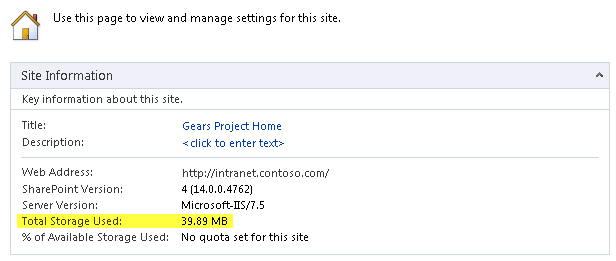
If you open up SharePoint Designer to the root site of your site collection, in the main window, once the site is opened under Site Information, you will see, as highlighted below, that it will conveniently display the Total Storage Used of your entire site collection! There! As the big red button on my desk often says after a good firm press… “That was easy!”.

image

Let’s look at a couple of other methods of getting this information, shall we?

StorMan.aspx – SharePoint 2010 Service Pack 1+

This one requires Service Pack 1 to be installed to be able to utilize this feature. It was not in the RTM version. At the root of your site collection, if you go to Site Actions > Site Settings > Site Collection Administration > Storage Metrics, this will give you details on the usage – such as what sites, lists, libraries, and items are taking up the most space, however, it will not give you a total like our trusty SharePoint Swiss Army Knife – SharePoint Designer does, but, it will allow you to drill down into the usage.

image

I will also urge you to view Bill Baer’s article on Storage Metrics in Service Pack 1 – which has some great screenshots of the functionality, as well as an overview, available here: http://blogs.technet.com/b/wbaer/archive/2011/06/28/service-pack-1-storage-metrics-storman-aspx.aspx

PowerShell

imagePowerShell, one of the other power tools in SharePoint 2010, much more akin to the Ginsu knife, can also serve up the details, and, like the Ginsu knife, allow you to slice and dice the information in a myriad of ways.

Below is an example script to connect to your site collection, and read out all of the usage information.

$site = Get-SPSite http://my.sitecollection.com
$site.Usage;
$site.Dispose();

Which gives the following output (storage shown highlighted below in bytes):

image

To view just the Storage property, and not Bandwidth, Visits, Hits, and DiscussionStorage, you can call this:

$site = Get-SPSite http://my.sitecollection.com
$site.Usage.Storage;
$site.Dispose();

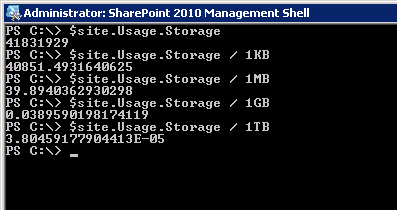
And only the Storage property with the total bytes will be displayed. You can also do some other cool tricks, such as calculating kilobytes, megabytes, gigabytes and terabytes right from the command line as well, to make the results a bit more readable:

image

Want more? OK! We can give it to you! Keep reading! (Because, reading is fundamental, you know.)

Web Analytics

Another option to view the storage used, as well as some additional metrics around it, if you have Web Analytics enabled, you can view your usage over time. To see this, go to Site Actions > Site Settings > Site Actions > Site Collection Web Analytics reports

image

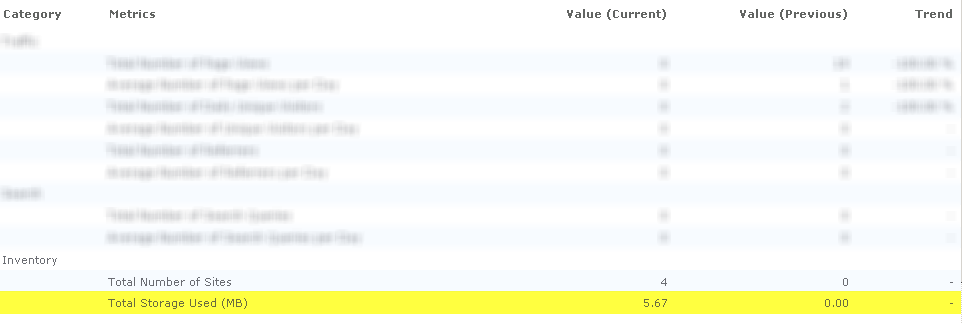
Once there, in the main screen, you can view a summary of the Total Storage Used under Inventory.

image

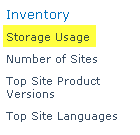
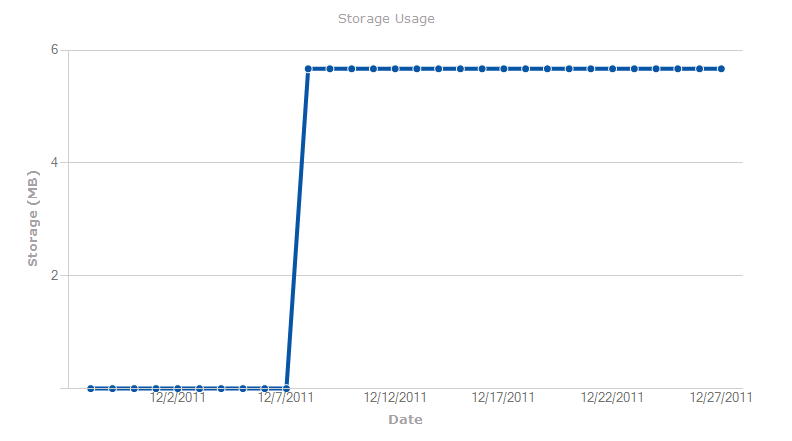
And if you click on Storage Usage under Inventory within the quick launch navigation on the left, you can then view reports on storage utilization for your site collection, with a graph of the values so you cane easily visualize the trend in storage usage.

image

image

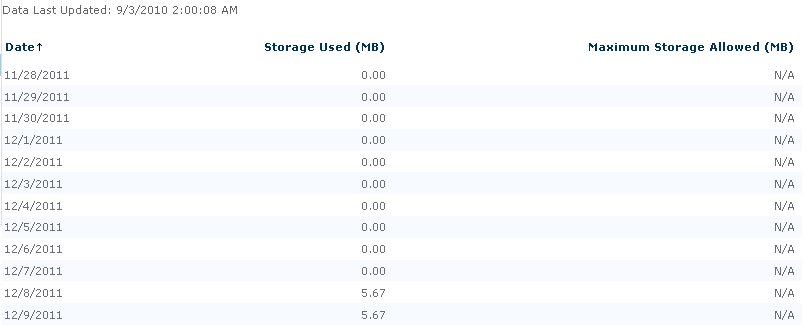
As well as a daily breakdown of the storage used, so you can see how this grows or falls over time.

image

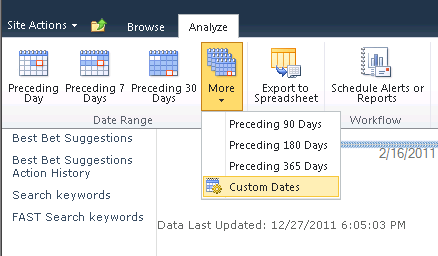
You can also run reports for any date range since Web Analytics have been enabled, as well as run workflows against this data for alerting and reporting.

image

I hope you were able to learn something new today… have another method in which you get your site collection storage metrics? Leave it in the comments below for everyone else!

Stay away from my search result pages [insert search engine name here] bot!!

imageNow, this is a bit overkill, but, there are almost as many different ways a search crawler makes use of a robots.txt file as there are search engines (this may be highly over-exaggerated, but anyways…).

Now, one thing you probably do not want with your public facing site, is for the search engine to waste it’s time crawling your search pages. You don’t exactly want a high page rank for your site’s search results, do you?

What to do, what to do?

Well, if your search results pages happen to live under /search/pages/results.aspx, here is an example. This again is a bit overkill, but it should get the job done. Now the search engines can focus on what you want to be getting searched for – your content!

Some search bots allow for wildcards, some are case insensitive, some are case sensitive – hence the number of variations below. Add this into your robots.txt, and you should be good to go.

Disallow: /search/pages/results.aspx
Disallow: /Search/Pages/Results.aspx
Disallow: /Search/Pages/results.aspx
Disallow: /Search/pages/Results.aspx
Disallow: /search/Pages/Results.aspx
Disallow: /search/pages/Results.aspx
Disallow: /Search/pages/results.aspx
Disallow: /search/Pages/results.aspx
Disallow: /search/
Disallow: /Search/
sallow: /search/pages/
Disallow: /Search/Pages/
Disallow: /Search/pages/
Disallow: /search/Pages/
Disallow: /*Results.aspx
Disallow: /*results.aspx

Any additions? Please share them here in the comments!

Are you suffering from TMSTGNS (Too Much Security Trimmed Global Navigation Syndrome)?

Is your site collection acting sluggish? Seeing load times of 5-15 seconds on any page or resource? Are other web applications and site collections in your farm acting just fine? Are server resources not over utilized? You may be suffering from Too Much Security Trimmed Global Navigation Syndrome (TMSTGNS). We will walk through some background information, symptoms, diagnosis, as well as ways you can bring your site collection back to life, and still allow your users to get where they need to go.

What is the “Global Navigation”?

Also known as the Top Navigation, or the Top Link Bar in SharePoint. You see it as the horizontal navigation at the top of your pages. See the image below as a reference (highlighted in yellow):

image

What is the cause of TMSTGNS?

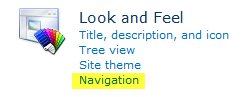
The global navigation in SharePoint is generally used to get around to sites and pages within your site collection –  based on the configuration from the Look and Feel groups in the Site Settings page for each of your sites. This is found under Site Actions > Site Settings > Look and Feel > Navigation

image

And once there, you can configure the dynamic nature of the menus (to automatically show subsites and pages for each of the sites, and whether or not to inherit navigation from those sites)

image

Also, by default, there are some settings which are not displayed on this page, which affect your navigation. Those settings are found at the site collection level under Site Actions > Site Settings > Site Collection Administration > Site collection navigation

image

The settings found within this little-used configuration screen are the root cause of TMSTGNS, and give the syndrome part of it’s name, Security Trimmed (ST).

image

As you can see in the highlighted sections above, in this screen are options to Enable security trimming, and to Enable audience targeting. What do these do you ask?

Security trimming, as the description above implies, will hide navigation links for sites or pages the user does not have access to. For instance, if only the Finance department had access to the Finance department team site, then with this option enabled, people who are in Human Resources would not see the navigation node for Finance. Now, this sounds like a great idea, right?

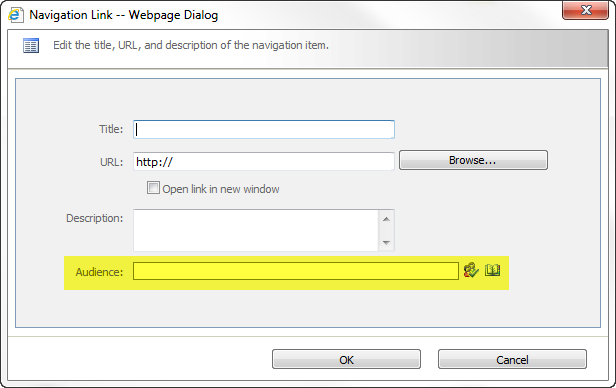
Audience targeting is similar. Under Site Actions > Site Settings > Look and Feel > Navigation, when you are adding a link or a header, you have the option to specify a targeted audience, so only those who are within those audiences can see those links.

SNAGHTML13964a3f

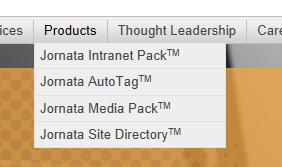
Yes, it is a good idea, keep things hidden that shouldn’t be seen if you do not have access, however, as your site collection grows to hundreds of sites, each which hang off of the Global Navigation, either directly there, or, which are found one or two levels below in navigation flyouts (see image below)….

image

SharePoint needs to iterate through EACH AND EVERY NAVIGATION NODE, and check if the current user has access to the site, as well as if they are in the audience for that link, EVERY TIME THE NAVIGATION LOADS! That is a lot of recursive security checking, and can take time. The more sites you have, the longer this will take.

You can see this in action especially with the Developer Dashboard running when your site has one or more team sites enabled (while the example below is minimal, I’ve seen this go on in some instances for pages and pages and pages):

image

Now, you see for each of the navigation nodes, it takes roughly 20ms for each link (the area above with the hidden sections to protect some private data) to be checked for access and audiences, which is the EnsureListItemsData method calls shown below each link. Multiply this by the number of navigation nodes you have, and you can probably come pretty close to the amount of time it takes for your pages to load. I have literally seen CPU spikes on servers 25% and higher utilization than normal with the W3WP.exe worker processes for IIS while this operation is taking place as well. It utilizes a lot of CPU to accomplish this task.

The quick fix for this? uncheck those two boxes under the Site collection navigation configuration screen. You will notice a huge performance improvement. This means however, that all of your users can see all of the links within the Global Navigation.


But what if I need to hide links, and keep them available to the users who need them?

This is a great question, and one that I can use the classic consulting phrase on – “it depends”. You may find that you can add these links to an audience targeted web part underneath the main site they are on. This may take an extra click, but, security is not transparent. Just compare the time it takes to go through an airport now than it did before 2001. If you need security, and performance, than a small subset of your users having to make an extra click might not be so bad. Ultimately it is up to the decisions you make within your organization, and how these work-arounds can and will be carried out and implemented.

What else can I do?

There are many options other than just disabling the security and audience trimming on the global navigation. Those might be building a custom navigation control (development), to implement security trimming for links in a different manor, such as checking a list which has ONLY the links to be trimmed from the Global Navigation, rather than having to check each link.

Using a list-based navigation source with item permissions enabled – this is also security trimming, however, it is only within a single list, so performance should be better, but, it will be slower than a navigation source without any security trimming.

You may also implement multiple navigation layers, one without security trimming, and one with a custom source that is security trimmed in the master page.

As I said, there are many options – you may need to think outside the box a bit to get to the best resolution for your organization, but at the very least, your pages will be loading a lot faster when you are not suffering anymore from TMSTGNS, thus giving your end users, and yourselves, a better SharePoint experience.


Are you a survivor of TMSTGNS?

Then share your story with everyone else in the comments below about how you were able to defeat this horrible performance degrading disease.

Speaking at SharePoint Saturday Austin

I am pleased to announce that I will be presenting at SharePoint Saturday Austin on January 21st, 2012, presenting my session on Planning and Configuring Extranets in SharePoint 2010, with my colleague Donal Conlon.

Information on the session is below:

Planning and Configuring Extranets in SharePoint 2010

Session Level: 300
Session Type: IT Pro / Admin
Most companies, large or small, require contact and collaboration with external entities, whether they are vendors, clients, or contractors. SharePoint gives us the ability to open up portals for collaboration with these external entities – this session will show you how to accomplish this using SharePoint 2010.

We will review what is required to make SharePoint “open” to the external world, discuss scenarios regarding security and privacy, as well as walk through configuring Forms Based Authentication, Claims Based Authentication, as well as using Business Connectivity Services in SharePoint 2010, to authenticate, and manage our external users.

Once completing this session, you should have a firm grasp on how to configure an extranet environment using SharePoint 2010, as well as what should be considered during the planning of your extranet scenarios.

I will also be giving away 2 copies of the book I am working on of the same subject.

About SharePoint Saturday Austin:

SharePoint Saturday Austin is a joint effort headed up by Jim Bob Howard and Matthew Lathrop, but made possibly only through the dedication and commitment of our volunteers, sponsors, the local Central Texas SPUG, the speaker community, and all of our attendees.

If you have any questions or would like to volunteer, please us the contact form on this page.

SharePoint Saturday Austin is part of a national and international calendar of free events, organized and overseen by the SharePoint Saturday Board of Directors. For more information about SPS and other events, visit: www.sharepointsaturday.org.

When and where will this magical event be held, you ask?

SharePoint Saturday Austin (#SPSAusTx)
Saturday, January 21, 2012
AT&T Executive Education and Conference Center, Austin, TX
8AM – 5PM
SharePint following ’til 7PM

Hope to see you there!

Registration Open for Boston Area SharePoint Users Group on 1/11/12

Registration is now open for the January 11, 2012 Boston Area SharePoint Users Group Meeting in Waltham, MA.

January 11th, 2012 Meeting Information – Waltham

PRESENTER
The presenter for our next meeting is Scott Jamison, Chief Architect and CEO for Jornata. He will be presenting "Making SharePoint 2010 ROCK by Increasing Findability".

Session Abstract
Want to make it easier for users to locate the right content, whether they’re browsing or searching in SharePoint? In this session, Scott shows you real-world ways to get the most out of key features like metadata, content search, people search, cloud tags, status feeds, list views, and content contribution.

About Scott
Scott Jamison is a SharePoint MVP and MCM. He’s also the Chief Architect and CEO at Jornata, a top-tier SharePoint consulting firm.

MEETING SPONSOR – CubisOne
CubisOne provides consulting and IT services to clients globally. CubisOne delivers unmatched business value to customers through a combination of process excellence, quality frameworks and service delivery innovation. By leveraging our onshore, offshore and onsite capabilities, our customers enjoy decreased costs, increased profitability.


RAFFLE PRIZES

We will be handing out raffle tickets at the BASPUG meetings.

LOCATION
We will be meeting at the Microsoft Waltham office, located on the 6th floor, at 201 Jones Road, Waltham, MA.

LINKED IN

Join our group on LinkedIn today to connect with the rest of the BASPUG members, and spread the word!


FACEBOOK

We are also on facebook! http://www.facebook.com/#!/pages/Boston-Area-SharePoint-User-Group/113652405354617


TWITTER
Follow news about the Boston Area SharePoint Users Group on twitter by following us @BASPUG, and by using the hashtag #BASPUG


WEB
Visit the Boston Area SharePoint Users Group website at http://www.bostonsharepointug.org

Speaking at SharePoint Saturday Virginia Beach

I cannot believe it has been 4 years since SharePoint Saturday started, and I am honored to be speaking at the very place where it all started, at SharePoint Saturday Virginia Beach! Who knew that in 4 years, SPS is now a GLOBAL phenomenon, in almost all parts of the world? I owe a lot to SharePoint Saturday, as it gave me my start in speaking on SharePoint almost 4 years ago in Boston.

I will be presenting “Planning and Configuring Extranets in SharePoint 2010”. I will also be giving away 2 copies of my upcoming book of the same topic. You must be present to win, obviously 🙂

Planning and Configuring Extranets in SharePoint 2010

Session Level: 300
Session Type: IT Pro / Admin
Most companies, large or small, require contact and collaboration with external entities, whether they are vendors, clients, or contractors. SharePoint gives us the ability to open up portals for collaboration with these external entities – this session will show you how to accomplish this using SharePoint 2010.

We will review what is required to make SharePoint “open” to the external world, discuss scenarios regarding security and privacy, as well as walk through configuring Forms Based Authentication, Claims Based Authentication, as well as using Business Connectivity Services in SharePoint 2010, to authenticate, and manage our external users.

Once completing this session, you should have a firm grasp on how to configure an extranet environment using SharePoint 2010, as well as what should be considered during the planning of your extranet scenarios.

What’s SharePoint Saturday Virginia Beach?
SharePoint Saturday Virginia Beach is an educational, informative & lively day filled with sessions from respected SharePoint professionals & MVPs, covering a wide variety of topics focused on Microsoft SharePoint technologies.

SharePoint Saturday Virginia Beach is FREE, open to the public and is your local chance to immerse yourself in SharePoint!

When is SharePoint Saturday Virginia Beach?
January 7, 2012, Saturday

Schedule outline is listed below and we are currently looking at over 60 sessions for the event, including some sessions for the City of VA Beach Public Schools.
7:30 am – 8:00 am – Registration & Breakfast
8:00 am – 8:45 am – Welcome and Keynote
8:50 am – 10:00 am – First Sessions
10:10 am -11:20 am – Second Sessions
11:30 am -12:40 pm – Third Sessions
12:40 pm -1:30 pm – Lunch
1:30 pm – 2:40 pm – Fourth Sessions
2:50 pm – 4:00 pm – Fifth Sessions
4:10 pm – 5:20 pm – Sixth Sessions
5:30 pm – 6:00 pm – Closing & Giveaways

Where will SharePoint Saturday Virginia Beach be held?
Virginia Beach Advanced Technology Center
VA Beach Campus of Tidewater Community College
1800 College Crescent
Virginia Beach, VA 23453
http://www.vbatc.com

For more information and to register, visit the site here: http://www.sharepointsaturday.org/virginiabeach

Presentation and Resources from 12/14/11 FCSPUG

imageIt was earlier this year when I spoke with Bill Nagle of K2 about getting a user group up and running in Fairfield, CT. After many months later of successful meetings, I was happy to be able to go down and present to the group. The meetings themselves are hosted at Bigelow Tea, which was an interesting place – great facility, and the air smelled like tea 🙂 They even gave me a variety box of teas for coming down – I fully intend to enjoy it all!

Thanks again to Bill Nagle of K2 for spearheading the group there, Bigelow Tea for hosting the meeting, traffic for not being terrible (it’s about a ~6 hour round trip to Fairfield), Travel America for their awesome rest stops, and last, but certainly not least, everyone who came out for the meeting!

Below are my slides (minimal) from the meeting, as well as a link to the SPBasePermissions enumeration PDF I mentioned, as well as a link to Eric Kraus’s blog post with the PowerShell script to display all Custom Actions within the farm.

Please let me know if you have any questions or comments on the material in the comments below!

SPBasePermissions class enumeration PDF: http://go.gvaro.net/SPBasePerms

Erik Kraus’s PowerShell Script to list all Custom Actions in a Farm: http://blogs.msdn.com/b/ekraus/archive/2010/05/03/list-all-customactions-in-the-farm.aspx

SharePoint 2010 Balsamiq Mockups Template

If you haven’t used Balsamiq Mockups before, you should check it out. It is an awesome tool for generating on the fly wireframes for SharePoint, and just about everything else.

Now that you’ve had a chance to look at it (and download and play with it), you are probably thinking… hey, I work in SharePoint, is there a good starter template I can use? Well, I am glad you asked. My good buddy, and colleague, The James Sturges, came up with a great template for it. Go and check out his post on the matter here: http://sharepoint.jsturges.com/2011/11/sp2010-wireframe-template/

Presentation from 12/13/11 CTSPUG

A big thank you to the Connecticut SharePoint User Group (CTSPUG) for having me down last night to deliver my presentation (slides below) on Best Practices in SharePoint Development. While the group itself has been around for 10 years (CT.Net), this was the second official SharePoint UG meeting, and I was happy to be a part of it! A big crowd too! The room was packed, and thankfully, I heard no snoring 🙂

As I mentioned at the beginning of the presentation, there are a lot of slides so you can have them for review afterwards, as we covered at lot of information. Below is a copy of the presentation on slideshare.

If you were at the session, or even wanted to attend but could not make it, please feel free to contact me in the comments below with any questions on the material.